Design Cost-Optimized Architectures
Nhóm câu hỏi này kiểm tra khả năng chọn kiến trúc rẻ nhất mà vẫn đáp ứng đúng yêu cầu kỹ thuật — đề thi hiếm khi hỏi thẳng “giá bao nhiêu”, mà mô tả một workload rồi để bạn tự nhận ra phương án nào gây over-provisioning, phải trả tiền cho tài nguyên nhàn rỗi, hoặc phát sinh chi phí vận hành không cần thiết. Cần lưu ý: trang này chỉ có 3 câu, trong khi domain Design Cost-Optimized Architectures chiếm 20% đề thi thật, tức là dưới mức đại diện rất xa. Hãy xem đây là phần khởi động và bắt buộc luyện thêm cost optimization ở nguồn khác trước khi đi thi.
Trọng tâm của domain
Phần tiêu đề “Trọng tâm của domain”- Chọn đúng dynamic scaling policy cho Auto Scaling group: target tracking scaling để bám sát metric và cắt over-provisioning, so với simple scaling (vướng cooldown), scheduled scaling (chỉ hợp traffic đoán trước) và suspend/resume scaling.
- Ghép đúng loại storage với yêu cầu workload: block storage low-latency Multi-AZ với Amazon FSx for NetApp ONTAP (iSCSI), so với FSx for Windows File Server, Amazon EFS và Amazon S3 — chọn sai loại storage là trả tiền cho thứ không dùng được.
- Kiến trúc event-driven ít tốn kém nhất: Amazon EventBridge nhắm thẳng target là ECS task trên AWS Fargate, thay vì chèn thêm Lambda, CloudTrail hay CloudWatch alarm.
- (chưa có trong trang này) Pricing model của compute: On-Demand, Reserved Instance, Savings Plans, Spot Instance cho workload chịu gián đoạn.
- (chưa có trong trang này) S3 storage class và lifecycle policy: S3 Intelligent-Tiering, Standard-IA, S3 Glacier cho dữ liệu ít truy cập.
- (chưa có trong trang này) Chi phí data transfer: NAT Gateway, VPC Endpoint, CloudFront, cross-AZ và cross-Region traffic.
- (chưa có trong trang này) Right-sizing và quản trị chi phí: AWS Cost Explorer, AWS Budgets, Compute Optimizer, Trusted Advisor.
- (chưa có trong trang này) Database tiết kiệm: Aurora Serverless v2, DynamoDB on-demand capacity, RDS Reserved Instance.
Bẫy hay gặp
Phần tiêu đề “Bẫy hay gặp”- Phương án “đúng về mặt kỹ thuật” nhưng thừa thành phần: thêm Lambda hoặc CloudTrail vào chuỗi EventBridge khi đề hỏi LEAST amount of effort — thêm dịch vụ là thêm chi phí và vận hành.
- Dùng cross-region replication để giải bài toán chỉ cần Multi-AZ, kéo theo phí data transfer và lưu trữ nhân đôi vô ích.
- Lẫn file storage với block storage, hoặc dùng object storage (S3) cho ứng dụng cần độ trễ sub-millisecond.
- Chọn scheduled scaling cho traffic không đoán trước, hoặc giữ capacity cố định ở mức đỉnh “cho an toàn” — đây chính là over-provisioning mà đề đang nhắm tới.
Thông tin bộ câu hỏi
Phần tiêu đề “Thông tin bộ câu hỏi”| Thông tin | Giá trị |
|---|---|
| Tỉ trọng trong đề thi | 20% |
| Số câu trong trang | 3 |
| Một đáp án | 3 |
| Nhiều đáp án | 0 |
Đáp án đúng và giải thích đầy đủ nằm trong khối gập lại. Làm hết trang rồi mới mở, để đo đúng năng lực ở domain này.
Question 1
Phần tiêu đề “Question 1”Type: Single answer · Câu gốc: #1
A company hosted a web application in an Auto Scaling group of EC2 instances. The IT manager is concerned about the over-provisioning of the resources that can cause higher operating costs. A Solutions Architect has been instructed to create a cost-effective solution without affecting the performance of the application.
Which dynamic scaling policy should be used to satisfy this requirement?
- A. Use simple scaling.
- B. Use scheduled scaling.
- C. Use suspend and resume scaling.
- D. Use target tracking scaling.
Answer & explanation
Correct answer: D
An Auto Scaling group contains a collection of Amazon EC2 instances that are treated as a logical grouping for the purposes of automatic scaling and management. An Auto Scaling group also enables you to use Amazon EC2 Auto Scaling features such as health check replacements and scaling policies. Both maintaining the number of instances in an Auto Scaling group and automatic scaling are the core functionality of the Amazon EC2 Auto Scaling service. The size of an Auto Scaling group depends on the number of instances that you set as the desired capacity. You can adjust its size to meet demand, either manually or by using automatic scaling.
Step scaling policies and simple scaling policies are two of the dynamic scaling options available for you to use. Both require you to create CloudWatch alarms for the scaling policies. Both require you to specify the high and low thresholds for the alarms. Both require you to define whether to add or remove instances, and how many, or set the group to an exact size. The main difference between the policy types is the step adjustments that you get with step scaling policies. When step adjustments are applied, and they increase or decrease the current capacity of your Auto Scaling group, the adjustments vary based on the size of the alarm breach.

The primary issue with simple scaling is that after a scaling activity is started, the policy must wait for the scaling activity or health check replacement to complete and the cooldown period to expire before responding to additional alarms. Cooldown periods help to prevent the initiation of additional scaling activities before the effects of previous activities are visible.
With a target tracking scaling policy, you can increase or decrease the current capacity of the group based on a target value for a specific metric. This policy will help resolve the over-provisioning of your resources. The scaling policy adds or removes capacity as required to keep the metric at, or close to, the specified target value. In addition to keeping the metric close to the target value, a target tracking scaling policy also adjusts to changes in the metric due to a changing load pattern.
Hence, the correct answer is: Use target tracking scaling.
The option that says: Use simple scaling is incorrect because you need to wait for the cooldown period to complete before initiating additional scaling activities. Target tracking or step scaling policies can trigger a scaling activity immediately without waiting for the cooldown period to expire.
The option that says: Use scheduled scaling is incorrect because this policy is mainly used for predictable traffic patterns. You need to use the target tracking scaling policy to optimize the cost of your infrastructure without affecting the performance.
The option that says: Use suspend and resume scaling is incorrect because this type is used to temporarily pause scaling activities triggered by your scaling policies and scheduled actions.
References:
https://docs.aws.amazon.com/autoscaling/ec2/userguide/as-scaling-target-tracking.html
https://docs.aws.amazon.com/autoscaling/ec2/userguide/AutoScalingGroup.html
Check out this AWS Auto Scaling Cheat Sheet:
Question 2
Phần tiêu đề “Question 2”Type: Single answer · Câu gốc: #22
A financial services company plans to migrate its trading application from on-premises Microsoft Windows Server to Amazon Web Services (AWS). The solution must ensure high availability across multiple Availability Zones and offer low-latency access to block storage.
Which of the following solutions will fulfill these requirements?
- A. Deploy the trading application on Amazon EC2 Windows Server instances across two Availability Zones. Use Amazon FSx for Windows File Server for shared storage.
- B. Deploy the trading application on Amazon EC2 Windows Server instances across two Availability Zones. Use Amazon Elastic File System (Amazon EFS) to provide shared storage between the instances. Configure Amazon EFS with cross-region replication to sync data across Availability Zones.
- C. Configure the trading application on Amazon EC2 Windows Server instances across two Availability Zones. Use Amazon FSx for NetApp ONTAP to create a Multi-AZ file system and access the data via iSCSI protocol.
- D. Configure the trading application on Amazon EC2 Windows instances across two Availability Zones. Use Amazon Simple Storage Service (Amazon S3) for storage and configure cross-region replication to sync data between S3 buckets in each Availability Zone.
Answer & explanation
Correct answer: C
Amazon FSx for NetApp ONTAP is a fully managed AWS service that provides high-performance, scalable file storage based on NetApp’s ONTAP file system. It offers versatile storage options, supporting both file (NFS, SMB) and block (iSCSI) protocols, making it compatible with Windows, Linux, and macOS environments.
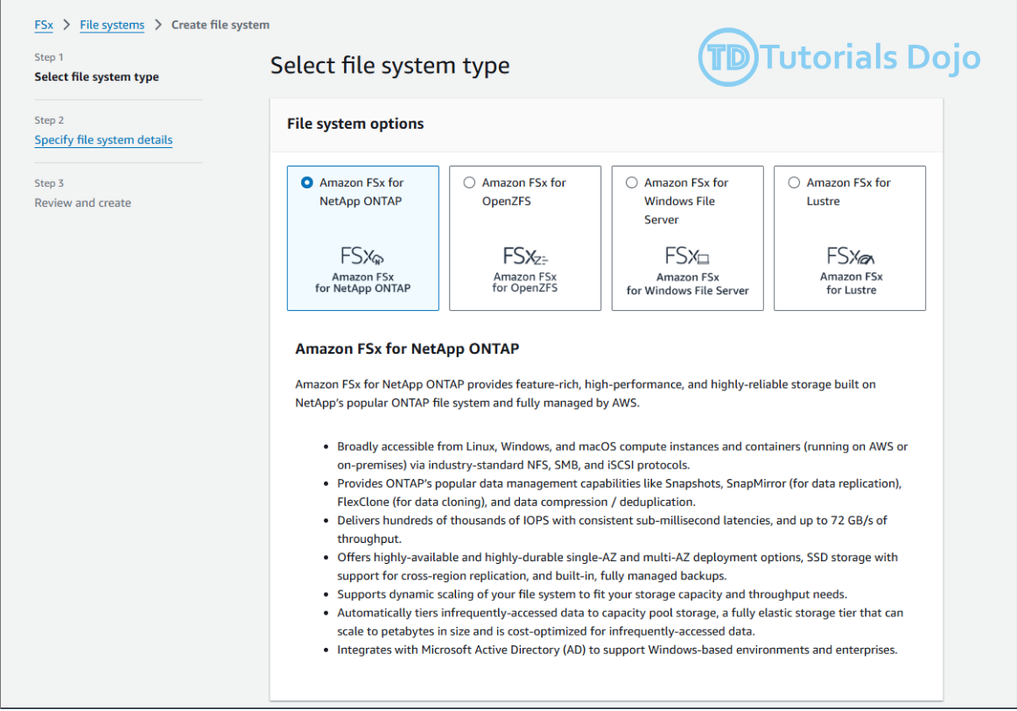
The Amazon FSx for NetApp ONTAP features Multi-AZ file systems designed to ensure continuous availability across AWS Availability Zones, providing high availability for your Windows Server workloads. It offers consistent sub-millisecond file operation latencies with SSD storage, essential for block storage workloads in Windows environments. FSx for NetApp ONTAP fully supports block storage protocols like iSCSI, commonly used in Windows Server settings, and it works seamlessly with the SMB protocol, ensuring compatibility with Windows Server and related applications.
Moreover, FSx for NetApp ONTAP simplifies migrating from on-premises NetApp systems to AWS for users currently utilizing NetApp storage. It can scale to accommodate petabyte-scale datasets, making it suitable for large Windows Server environments.
Hence, the correct answer is: Configure the trading application on Amazon EC2 Windows Server instances across two Availability Zones. Use Amazon FSx for NetApp ONTAP to create a Multi-AZ file system and access the data via iSCSI protocol.
The option that says: Deploy the trading application on Amazon EC2 Windows Server instances across two Availability Zones. Use Amazon FSx for Windows File Server for shared storage is incorrect. Amazon FSx for Windows File Server only provides shared, low-latency file storage for Windows environments. It doesn’t support low-latency access to shared block storage.
The option that says: Deploy the trading application on Amazon EC2 Windows Server instances across two Availability Zones. Use Amazon Elastic File System (Amazon EFS) to provide shared storage between the instances. Configure Amazon EFS with cross-region replication to sync data across Availability Zones is incorrect. While this option provides high availability across AZs, Amazon EFS is not optimized for Windows workloads and doesn’t offer low-latency block storage.
The option that says: Configure the trading application on Amazon EC2 Windows instances across two Availability Zones. Use Amazon Simple Storage Service (Amazon S3) for storage and configure cross-region replication to sync data between S3 buckets in each Availability Zone is incorrect. While this option provides high availability across AZs, Amazon S3 is primarily an object storage, not block storage. It doesn’t offer the low-latency access required for a trading application.
References:
https://docs.aws.amazon.com/fsx/latest/ONTAPGuide/what-is-fsx-ontap.html
https://docs.aws.amazon.com/fsx/latest/ONTAPGuide/high-availability-AZ.html
Check out this Amazon FSx Cheat Sheet:
Question 3
Phần tiêu đề “Question 3”Type: Single answer · Câu gốc: #23
A company is using AWS Fargate to run a batch job whenever an object is uploaded to an Amazon S3 bucket. The minimum ECS task count is initially set to 1 to save on costs and should only be increased based on new objects uploaded to the S3 bucket.
Which is the most suitable option to implement with the LEAST amount of effort?
- A. Set up an Amazon EventBridge (Amazon CloudWatch Events) rule to detect S3 object PUT operations and set the target to a Lambda function that will run the
StartTaskAPI command. - B. Set up an Amazon EventBridge (Amazon CloudWatch Events) rule to detect S3 object PUT operations and set the target to the ECS cluster to run a new ECS task.
- C. Set up an alarm in Amazon CloudWatch to monitor S3 object-level operations that are recorded on CloudTrail. Create an Amazon EventBridge (Amazon CloudWatch Events) rule that triggers the ECS cluster when new CloudTrail events are detected.
- D. Set up an alarm in CloudWatch to monitor S3 object-level operations recorded on CloudTrail. Set two alarm actions to update the ECS task count to scale-out/scale-in depending on the S3 event.
Answer & explanation
Correct answer: B
Amazon EventBridge (Amazon CloudWatch Events) is a serverless event bus that makes it easy to connect applications together. It uses data from your own applications, integrated software as a service (SaaS) applications, and AWS services. This simplifies the process of building event-driven architectures by decoupling event producers from event consumers. This allows producers and consumers to be scaled, updated, and deployed independently. Loose coupling improves developer agility in addition to application resiliency.
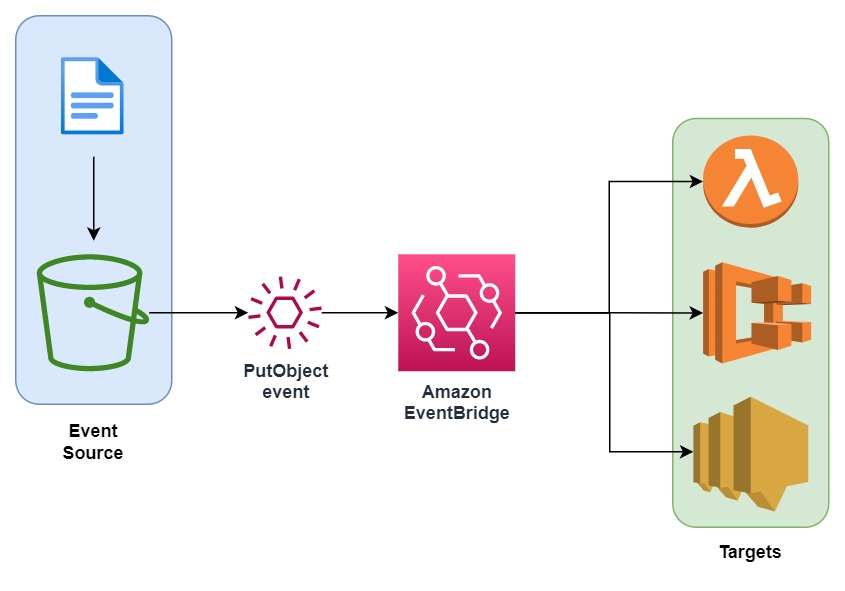
You can use Amazon EventBridge (Amazon CloudWatch Events) to run Amazon ECS tasks when certain AWS events occur. You can set up an EventBridge rule that runs an Amazon ECS task whenever a file is uploaded to a certain Amazon S3 bucket using the Amazon S3 PUT operation.
Hence, the correct answer is: Set up an Amazon EventBridge (Amazon CloudWatch Events) rule to detect S3 object PUT operations and set the target to the ECS cluster to run a new ECS task.
The option that says: Set up an Amazon EventBridge (Amazon CloudWatch Events) rule to detect S3 object PUT operations and set the target to a Lambda function that will run the StartTask API command is incorrect. Although this solution meets the requirement, creating your own Lambda function for this scenario is not really necessary. It is much simpler to control ECS tasks directly as targets for the CloudWatch Event rule. Take note that the scenario asks for a solution that is the easiest to implement.
The option that says: Set up an alarm in Amazon CloudWatch to monitor S3 object-level operations that are recorded on CloudTrail. Create an Amazon EventBridge (Amazon CloudWatch Events) rule that triggers the ECS cluster when new CloudTrail events are detected is incorrect because using CloudTrail and CloudWatch Alarm creates an unnecessary complexity to what you want to achieve. Amazon EventBridge (Amazon CloudWatch Events) can directly target an ECS task on the Targets section when you create a new rule.
The option that says: Set up an alarm in CloudWatch to monitor CloudTrail since this S3 object-level operations are recorded on CloudTrail. Set two alarm actions to update ECS task count to scale-out/scale-in depending on the S3 event is incorrect because you can’t directly set CloudWatch Alarms to update the ECS task count.
References:
https://docs.aws.amazon.com/AmazonCloudWatch/latest/events/CloudWatch-Events-tutorial-ECS.html
https://docs.aws.amazon.com/AmazonCloudWatch/latest/events/Create-CloudWatch-Events-Rule.html
Check out this Amazon CloudWatch Cheat Sheet: