Design High-Performing Architectures
Domain này kiểm tra khả năng chọn dịch vụ khớp với đặc tính tải: tốc độ scale, giao thức truy cập dữ liệu, độ trễ và thông lượng. Cả bốn phương án thường đều chạy được, nên thứ thực sự bị chấm là đọc ra ràng buộc ẩn trong đề — POSIX, SMB, NoSQL, “trong vài giây”, “ít operational overhead nhất” — rồi dùng chính nó để loại phương án.
Trọng tâm của domain
Phần tiêu đề “Trọng tâm của domain”- Chọn storage theo giao thức và kiểu truy cập: EFS cho shared POSIX, FSx for Windows File Server cho SMB, FSx for Lustre cho parallel hot storage, S3 và Glacier cho cold.
- Chọn đúng kiểu scale: Scheduled, Dynamic hay Predictive scaling của Auto Scaling; Aurora Auto Scaling cho read replica; Lambda sau API Gateway khi burst đến trong vài giây.
- Kiến trúc event-driven: S3 Event Notification fanout qua SNS tới nhiều SQS, DynamoDB Streams gọi Lambda rồi SNS, Kinesis Data Streams với Lambda, Glue ETL kích bằng EventBridge, Aurora MySQL native function.
- Tăng tốc và bảo vệ tầng API/edge: throttling limits cùng result caching của API Gateway, Lambda@Edge và origin failover của CloudFront.
- Hiệu năng ở mức thiết kế dữ liệu: partition key high-cardinality của DynamoDB để tránh hot partition, CloudWatch custom metric cho Memory Utilization.
- Đưa workload on-premises lên cloud đúng cách: homogeneous migration đẩy Oracle sang Amazon RDS for Oracle Multi-AZ bằng AWS Database Migration Service, rehost ứng dụng .NET lên AWS Elastic Beanstalk Multi-AZ khi đề không cho phép viết lại.
- Dữ liệu đa account và truyền quy mô lớn: AWS RAM với AWS Organizations, AWS Lake Formation, VPC endpoint cho S3 và DynamoDB, S3 Transfer Acceleration kèm Multipart Upload.
Bẫy hay gặp
Phần tiêu đề “Bẫy hay gặp”- Phương án multi-region làm mồi khi đề đòi cost-effective: Aurora Global Database hay cross-region read replica thay cho Aurora Auto Scaling, deploy nhiều region với Route 53 latency routing thay cho Lambda@Edge.
- Dịch vụ bị gán vai trò không phải của nó: AWS Control Tower thay RAM hay Lake Formation, CloudFront thay throttling, encryption at rest coi như định tuyến private, RDS event subscription coi như cơ chế bắt thay đổi dữ liệu.
- Sai thứ tự trong pipeline: PII ghi xuống S3 hoặc DynamoDB rồi mới anonymize, quên bật DynamoDB Streams, Glue crawler chạy theo lịch thay vì trigger S3 Object Created.
- Đúng họ dịch vụ nhưng sai biến thể hoặc sai tốc độ: EFS cho workload Windows, Redshift khi đề đòi NoSQL, ElastiCache thay cho file system chia sẻ, nâng EBS lên Provisioned IOPS khi vấn đề thật là cần shared file system; ECS hay Elastic Beanstalk sau API Gateway thay cho Lambda khi burst đến “trong vài giây” — lưu ý chính Elastic Beanstalk lại là đáp án đúng khi đề hỏi rehost một ứng dụng .NET nguyên trạng.
- Làm quá yêu cầu khi đề chỉ cần chuyển nguyên trạng: refactor .NET sang .NET Core chạy trên EKS với Fargate, hay replatform sang ECS trên EC2 worker node, trong khi đề đòi migrate nhanh và ít thay đổi nhất.
Thông tin bộ câu hỏi
Phần tiêu đề “Thông tin bộ câu hỏi”| Thông tin | Giá trị |
|---|---|
| Tỉ trọng trong đề thi | 24% |
| Số câu trong trang | 21 |
| Một đáp án | 18 |
| Nhiều đáp án | 3 |
Đáp án đúng và giải thích đầy đủ nằm trong khối gập lại. Làm hết trang rồi mới mở, để đo đúng năng lực ở domain này.
Question 1
Phần tiêu đề “Question 1”Type: Multi-select · Câu gốc: #6
A global IT company with offices around the world has multiple AWS accounts. To improve efficiency and drive costs down, the Chief Information Officer (CIO) wants to set up a solution that centrally manages their AWS resources. This will allow them to procure AWS resources centrally and share resources such as AWS Transit Gateways, AWS License Manager configurations, or Amazon Route 53 Resolver rules across their various accounts.
As the Solutions Architect, which combination of options should you implement in this scenario? (Select TWO.)
- A. Use the AWS Resource Access Manager (RAM) service to easily and securely share your resources with your AWS accounts.
- B. Use the AWS Identity and Access Management service to set up cross-account access that will easily and securely share your resources with your AWS accounts.
- C. Use AWS Control Tower to easily and securely share your resources with your AWS accounts.
- D. Consolidate all of the company’s accounts using AWS Organizations.
- E. Consolidate all of the company’s accounts using AWS ParallelCluster.
Answer & explanation
Correct answer: A, D
AWS Resource Access Manager (RAM) is a service that enables you to easily and securely share AWS resources with any AWS account or within your AWS Organization. You can share AWS Transit Gateways, Subnets, AWS License Manager configurations, and Amazon Route 53 Resolver rules resources with RAM.
Many organizations use multiple accounts to create administrative or billing isolation, and limit the impact of errors. RAM eliminates the need to create duplicate resources in multiple accounts, reducing the operational overhead of managing those resources in every single account you own. You can create resources centrally in a multi-account environment, and use RAM to share those resources across accounts in three simple steps: create a Resource Share, specify resources, and specify accounts. RAM is available to you at no additional charge.
.379df75d48a8e2cc6160859b7ca3626a9b9be0c1.png)
You can procure AWS resources centrally, and use RAM to share resources such as subnets or License Manager configurations with other accounts. This eliminates the need to provision duplicate resources in every account in a multi-account environment, reducing the operational overhead of managing those resources in every account.
AWS Organizations is an account management service that lets you consolidate multiple AWS accounts into an organization that you create and centrally manage. With Organizations, you can create member accounts and invite existing accounts to join your organization. You can organize those accounts into groups and attach policy-based controls.
Hence, the correct combination of options in this scenario is:
- Consolidate all of the company’s accounts using AWS Organizations.
- Use the AWS Resource Access Manager (RAM) service to easily and securely share your resources with your AWS accounts.
The option that says: Use the AWS Identity and Access Management service to set up cross-account access that will easily and securely share your resources with your AWS accounts is incorrect. Although you can delegate access to resources that are in different AWS accounts using IAM, this process is extremely tedious and entails a lot of operational overhead since you have to manually set up cross-account access to each and every AWS account of the company. A better solution is to use AWS Resources Access Manager instead.
The option that says: Use AWS Control Tower to easily and securely share your resources with your AWS accounts is incorrect because AWS Control Tower simply offers the easiest way to set up and govern a new, secure, multi-account AWS environment. This is not the most suitable service to use to securely share your resources across AWS accounts or within your Organization. You have to use AWS Resources Access Manager (RAM) instead.
The option that says: Consolidate all of the company’s accounts using AWS ParallelCluster is incorrect because AWS ParallelCluster is simply an AWS-supported open-source cluster management tool that makes it easy for you to deploy and manage High-Performance Computing (HPC) clusters on AWS. In this particular scenario, it is more appropriate to use AWS Organizations to consolidate all of your AWS accounts.
References:
https://docs.aws.amazon.com/ram/latest/userguide/shareable.html
Question 2
Phần tiêu đề “Question 2”Type: Single answer · Câu gốc: #7
A tech company has a CRM application hosted on an Auto Scaling group of On-Demand EC2 instances with different instance types and sizes. The application is extensively used during office hours from 9 in the morning to 5 in the afternoon. Their users are complaining that the performance of the application is slow during the start of the day but then works normally after a couple of hours.
Which of the following is the MOST operationally efficient solution to implement to ensure the application works properly at the beginning of the day?
- A. Configure a Dynamic scaling policy for the Auto Scaling group to launch new instances based on the CPU utilization.
- B. Configure a Dynamic scaling policy for the Auto Scaling group to launch new instances based on the Memory utilization.
- C. Configure a Scheduled scaling policy for the Auto Scaling group to launch new instances before the start of the day.
- D. Configure a Predictive scaling policy for the Auto Scaling group to automatically adjust the number of Amazon EC2 instances
Answer & explanation
Correct answer: C
Scaling based on a schedule allows you to scale your application in response to predictable load changes. For example, every week the traffic to your web application starts to increase on Wednesday, remains high on Thursday, and starts to decrease on Friday. You can plan your scaling activities based on the predictable traffic patterns of your web application.

To configure your Auto Scaling group to scale based on a schedule, you create a scheduled action. The scheduled action tells Amazon EC2 Auto Scaling to perform a scaling action at specified times. To create a scheduled scaling action, you specify the start time when the scaling action should take effect and the new minimum, maximum, and desired sizes for the scaling action. At the specified time, Amazon EC2 Auto Scaling updates the group with the values for minimum, maximum, and desired size specified by the scaling action. You can create scheduled actions for scaling one time only or for scaling on a recurring schedule.
Hence, configuring a Scheduled scaling policy for the Auto Scaling group to launch new instances before the start of the day is the correct answer. You need to configure a Scheduled scaling policy. This will ensure that the instances are already scaled up and ready before the start of the day since this is when the application is used the most.
The following options are both incorrect. Although these are valid solutions, it is still better to configure a Scheduled scaling policy as you already know the exact peak hours of your application. By the time either the CPU or Memory hits a peak, the application already has performance issues, so you need to ensure the scaling is done beforehand using a Scheduled scaling policy:
-Configure a Dynamic scaling policy for the Auto Scaling group to launch new instances based on the CPU utilization
-Configure a Dynamic scaling policy for the Auto Scaling group to launch new instances based on the Memory utilization
The option that says: Configure a Predictive scaling policy for the Auto Scaling group to automatically adjust the number of Amazon EC2 instances is incorrect. Although this type of scaling policy can be used in this scenario, it is not the most operationally efficient option. Take note that the scenario mentioned that the Auto Scaling group consists of Amazon EC2 instances with different instance types and sizes. Predictive scaling assumes that your Auto Scaling group is homogenous, which means that all EC2 instances are of equal capacity. The forecasted capacity can be inaccurate if you are using a variety of EC2 instance sizes and types on your Auto Scaling group.
References:
https://docs.aws.amazon.com/autoscaling/ec2/userguide/schedule_time.html
https://docs.aws.amazon.com/autoscaling/ec2/userguide/ec2-auto-scaling-scheduled-scaling.html
Check out this AWS Auto Scaling Cheat Sheet:
Question 3
Phần tiêu đề “Question 3”Type: Single answer · Câu gốc: #9
A company has a highly available architecture consisting of an Elastic Load Balancer and multiple Amazon EC2 instances configured with Auto Scaling across three Availability Zones. The company needs to monitor EC2 instances based on a specific metric that is not readily available in Amazon CloudWatch.
Which of the following is a custom metric in CloudWatch that requires manual setup?
- A.
Memory Utilizationof an EC2 instance - B.
CPU Utilizationof an EC2 instance - C.
Disk Read activityof an EC2 instance - D.
Network packets outof an EC2 instance
Answer & explanation
Correct answer: A
Amazon CloudWatch has Amazon EC2 Metrics available for monitoring. CPU Utilization identifies the processing power required to run an application upon a selected instance. Network Utilization identifies the volume of incoming and outgoing network traffic to a single instance. The Disk Read metric is used to determine the volume of data the application reads from the hard disk of the instance. This can be used to determine the speed of the application. However, there are certain metrics that are not readily available in CloudWatch which can be collected by setting up a custom metric.

You need to prepare a custom metric using CloudWatch Monitoring Scripts which is written in Perl. You can also install CloudWatch Agent to collect more system-level metrics from Amazon EC2 instances. Here’s the list of some of the custom metrics that you can set up:
-
Memory utilization -
Disk swap utilization -
Disk space utilization -
Page file utilization -
Log collection
Hence, the correct answer is: Memory Utilization of an EC2 instance.
The option that says: CPU Utilization of an EC2 instance is incorrect because this metric is typically available by default in CloudWatch and does not require a custom metric setup.
The option that says: Disk Read activity of an EC2 instance is incorrect because only certain storage-related metrics, such as disk space utilization, require custom monitoring. Whereas disk read activity is already included in CloudWatch.
The option that says: Network packets out of an EC2 instance is incorrect because this metric is typically included in CloudWatch’s default network utilization monitoring, so there is no need to configure a custom metric.
References:
https://docs.aws.amazon.com/AWSEC2/latest/UserGuide/monitoring_ec2.html
https://docs.aws.amazon.com/AWSEC2/latest/UserGuide/mon-scripts.html#using_put_script
Check out these Amazon EC2 and Amazon CloudWatch Cheat Sheets:
https://tutorialsdojo.com/amazon-elastic-compute-cloud-amazon-ec2/
Question 4
Phần tiêu đề “Question 4”Type: Single answer · Câu gốc: #11
A healthcare organization wants to build a system that can predict drug prescription abuse. The organization will gather real-time data from multiple sources, which include Personally Identifiable Information (PII). It’s crucial that this sensitive information is anonymized prior to landing in a NoSQL database for further processing.
Which solution would meet the requirements?
- A. Create a data lake in Amazon S3 and use it as the primary storage for patient health data. Use an S3 trigger to run an AWS Lambda function that performs anonymization. Send the anonymized data to Amazon DynamoDB.
- B. Stream the data in an Amazon DynamoDB table. Enable DynamoDB Streams, and configure an AWS Lambda function with
AmazonDynamoDBFullAccesspermissions to perform anonymization on newly written items. - C. Deploy an Amazon Data Firehose stream to capture and transform the streaming data. Deliver the anonymized data to Amazon Redshift for analysis.
- D. Ingest real-time data using Amazon Kinesis Data Stream. Use an AWS Lambda function to anonymize the PII, then store it in Amazon DynamoDB.
Answer & explanation
Correct answer: D
Amazon Kinesis Data Streams (KDS) is a massively scalable and durable real-time data streaming service. KDS can continuously capture gigabytes of data per second from hundreds of thousands of sources.
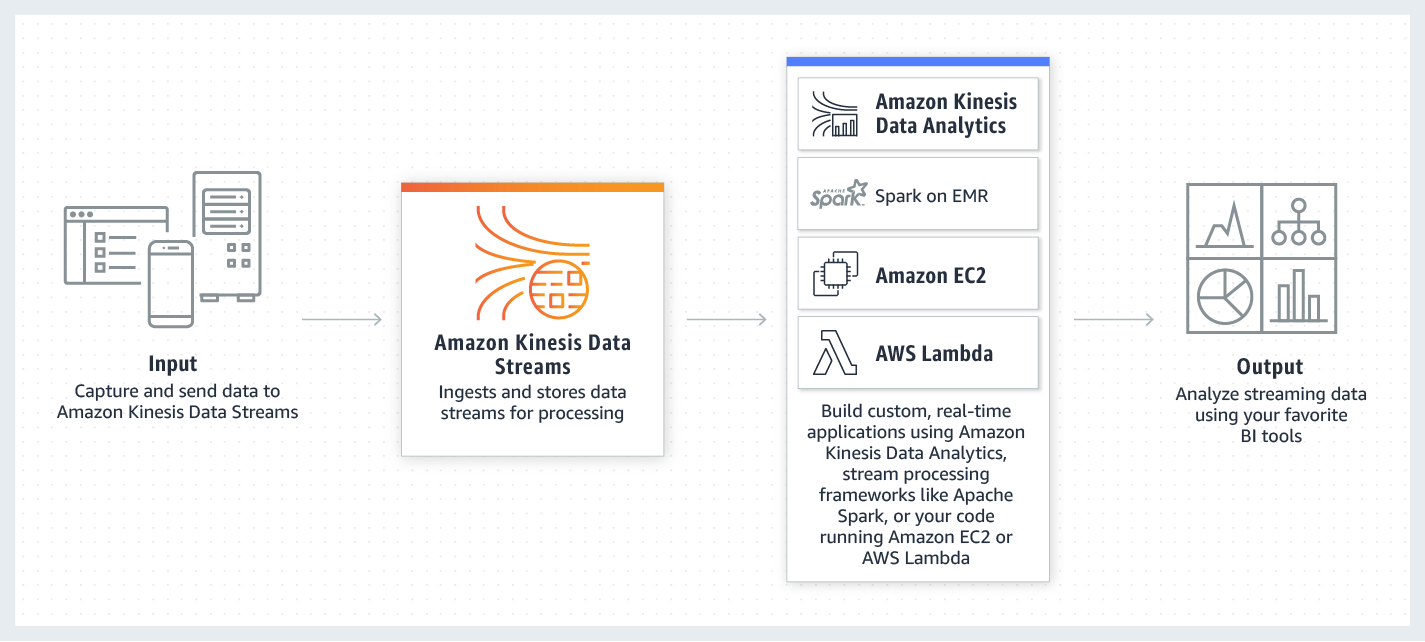
Kinesis Data Streams integrates seamlessly with AWS Lambda, which can be utilized to transform and anonymize Personally Identifiable Information (PII) in transit before it is stored in any system. This ensures that sensitive information is anonymized immediately, preventing unanonymized PII from being stored in any storage system, as required. The anonymized data is then stored in Amazon DynamoDB, a NoSQL database suitable for handling the processed data for further analysis, such as predicting drug prescription abuse.
Hence, the correct answer is: Ingest real-time data using Amazon Kinesis Data Stream. Use an AWS Lambda function to anonymize the PII, then store it in Amazon DynamoDB.
The option that says: Create a data lake in Amazon S3 and use it as the primary storage for patient health data. Use an S3 trigger to run an AWS Lambda function that performs anonymization. Send the anonymized data to Amazon DynamoDB is incorrect. This approach stores unanonymized PII in Amazon S3 before the Lambda function anonymizes it. This simply violates the requirement that PII be anonymized before landing in any storage system. Storing sensitive data in S3, even temporarily, only increases the risk of exposure and does not comply with the privacy requirements.
The option that says: Stream the data in an Amazon DynamoDB table. Enable DynamoDB Streams, and configure an AWS Lambda function with AmazonDynamoDBFullAccess permissions to perform anonymization on newly written items is incorrect. DynamoDB Streams processes changes to already written data, meaning unanonymized PII would be stored in DynamoDB before anonymization, violating the requirement. Additionally, using AmazonDynamoDBFullAccess violates the principle of least privilege, as it primarily grants more permissions than necessary.
The option that says: Deploy an Amazon Data Firehose stream to capture and transform the streaming data. Deliver the anonymized data to Amazon Redshift for analysis is incorrect. The requirement specifies that the anonymized data must be stored in a NoSQL database. Amazon Redshift is a relational data warehousing solution, not a NoSQL database, making this option unsuitable.
References:
https://aws.amazon.com/kinesis/data-streams/
https://docs.aws.amazon.com/lambda/latest/dg/with-kinesis.html
Check out this Amazon Kinesis Cheat Sheet:
Question 5
Phần tiêu đề “Question 5”Type: Single answer · Câu gốc: #13
A company is using Amazon S3 to store frequently accessed data. When an object is created or deleted, the S3 bucket will send an event notification to the Amazon SQS queue. A solutions architect needs to create a solution that will notify the development and operations team about the created or deleted objects.
Which of the following would satisfy this requirement?
- A. Set up another SQS queue for the other team. Grant S3 permission to send a notification to the second SQS queue.
- B. Create a new Amazon SNS FIFO topic for the other team. Grant S3 permission to send the notification to the second SNS topic.
- C. Set up an Amazon SNS topic and configure two SQS queues to poll the SNS topic. Grant S3 permission to send notifications to SNS and update the bucket to use the new SNS topic.
- D. Create an Amazon SNS topic and configure two SQS queues to subscribe to the topic. Grant S3 permission to send notifications to SNS and update the bucket to use the new SNS topic.
Answer & explanation
Correct answer: D
The Amazon S3 notification feature enables you to receive notifications when certain events happen in your bucket. To enable notifications, you must first add a notification configuration that identifies the events you want Amazon S3 to publish and the destinations where you want Amazon S3 to send the notifications. You store this configuration in the notification subresource that is associated with a bucket.
Amazon S3 supports the following destinations where it can publish events:
-
Amazon Simple Notification Service (Amazon SNS) topic
-
Amazon Simple Queue Service (Amazon SQS) queue
-
AWS Lambda
In Amazon SNS, the fanout scenario is when a message published to an SNS topic is replicated and pushed to multiple endpoints, such as Amazon SQS queues, HTTP(S) endpoints, and Lambda functions. This allows for parallel asynchronous processing.
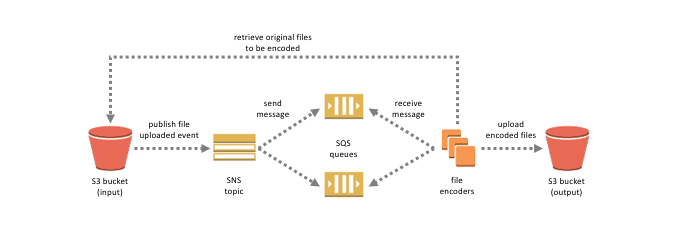
For example, you can develop an application that publishes a message to an SNS topic whenever an order is placed for a product. Then, SQS queues that are subscribed to the SNS topic receive identical notifications for the new order. An Amazon Elastic Compute Cloud (Amazon EC2) server instance attached to one of the SQS queues can handle the processing or fulfillment of the order. And you can attach another Amazon EC2 server instance to a data warehouse for analysis of all orders received.
Based on the given scenario, the existing setup sends the event notification to an SQS queue. Since you need to send the notification to the development and operations team, you can use a combination of Amazon SNS and SQS. By using the message fanout pattern, you can create a topic and use two Amazon SQS queues to subscribe to the topic. If Amazon SNS receives an event notification, it will publish the message to both subscribers.
Take note that Amazon S3 event notifications are designed to be delivered at least once and to one destination only. You cannot attach two or more SNS topics or SQS queues for S3 event notification. Therefore, you must send the event notification to Amazon SNS.
Hence, the correct answer is: Create an Amazon SNS topic and configure two SQS queues to subscribe to the topic. Grant S3 permission to send notifications to SNS and update the bucket to use the new SNS topic.
The option that says: Set up another SQS queue for the other team. Grant S3 permission to send a notification to the second SQS queue is incorrect because you can only add 1 SQS or SNS at a time for Amazon S3 events notification. If you need to send the events to multiple subscribers, you should implement a message fanout pattern with Amazon SNS and Amazon SQS.
The option that says: Create a new Amazon SNS FIFO topic for the other team. Grant S3 permission to send the notification to the second SNS topic is incorrect. Just as mentioned in the previous option, you can only add 1 SQS or SNS at a time for Amazon S3 events notification. In addition, neither Amazon SNS FIFO topic nor Amazon SQS FIFO queue is warranted in this scenario. Both of them can be used together to provide strict message ordering and message deduplication. The FIFO capabilities of each of these services work together to act as a fully managed service to integrate distributed applications that require data consistency in near-real-time.
The option that says: Set up an Amazon SNS topic and configure two SQS queues to poll the SNS topic. Grant S3 permission to send notifications to SNS and update the bucket to use the new SNS topic is incorrect because you can’t poll Amazon SNS. Instead of configuring queues to poll Amazon SNS, you should configure each Amazon SQS queue to subscribe to the SNS topic.
References:
https://docs.aws.amazon.com/AmazonS3/latest/dev/ways-to-add-notification-config-to-bucket.html
https://docs.aws.amazon.com/AmazonS3/latest/dev/NotificationHowTo.html#notification-how-to-overview
https://docs.aws.amazon.com/sns/latest/dg/welcome.html
Check out this Amazon S3 Cheat Sheet:
Question 6
Phần tiêu đề “Question 6”Type: Single answer · Câu gốc: #18
A startup is using Amazon RDS to store data from a web application. Most of the time, the application has low user activity but it receives bursts of traffic within seconds whenever there is a new product announcement. The Solutions Architect needs to create a solution that will allow users around the globe to access the data using an API.
What should the Solutions Architect do meet the above requirement?
- A. Create an API using Amazon API Gateway and use the Amazon ECS cluster with Service Auto Scaling to handle the bursts of traffic in seconds.
- B. Create an API using Amazon API Gateway and use Amazon Elastic Beanstalk with Auto Scaling to handle the bursts of traffic in seconds.
- C. Create an API using Amazon API Gateway and use AWS Lambda to handle the bursts of traffic in seconds.
- D. Create an API using Amazon API Gateway and use an Auto Scaling group of Amazon EC2 instances to handle the bursts of traffic in seconds.
Answer & explanation
Correct answer: C
AWS Lambda lets you run code without provisioning or managing servers. You pay only for the compute time you consume. With Lambda, you can run code for virtually any type of application or backend service - all with zero administration. Just upload your code, and Lambda takes care of everything required to run and scale your code with high availability. You can set up your code to automatically trigger from other AWS services or call it directly from any web or mobile app.
The first time you invoke your function, AWS Lambda creates an instance of the function and runs its handler method to process the event. When the function returns a response, it stays active and waits to process additional events. If you invoke the function again while the first event is being processed, Lambda initializes another instance, and the function processes the two events concurrently. As more events come in, Lambda routes them to available instances and creates new instances as needed. When the number of requests decreases, Lambda stops unused instances to free up the scaling capacity for other functions.

Your functions’ concurrency is the number of instances that serve requests at a given time. For an initial burst of traffic, your functions’ cumulative concurrency in a Region can reach an initial level of between 500 and 3000, which varies per Region.
Based on the given scenario, you need to create a solution that will satisfy the two requirements. The first requirement is to create a solution that will allow the users to access the data using an API. To implement this solution, you can use Amazon API Gateway. The second requirement is to handle the burst of traffic within seconds. You should use AWS Lambda in this scenario because Lambda functions can absorb reasonable bursts of traffic for approximately 15-30 minutes.
Lambda can scale faster than the regular Auto Scaling feature of Amazon EC2, Amazon Elastic Beanstalk, or Amazon ECS. This is because AWS Lambda is more lightweight than other computing services. Under the hood, Lambda can run your code to thousands of available AWS-managed EC2 instances (that could already be running) within seconds to accommodate traffic. This is faster than the Auto Scaling process of launching new EC2 instances that could take a few minutes or so. An alternative is to overprovision your compute capacity but that will incur significant costs. The best option to implement given the requirements is a combination of AWS Lambda and Amazon API Gateway.
Hence, the correct answer is: Create an API using Amazon API Gateway and use AWS Lambda to handle the bursts of traffic.
The option that says: Create an API using Amazon API Gateway and use the Amazon ECS cluster with Service Auto Scaling to handle the bursts of traffic in seconds is incorrect. AWS Lambda is a better option than Amazon ECS since it can handle a sudden burst of traffic within seconds and not minutes.
The option that says: Create an API using Amazon API Gateway and use Amazon Elastic Beanstalk with Auto Scaling to handle the bursts of traffic in seconds is incorrect because just like the previous option, the use of Auto Scaling has a delay of a few minutes as it launches new EC2 instances that will be used by Amazon Elastic Beanstalk.
The option that says: Create an API using Amazon API Gateway and use an Auto Scaling group of Amazon EC2 instances to handle the bursts of traffic in seconds is incorrect because the processing time of Amazon EC2 Auto Scaling to provision new resources takes minutes. Take note that in the scenario, a burst of traffic within seconds is expected to happen.
References:
https://aws.amazon.com/blogs/startups/from-0-to-100-k-in-seconds-instant-scale-with-aws-lambda/
https://docs.aws.amazon.com/lambda/latest/dg/invocation-scaling.html
Check out this AWS Lambda Cheat Sheet:
Question 7
Phần tiêu đề “Question 7”Type: Single answer · Câu gốc: #25
A content management system (CMS) is hosted on a fleet of auto-scaled, On-Demand Amazon EC2 instances that use Amazon Aurora as its database. Currently, the system stores the file documents that users upload in one of the attached Amazon EBS volumes. The system’s performance has been observed to be slow, and the manager has instructed the team to improve the architecture.
In this scenario, which solution should be implemented to achieve a scalable, highly available, POSIX-compliant shared file system?
- A. Create an Amazon S3 bucket and use this as the storage for the CMS
- B. Use Amazon EFS to provide a shared file system for concurrent access to data
- C. Upgrade your existing EBS volumes to Provisioned IOPS SSD volumes
- D. Leverage Amazon ElastiCache to cache frequently accessed data and reduce latency
Answer & explanation
Correct answer: B
Amazon Elastic File System (Amazon EFS) provides simple, scalable, elastic file storage for use with AWS Cloud services and on-premises resources. When mounted on Amazon EC2 instances, an Amazon EFS file system provides a standard file system interface and file system access semantics, allowing you to seamlessly integrate Amazon EFS with your existing applications and tools. Multiple Amazon EC2 instances can access an Amazon EFS file system at the same time, allowing Amazon EFS to provide a common data source for workloads and applications running on more than one Amazon EC2 instance.
This particular scenario tests your understanding of EBS, EFS, and S3. In this scenario, there is a fleet of On-Demand EC2 instances that store file documents from the users to one of the attached EBS Volumes. The system performance is quite slow because the architecture doesn’t provide the EC2 instances parallel shared access to the file documents.
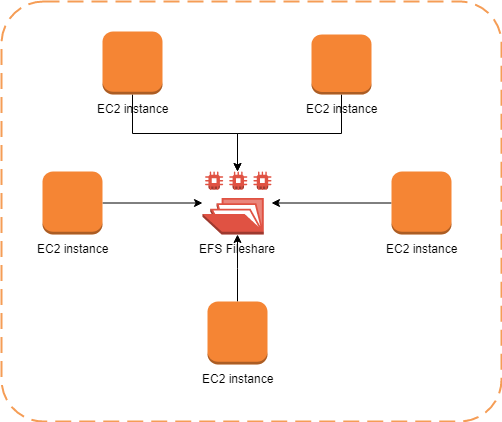
Although an EBS Volume can be attached to multiple EC2 instances, you can only do so on instances within an availability zone. What we need is highly available storage that can span multiple availability zones. Take note as well that the type of storage needed here is file storage, which means that S3 is not the best service to use because it is primarily used for object storage.
Hence, the correct answer is: Use Amazon EFS to provide a shared file system for concurrent access to data.
The option that says: Create an Amazon S3 bucket and use this as the storage for the CMS is incorrect because Amazon S3 is just an object storage service, which does not provide the required file system interface and file locking needed by a CMS.
The option that says: Upgrade your existing EBS volumes to Provisioned IOPS SSD volumes is incorrect because simply upgrading EBS does not address the requirement for a shared, POSIX-compliant file system. EBS volumes are block storage devices attached to a single instance, making them unsuitable for shared storage.
The option that says: Leverage Amazon ElastiCache to cache frequently accessed data and reduce latency is incorrect because this is an in-memory data store that improves the performance of your applications, which is not what you need since it is not a file storage.
References:
https://docs.aws.amazon.com/efs/latest/ug/whatisefs.html
https://docs.aws.amazon.com/efs/latest/ug/mount-multiple-ec2-instances.html
Check out this Amazon EFS Cheat Sheet:
https://tutorialsdojo.com/amazon-efs/
Check out this Amazon S3 vs EBS vs EFS Cheat Sheet:
Question 8
Phần tiêu đề “Question 8”Type: Single answer · Câu gốc: #26
An e-commerce company runs a highly scalable web application that depends on an Amazon Aurora database. As the number of users increases, the read replica faces difficulties keeping up with the increasing read traffic, causing performance bottlenecks during peak periods.
Which of the following will resolve the issue with the most cost-effective solution?
- A. Increase the size of the Aurora DB cluster.
- B. Use automatic scaling for the Aurora read replica using Aurora Auto Scaling.
- C. Implement read scaling with Aurora Global Database.
- D. Set up a read replica that can operate across different regions.
Answer & explanation
Correct answer: B
Amazon Aurora is a cloud-based relational database service that provides better performance and reliability for database workloads. It is highly available and scalable, making it a great choice for businesses of any size. One of the key features of Amazon Aurora is Aurora Auto Scaling, which automatically adjusts the capacity of your Aurora database cluster based on the workload. This means that you don’t have to worry about manually adjusting the ability of your database cluster to handle changes in demand. With Aurora Auto Scaling, you can be sure that your database cluster will always have the appropriate capacity to handle your workload while minimizing costs.
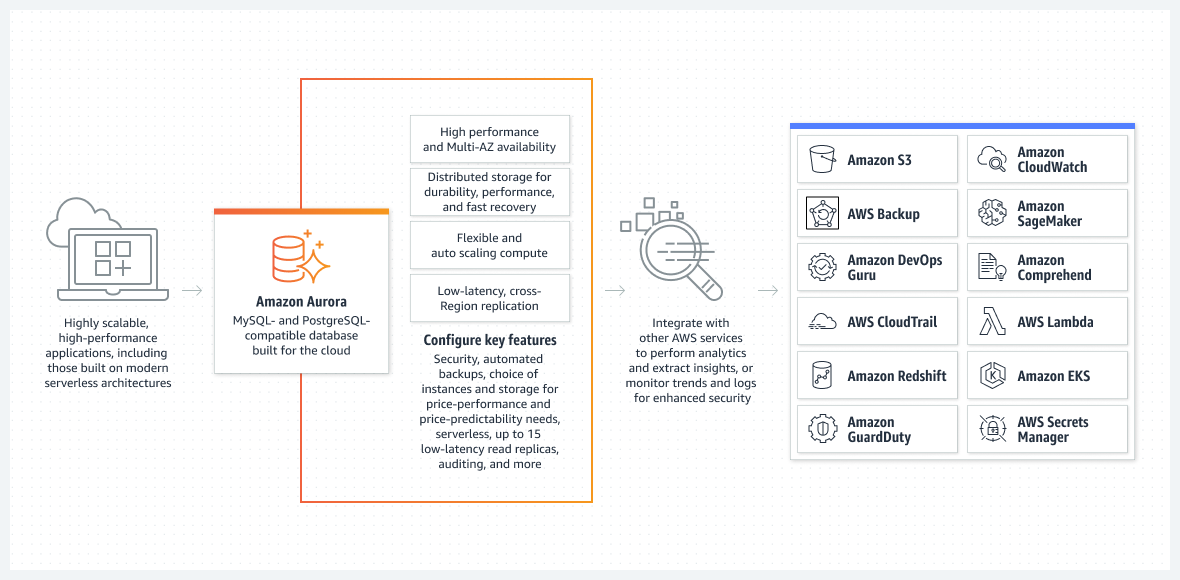
Aurora Auto Scaling is particularly useful for businesses that have fluctuating workloads. It ensures that your database cluster scales up or down as needed without manual intervention. This feature saves time and resources, allowing businesses to focus on other aspects of their operations. Aurora Auto Scaling is also cost-effective, as it helps minimize unnecessary expenses associated with overprovisioning or underprovisioning database resources.
In this scenario, the company can benefit from using Aurora Auto Scaling. This solution allows the system to dynamically manage resources, effectively addressing the surge in read traffic during peak periods. This dynamic management of resources ensures that the company pays only for the extra resources when they are genuinely required.
Hence, the correct answer is: Use automatic scaling for the Aurora read replica using Aurora Auto Scaling.
The option that says: Increase the size of the Aurora DB cluster is incorrect because it’s not economical to upsize the cluster just to alleviate the bottleneck during peak periods. A static increase in the DB cluster size results in constant costs, regardless of whether your database’s resources are being fully utilized during off-peak periods or not.
The option that says: Implement read scaling with Aurora Global Database is incorrect. Amazon Aurora Global Database is primarily designed for globally distributed applications, allowing a single Amazon Aurora database to span multiple AWS Regions. While this can provide global availability, it introduces additional complexity and can be more expensive due to infrastructure and data transfer costs.
The option that says: Set up a read replica that can operate across different regions is incorrect. Setting up a read replica that operates across different regions can provide read scalability and load-balancing benefits by typically distributing the read traffic across regions. However, it is not the most cost-effective solution in this scenario since it incurs additional costs associated with inter-region data replication. Moreover, the issue is not related to cross-region availability but rather the read replica’s performance within the current region.
References:
https://docs.aws.amazon.com/AmazonRDS/latest/AuroraUserGuide/Aurora.Integrating.AutoScaling.html
https://docs.aws.amazon.com/AmazonRDS/latest/AuroraUserGuide/CHAP_AuroraOverview.html
Check out this Amazon Aurora Cheat Sheet:
Question 9
Phần tiêu đề “Question 9”Type: Single answer · Câu gốc: #27
A popular social network is hosted in AWS and is using a Amazon DynamoDB table as its database. There is a requirement to implement a ‘follow’ feature where users can subscribe to certain updates made by a particular user and be notified via email.
Which of the following is the most suitable solution to implement to meet the requirement?
- A. Using the Amazon Kinesis Client Library (KCL), write an application that leverages on DynamoDB Streams Kinesis Adapter that will fetch data from the DynamoDB Streams endpoint. When there are updates made by a particular user, notify the subscribers via email using Amazon SNS.
- B. Create an AWS Lambda function that uses DynamoDB Streams Amazon Kinesis Adapter which will fetch data from the DynamoDB Streams endpoint. Set up an Amazon SNS Topic that will notify the subscribers via email when there is an update made by a particular user.
- C. Set up a DAX cluster to access the source DynamoDB table. Create a new DynamoDB trigger and an AWS Lambda function. For every update made in the user data, the trigger will send data to the Lambda function which will then notify the subscribers via email using Amazon SNS.
- D. Enable DynamoDB Stream and create an AWS Lambda trigger, as well as the IAM role which contains all of the permissions that the Lambda function will need at runtime. The data from the stream record will be processed by the Lambda function which will then publish a message to Amazon SNS Topic that will notify the subscribers via email.
Answer & explanation
Correct answer: D
A DynamoDB stream is an ordered flow of information about changes to items in an Amazon DynamoDB table. When you enable a stream on a table, DynamoDB captures information about every modification to data items in the table.
Whenever an application creates, updates, or deletes items in the table, DynamoDB Streams writes a stream record with the primary key attribute(s) of the items that were modified. A *stream record *contains information about a data modification to a single item in a DynamoDB table. You can configure the stream so that the stream records capture additional information, such as the “before” and “after” images of modified items.
Amazon DynamoDB is integrated with AWS Lambda so that you can create triggers—pieces of code that automatically respond to events in DynamoDB Streams. With triggers, you can build applications that react to data modifications in DynamoDB tables.
If you enable DynamoDB Streams on a table, you can associate the stream ARN with a Lambda function that you write. Immediately after an item in the table is modified, a new record appears in the table’s stream. AWS Lambda polls the stream and invokes your Lambda function synchronously when it detects new stream records. The Lambda function can perform any actions you specify, such as sending a notification or initiating a workflow.
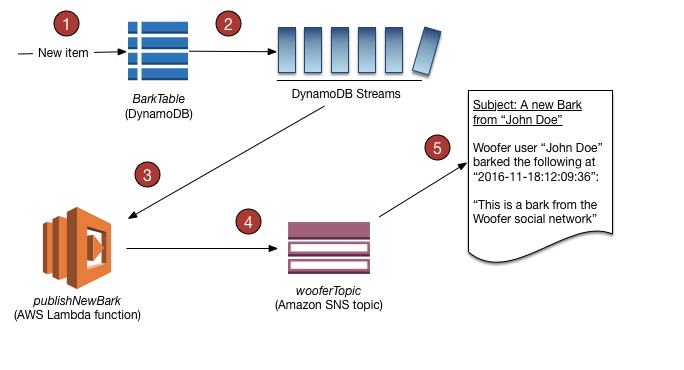
Hence, the correct answer is: Enable DynamoDB Stream and create an AWS Lambda trigger, as well as the IAM role which contains all of the permissions that the Lambda function will need at runtime. The data from the stream record will be processed by the Lambda function which will then publish a message to Amazon SNS Topic that will notify the subscribers via email.
The option that says: Using the Amazon Kinesis Client Library (KCL), write an application that leverages on DynamoDB Streams Kinesis Adapter that will fetch data from the DynamoDB Streams endpoint. When there are updates made by a particular user, notify the subscribers via email using Amazon SNS is incorrect. Although this is a valid solution, it is missing a vital step which is to enable DynamoDB Streams. With the DynamoDB Streams Kinesis Adapter in place, you can begin developing applications via the KCL interface, with the API calls seamlessly directed at the DynamoDB Streams endpoint. Remember that the DynamoDB Stream feature is not enabled by default.
The option that says: Create an AWS Lambda function that uses DynamoDB Streams Amazon Kinesis Adapter which will fetch data from the DynamoDB Streams endpoint. Set up an Amazon SNS Topic that will notify the subscribers via email when there is an update made by a particular user is incorrect because just like in the above, you have to manually enable DynamoDB Streams first before you can use its endpoint.
The option that says: Set up a DAX cluster to access the source DynamoDB table. Create a new DynamoDB trigger and an AWS Lambda function. For every update made in the user data, the trigger will send data to the Lambda function which will then notify the subscribers via email using Amazon SNS is incorrect because the DynamoDB Accelerator (DAX) feature is primarily used to significantly improve the in-memory read performance of your database, and not to capture the time-ordered sequence of item-level modifications. You should use DynamoDB Streams in this scenario instead.
References:
https://docs.aws.amazon.com/amazondynamodb/latest/developerguide/Streams.html
https://docs.aws.amazon.com/amazondynamodb/latest/developerguide/Streams.Lambda.Tutorial.html
Check out this Amazon DynamoDB Cheat Sheet:
Question 10
Phần tiêu đề “Question 10”Type: Single answer · Câu gốc: #28
A retail company receives raw .csv data files into its Amazon S3 bucket from multiple sources on an hourly basis, with an average file size of 2 GB. The bucket is managed using S3 Access Grants for fine‑grained access control.
An automated process must be implemented to convert these .csv files into the more efficient Apache Parquet format and store the converted files in another S3 bucket. Additionally, the conversion process must be automatically initiated each time a new file is uploaded into the S3 bucket.
Which of the following options must be implemented to meet these requirements with the LEAST operational overhead?
- A. Use an AWS Lambda function triggered by an S3 Object Created event to convert the
.csvfiles to Parquet format. Use the AWS Transfer Family with SFTP service to move the output files to the target S3 bucket. - B. Utilize an AWS Glue extract, transform, and load (ETL) job to process and convert the
.csvfiles to Apache Parquet format and then store the output files into the target S3 bucket. Configure an Amazon EventBridge rule to trigger the Glue job on S3 Object Created events. - C. Set up an Apache Spark job running in an Amazon EC2 instance and create an Amazon EventBridge rule to monitor S3 Object Created events in the S3 bucket. Configure AWS Lambda to invoke the Spark job for every new
.csvfile added via a Function URL. - D. Create an ETL (Extract, Transform, Load) job and a Data Catalog table in AWS Glue. Configure the Glue crawler to run on a schedule to check for new files in the S3 bucket every hour and convert them to Parquet format.
Answer & explanation
Correct answer: B
AWS Glue is a powerful ETL service that easily moves data between different data stores. By using AWS Glue, you can create and manage ETL jobs to transfer data from various sources, such as Amazon S3, Amazon RDS, and Amazon Redshift. Additionally, AWS Glue enables you to transform data as needed to fit specific requirements. One of the key advantages of AWS Glue is its automatic schema discovery and mapping, which allows data from different sources with varying schemas to be processed efficiently. Glue jobs can also be automatically triggered using an Amazon EventBridge rule or an AWS Lambda function in response to S3 Object Created events, enabling an event-driven and automated data processing workflow.
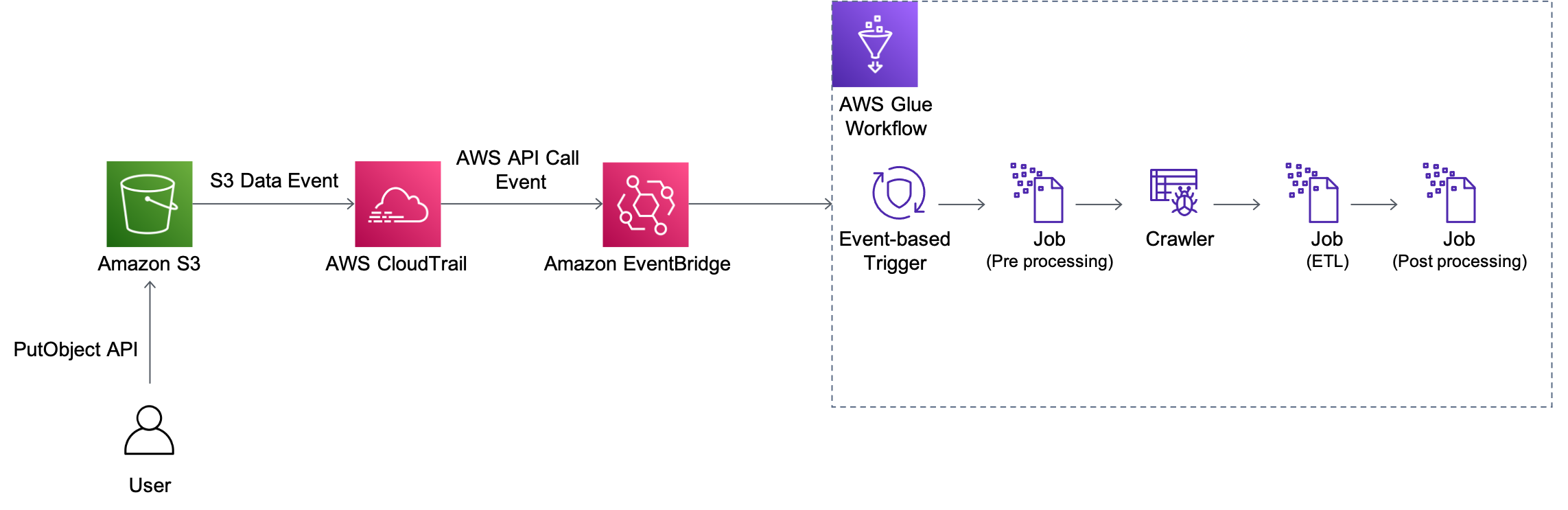
When working with big data processing, it is often necessary to convert data from one format to another to optimize processing efficiency. Apache Parquet is a columnar storage format that is designed to provide higher efficiency and performance for big data processing. By storing and processing large amounts of data with high compression rates and faster query times, Parquet can offer significant benefits to the company. Fortunately, Parquet is compatible with many data processing frameworks such as Spark, Hive, and Hadoop, making it a versatile format for big data processing. By using AWS Glue and other AWS services, you can easily convert their .csv files to the more efficient Apache Parquet format and store the output files in an S3 bucket, making it easy to access and process large amounts of data.
Hence, the correct answer is: Utilize an AWS Glue extract, transform, and load (ETL) job to process and convert the .csv files to Apache Parquet format and then store the output files into the target S3 bucket. Configure an Amazon EventBridge rule to trigger the Glue job on S3 Object Created events.
The option that says: Use an AWS Lambda function triggered by an S3 Object Created event to convert the .csv files to Parquet format. Use the AWS Transfer Family with SFTP service to move the output files to the target S3 bucket is incorrect. The conversion of the CSV files to Parquet format by using a combination of a Lambda function and S3 event notification would work; however, this is not the most efficient solution when handling large amounts of data. The Lambda function has a maximum execution time limit, which means that converting large files may result in timeout issues. Using the AWS Transfer Family with the SFTP service to move the output files to the target S3 bucket is unnecessary too. Moreover, reading the records has to be delivered via a data stream since a Lambda function has a memory limit. This entails additional effort compared with just using AWS Glue.
The option that says: Set up an Apache Spark job running in an Amazon EC2 instance and create an Amazon EventBridge rule to monitor S3 Object Created events in the S3 bucket. Configure AWS Lambda to invoke the Spark job for every new .csv file added via a Function URL is incorrect. Running Spark on EC2 instances typically requires manual provisioning, monitoring, and maintenance, leading to time and additional costs. Additionally, using Amazon EventBridge to trigger the Spark job through a Function URL adds complexity and potential points of failure. Thus, this option just introduces unnecessary complexity and operational overhead.
The option that says: Create an ETL (Extract, Transform, Load) job and a Data Catalog table in AWS Glue. Configure the Glue crawler to run on a schedule to check for new files in the S3 bucket every hour and convert them to Parquet format is incorrect. Although it is right to create an ETL job using AWS Glue, triggering the job on a scheduled basis rather than being triggered automatically by a new file upload is not ideal. It is not as efficient as using an S3 event trigger to initiate the conversion process immediately upon file upload.
References:
https://docs.aws.amazon.com/glue/latest/dg/aws-glue-programming-etl-format-parquet-home.html
https://docs.aws.amazon.com/glue/latest/dg/starting-workflow-eventbridge.html
https://docs.aws.amazon.com/AmazonS3/latest/userguide/EventBridge.html
Check out this AWS Glue Cheat Sheet:
Question 11
Phần tiêu đề “Question 11”Type: Single answer · Câu gốc: #29
A cryptocurrency trading platform is using an API built in AWS Lambda and API Gateway. Due to the recent news and rumors about the upcoming price surge of Bitcoin, Ethereum and other cryptocurrencies, it is expected that the trading platform would have a significant increase in site visitors and new users in the coming days ahead.
In this scenario, how can you protect the backend systems of the platform from traffic spikes?
- A. Switch from using AWS Lambda and API Gateway to a more scalable and highly available architecture using EC2 instances, ELB, and Auto Scaling.
- B. Enable throttling limits and result caching in API Gateway.
- C. Use CloudFront in front of the API Gateway to act as a cache.
- D. Move the Lambda function in a VPC.
Answer & explanation
Correct answer: B
Amazon API Gateway provides throttling at multiple levels including global and by service call. Throttling limits can be set for standard rates and bursts. For example, API owners can set a rate limit of 1,000 requests per second for a specific method in their REST APIs, and also configure Amazon API Gateway to handle a burst of 2,000 requests per second for a few seconds. Amazon API Gateway tracks the number of requests per second. Any request over the limit will receive a 429 HTTP response. The client SDKs generated by Amazon API Gateway retry calls automatically when met with this response. Hence, enabling throttling limits and result caching in API Gateway is the correct answer.
You can add caching to API calls by provisioning an Amazon API Gateway cache and specifying its size in gigabytes. The cache is provisioned for a specific stage of your APIs. This improves performance and reduces the traffic sent to your back end. Cache settings allow you to control the way the cache key is built and the time-to-live (TTL) of the data stored for each method. Amazon API Gateway also exposes management APIs that help you invalidate the cache for each stage.
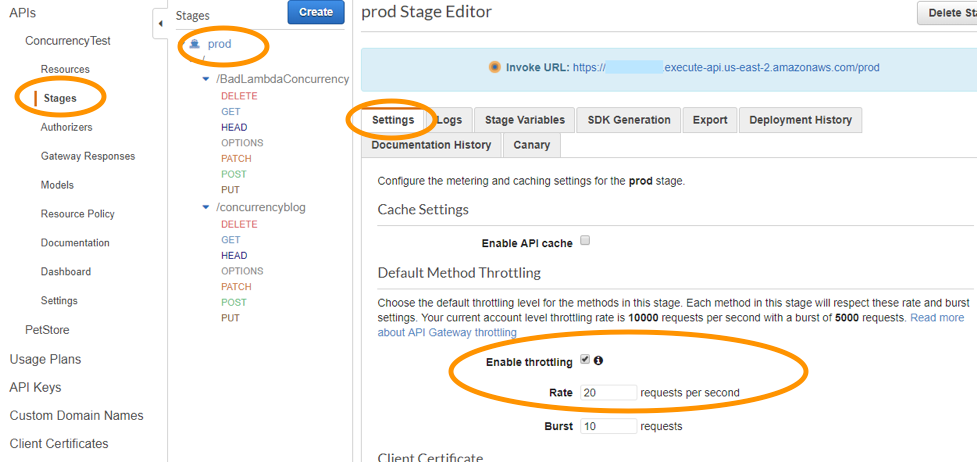
The option that says: Switch from using AWS Lambda and API Gateway to a more scalable and highly available architecture using EC2 instances, ELB, and Auto Scaling is incorrect since there is no need to transfer your applications to other services.
Using CloudFront in front of the API Gateway to act as a cache is incorrect because CloudFront only speeds up content delivery which provides a better latency experience for your users. It does not help much for the backend.
Moving the Lambda function in a VPC is incorrect because this answer is irrelevant to what is being asked. A VPC is your own virtual private cloud where you can launch AWS services.
Reference:
https://aws.amazon.com/api-gateway/faqs/
Check out this Amazon API Gateway Cheat Sheet:
https://tutorialsdojo.com/amazon-api-gateway/
Here is an in-depth tutorial on Amazon API Gateway:
Question 12
Phần tiêu đề “Question 12”Type: Single answer · Câu gốc: #36
A company is using a combination of Amazon API Gateway and AWS Lambda for the web services of an online web portal that is accessed by hundreds of thousands of clients each day. The company will be announcing a new revolutionary product, and it is expected that the web portal will receive a massive number of visitors from all around the globe.
How can the back-end systems and applications, beyond the subnet-level filtering of network ACLs, be protected from traffic spikes?
- A. Use throttling limits in API Gateway
- B. API Gateway will automatically scale and handle massive traffic spikes so you do not have to do anything.
- C. Manually upgrade the Amazon EC2 instances being used by API Gateway
- D. Configure API Gateway for Multi-AZ deployment and provision a read replica
Answer & explanation
Correct answer: A
Amazon API Gateway provides throttling at multiple levels, including global and by a service call. Throttling limits can be set for standard rates and bursts. For example, API owners can set a rate limit of 1,000 requests per second for a specific method in their REST APIs, and also configure Amazon API Gateway to handle a burst of 2,000 requests per second for a few seconds.
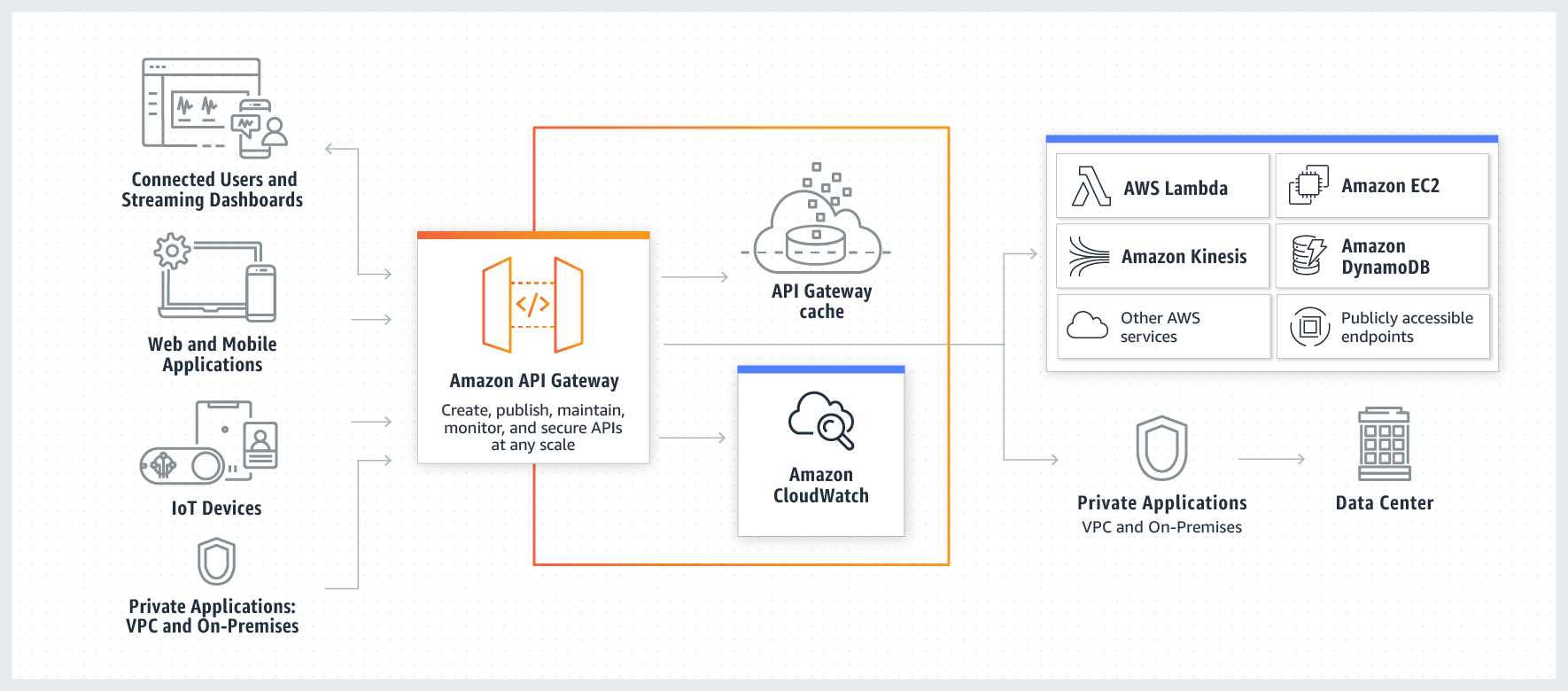
Amazon API Gateway tracks the number of requests per second. Any requests over the limit will receive a 429 HTTP response. The client SDKs generated by Amazon API Gateway retry calls automatically when met with this response.
Hence, the correct answer is: Use throttling limits in API Gateway.
The option that says: API Gateway will automatically scale and handle massive traffic spikes so you do not have to do anything is incorrect. Although it can scale using AWS Edge locations, you still need to configure the throttling, typically to further manage the bursts of your APIs.
The option that says: Manually upgrade the Amazon EC2 instances being used by API Gateway is incorrect because API Gateway is a fully managed service, and hence, you do not have access to its underlying resources.
The option that says: Configure API Gateway for Multi-AZ deployment and provision a read replica is incorrect because only RDS has Multi-AZ and Read Replica capabilities, and not API Gateway.
References:
https://aws.amazon.com/api-gateway/faqs/#Throttling_and_Caching
https://docs.aws.amazon.com/apigateway/
Check out this Amazon API Gateway Cheat Sheet:
Question 13
Phần tiêu đề “Question 13”Type: Multi-select · Câu gốc: #40
A popular social media website uses a Amazon CloudFront web distribution to serve static content to millions of users around the globe. Recently, the website has received a number of complaints about long login times. Additionally, there are instances where users encounter HTTP 504 errors. The manager has instructed the team to significantly reduce login time and further optimize the system.
Which of the following options should be used together to set up a cost-effective solution that improves the application’s performance? (Select TWO.)
- A. Customize the content that the CloudFront web distribution delivers to your users using Lambda@Edge, which allows your AWS Lambda functions to execute the authentication process in AWS locations closer to the users.
- B. Establish multiple Amazon VPCs in different AWS regions and configure a transit VPC to interconnect all of your resources. To handle the requests faster, set up AWS Lambda functions in each region with the AWS Serverless Application Model (SAM) service.
- C. Configure your origin to add a
Cache-Control max-agedirective to your objects, and specify the longest practical value formax-ageto increase the cache hit ratio of your CloudFront distribution. - D. Deploy your application to multiple AWS regions to accommodate your users around the world. Set up a Route 53 record with latency routing policy to route incoming traffic to the region that provides the best latency to the user.
- E. Implement an origin failover by creating an origin group that includes two origins. Assign one as the primary origin and the other as secondary, which enables CloudFront to automatically switch to if the primary origin encounters specific HTTP status code failure responses.
Answer & explanation
Correct answer: A, E
Lambda@Edge lets you run Lambda functions to customize the content that CloudFront delivers, executing the functions in AWS locations closer to the viewer. The functions run in response to CloudFront events, without provisioning or managing servers. You can use Lambda functions to change CloudFront requests and responses at the following points:
-
After CloudFront receives a request from a viewer (viewer request)
-
Before CloudFront forwards the request to the origin (origin request)
-
After CloudFront receives the response from the origin (origin response)
-
Before CloudFront forwards the response to the viewer (viewer response)
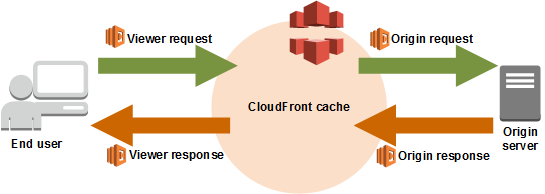
In the given scenario, you can use Lambda@Edge to allow your Lambda functions to customize the content that CloudFront delivers and to execute the authentication process in AWS locations closer to the users. In addition, you can set up an origin failover by creating an origin group with two origins with one as the primary origin and the other as the second origin which CloudFront automatically switches to when the primary origin fails. This will alleviate the occasional HTTP 504 errors that users are experiencing.
Therefore, the correct answers are:
- Customize the content that the CloudFront web distribution delivers to your users using Lambda@Edge, which allows your AWS Lambda functions to execute the authentication process in AWS locations closer to the users.
- Implement an origin failover by creating an origin group that includes two origins. Assign one as the primary origin and the other as secondary, which enables CloudFront to automatically switch to if the primary origin encounters specific HTTP status code failure responses.
The option that says: Establish multiple Amazon VPCs in different AWS regions and configure a transit VPC to interconnect all of your resources. To handle the requests faster, set up AWS Lambda functions in each region with the AWS Serverless Application Model (SAM) service is incorrect because of the same reason provided above. Although setting up multiple VPCs across various regions which are just connected with a transit VPC is valid, this solution still entails higher setup and maintenance costs. A more cost-effective option would be to use Lambda@Edge instead.
The option that says: Configure your origin to add a Cache-Control max-age directive to your objects, and specify the longest practical value for max-age to increase the cache hit ratio of your CloudFront distribution is incorrect because improving the cache hit ratio for the CloudFront distribution is irrelevant in this scenario. You can only improve your cache performance by increasing the proportion of your viewer requests that are served from CloudFront edge caches instead of going to your origin servers for content. However, take note that the problem in the scenario is the sluggish authentication process of your global users and not just the caching of the static objects.
The option that says: Deploy your application to multiple AWS regions to accommodate your users around the world. Set up a Route 53 record with latency routing policy to route incoming traffic to the region that provides the best latency to the user is incorrect. Although this may resolve the performance issue, this solution entails a significant implementation cost since you have to deploy your application to multiple AWS regions. Remember that the scenario asks for a solution that will improve the performance of the application with minimal cost.
References:
https://docs.aws.amazon.com/lambda/latest/dg/lambda-edge.html
Check out these Amazon CloudFront and AWS Lambda Cheat Sheets:
Question 14
Phần tiêu đề “Question 14”Type: Single answer · Câu gốc: #42
A Docker application, which is running on an Amazon ECS cluster behind a load balancer, is heavily using Amazon DynamoDB. The application requires improved database performance by distributing the workload evenly and utilizing the provisioned throughput efficiently. Currently, the table’s write capacity units (WCU) are unevenly consumed due to key distribution.
Which of the following should be implemented for the DynamoDB table?
- A. Reduce the number of partition keys in the DynamoDB table.
- B. Use partition keys with high-cardinality attributes, which have a large number of distinct values for each item.
- C. Use partition keys with low-cardinality attributes, which have a small number of distinct values for each item.
- D. Avoid using a primary key that combines both a partition key and a sort key.
Answer & explanation
Correct answer: B
The partition key portion of a table’s primary key determines the logical partitions in which a table’s data is stored. This, in turn, affects the underlying physical partitions. Provisioned I/O capacity for the table is divided evenly among these physical partitions. Therefore, a partition key design that doesn’t distribute I/O requests evenly can create “hot” partitions that result in throttling and use your provisioned I/O capacity inefficiently.
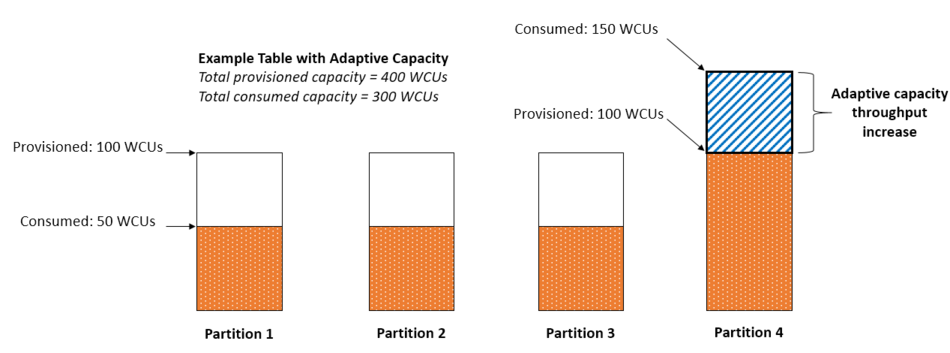
The optimal usage of a table’s provisioned throughput depends not only on the workload patterns of individual items but also on the partition-key design. This doesn’t mean that you must access all partition key values to achieve an efficient throughput level, or even that the percentage of accessed partition key values must be high. It does mean that the more distinct partition key values that your workload accesses, the more those requests will be spread across the partitioned space. In general, you will use your provisioned throughput more efficiently as the ratio of partition key values accessed to the total number of partition key values increases.
Hence, the correct answer is: Use partition keys with high-cardinality attributes, which have a large number of distinct values for each item.
The option that says: Reducing the number of partition keys in the DynamoDB table is incorrect. Instead of doing this, you should actually add more to improve its performance to distribute the I/O requests evenly and not simply avoid “hot” partitions.
The option that says: Using partition keys with low-cardinality attributes, which have a small number of distinct values for each item, is incorrect because this is only the exact opposite of the correct answer. Remember that the more distinct partition key values your workload accesses, the more those requests will be spread across the partitioned space. Conversely, the less distinct partition key values, the less evenly spread they would be across the partitioned space, which effectively slows the performance.
The option that says: Avoid using a primary key that combines both a partition key and a sort key, is incorrect because, as mentioned, a composite primary key will provide more partitions for the table and, in turn, improve the performance. Hence, it should be used and not avoided.
References:
https://docs.aws.amazon.com/amazondynamodb/latest/developerguide/bp-partition-key-uniform-load.html
https://aws.amazon.com/blogs/database/choosing-the-right-dynamodb-partition-key/
Check out this Amazon DynamoDB Cheat Sheet:
Question 15
Phần tiêu đề “Question 15”Type: Single answer · Câu gốc: #45
An AI-powered Forex trading application consumes thousands of data sets to train its machine learning model. The application’s workload requires a high-performance, parallel hot storage to process the training datasets concurrently. It also needs cost-effective cold storage to archive those datasets that yield low profit.
Which of the following Amazon storage services should the developer use?
- A. Use Amazon FSx For Lustre and the Provisioned IOPS SSD (io1) volumes of Amazon EBS for hot and cold storage respectively.
- B. Use Amazon FSx For Lustre and Amazon S3 for hot and cold storage respectively.
- C. Use Amazon Elastic File System and Amazon S3 for hot and cold storage respectively.
- D. Use Amazon FSx For Windows File Server and Amazon S3 for hot and cold storage respectively.
Answer & explanation
Correct answer: B
Hot storage refers to the storage that keeps frequently accessed data (hot data). Warm storage refers to the storage that keeps less frequently accessed data (warm data). Cold storage refers to the storage that keeps rarely accessed data (cold data). In terms of pricing, the colder the data, the cheaper it is to store, and the costlier it is to access when needed.

Amazon FSx For Lustre is a high-performance file system for fast processing of workloads. Lustre is a popular open-source parallel file system which stores data across multiple network file servers to maximize performance and reduce bottlenecks.
Amazon FSx for Windows File Server is a fully managed Microsoft Windows file system with full support for the SMB protocol, Windows NTFS, and Microsoft Active Directory (AD) Integration.
Amazon Elastic File System is a fully-managed file storage service that makes it easy to set up and scale file storage in the Amazon Cloud.
Amazon S3 is an object storage service that offers industry-leading scalability, data availability, security, and performance. S3 offers different storage tiers for different use cases (frequently accessed data, infrequently accessed data, and rarely accessed data).
The question has two requirements:
- High-performance, parallel hot storage to process the training datasets concurrently.
- Cost-effective cold storage to keep the archived datasets that are accessed infrequently
In this case, we can use Amazon FSx For Lustre for the first requirement, as it provides a high-performance, parallel file system for hot data. On the second requirement, we can use Amazon S3 for storing cold data. Amazon S3 supports a cold storage system via Amazon S3 Glacier / Glacier Deep Archive.
Hence, the correct answer is: Use Amazon FSx For Lustre and Amazon S3 for hot and cold storage respectively.
The option that says: Use Amazon FSx For Lustre and Amazon EBS Provisioned IOPS SSD (io1) volumes for hot and cold storage respectively is incorrect because the Provisioned IOPS SSD (io1) volumes are primarily designed for storing hot data (data that are frequently accessed) used in I/O-intensive workloads. EBS has a storage option called “Cold HDD,” but due to its price, it is not ideal for data archiving. EBS Cold HDD is much more expensive than Amazon S3 Glacier / Glacier Deep Archive and is often utilized in applications where sequential cold data is read less frequently.
The option that says: Use Amazon Elastic File System and Amazon S3 for hot and cold storage respectively is incorrect. Although EFS supports concurrent access to data, it does not have the high-performance ability that is typically required for machine learning workloads.
The option that says: Use Amazon FSx For Windows File Server and Amazon S3 for hot and cold storage respectively is incorrect because Amazon FSx For Windows File Server does not have a parallel file system, unlike Lustre.
References:
https://aws.amazon.com/blogs/startups/picking-the-right-data-store-for-your-workload/
Check out this Amazon FSx Cheat Sheet:
Question 16
Phần tiêu đề “Question 16”Type: Single answer · Câu gốc: #47
A company plans to launch an Amazon EC2 instance in a private subnet for its internal corporate web portal. For security purposes, the EC2 instance must send data to Amazon DynamoDB and Amazon S3 via private endpoints that don’t pass through the public Internet, which does not involve NAT Instances.
Which of the following can meet the above requirements?
- A. Use a DynamoDB VPC endpoint and an S3 VPC endpoint to route all access to these services via private endpoints.
- B. Use AWS VPN CloudHub to route all access to S3 and DynamoDB via private endpoints.
- C. Enable DynamoDB Encryption at Rest with the default AWS-managed key and S3 Server-Side Encryption with the default AWS KMS key to route all traffic to DynamoDB and S3 via private endpoints.
- D. Use AWS Direct Connect to route all access to S3 and DynamoDB via private endpoints.
Answer & explanation
Correct answer: A
A VPC endpoint allows you to privately connect your VPC to supported AWS and VPC endpoint services powered by AWS PrivateLink without needing an Internet gateway, NAT computer, VPN connection, or AWS Direct Connect connection. Instances in your VPC do not require public IP addresses to communicate with resources in the service. Traffic between your VPC and the other service does not leave the Amazon network.
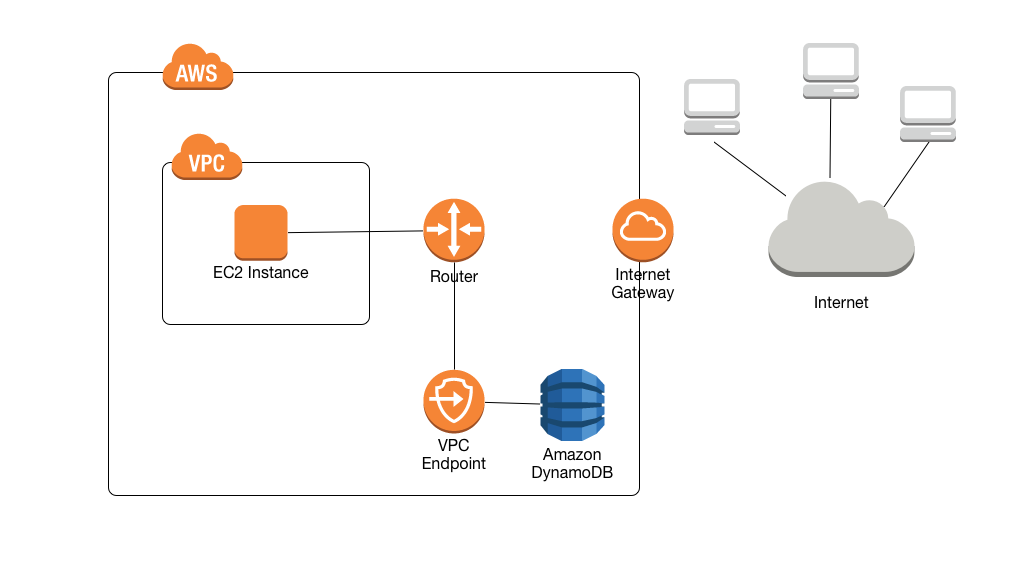
In the scenario, you are asked to configure private endpoints to send data to Amazon DynamoDB and Amazon S3 without accessing the public Internet. Among the options given, VPC endpoint is the most suitable service that will allow you to use private IP addresses to access both DynamoDB and S3 without any exposure to the public internet.
Hence, the correct answer is: Use a DynamoDB VPC endpoint and an S3 VPC endpoint to route all access to these services via private endpoints.
The option that says: Enable DynamoDB Encryption at Rest with the default AWS-managed key and S3 Server-Side Encryption with the default AWS KMS key to route all traffic to DynamoDB and S3 via private endpoints is incorrect because encryption at rest does not affect the traffic routing. Encryption manages data security but does not control how traffic is routed between services.
The option that says: Use AWS Direct Connect to route all access to S3 and DynamoDB via private endpoints is incorrect because AWS Direct Connect is primarily used to establish a dedicated network connection from your premises to AWS. The scenario didn’t say that the company is using its own on-premises server or has a hybrid cloud architecture.
The option that says: Use AWS VPN CloudHub to route all access in S3 and DynamoDB to a private endpoint is incorrect because AWS VPN CloudHub is typically used to provide secure communication between remote sites and not for creating a private endpoint to access Amazon S3 and DynamoDB within the Amazon network.
References:
https://docs.aws.amazon.com/amazondynamodb/latest/developerguide/vpc-endpoints-dynamodb.html
https://docs.aws.amazon.com/glue/latest/dg/vpc-endpoints-s3.html
Check out this Amazon VPC Cheat Sheet:
Question 17
Phần tiêu đề “Question 17”Type: Single answer · Câu gốc: #51
A company wishes to query data that resides in multiple AWS accounts from a central data lake. Each account has its own Amazon S3 bucket that stores data unique to its business function. Access to the data lake must be granted based on user roles.
Which solution will minimize overhead and costs while meeting the required access patterns?
- A. Use AWS Lake Formation to consolidate data from multiple accounts into a single account.
- B. Use Amazon Data Firehose to consolidate data from multiple accounts into a single account.
- C. Create a scheduled AWS Lambda function using Amazon EventBridge for transferring data from multiple accounts to the S3 buckets of the central account.
- D. Use AWS Control Tower to centrally manage each account’s S3 buckets.
Answer & explanation
Correct answer: A
AWS Lake Formation is a service that makes it easy to set up a secure data lake in days. A data lake is a centralized, curated, and secured repository that stores all your data, both in its original form and prepared for analysis. A data lake enables you to break down data silos and combine different types of analytics to gain insights and guide better business decisions.
Amazon S3 forms the storage layer for Lake Formation. If you already use S3, you typically begin by registering existing S3 buckets that contain your data. Lake Formation creates new buckets for the data lake and imports data into them. AWS always stores this data in your account, and only you have direct access to it.
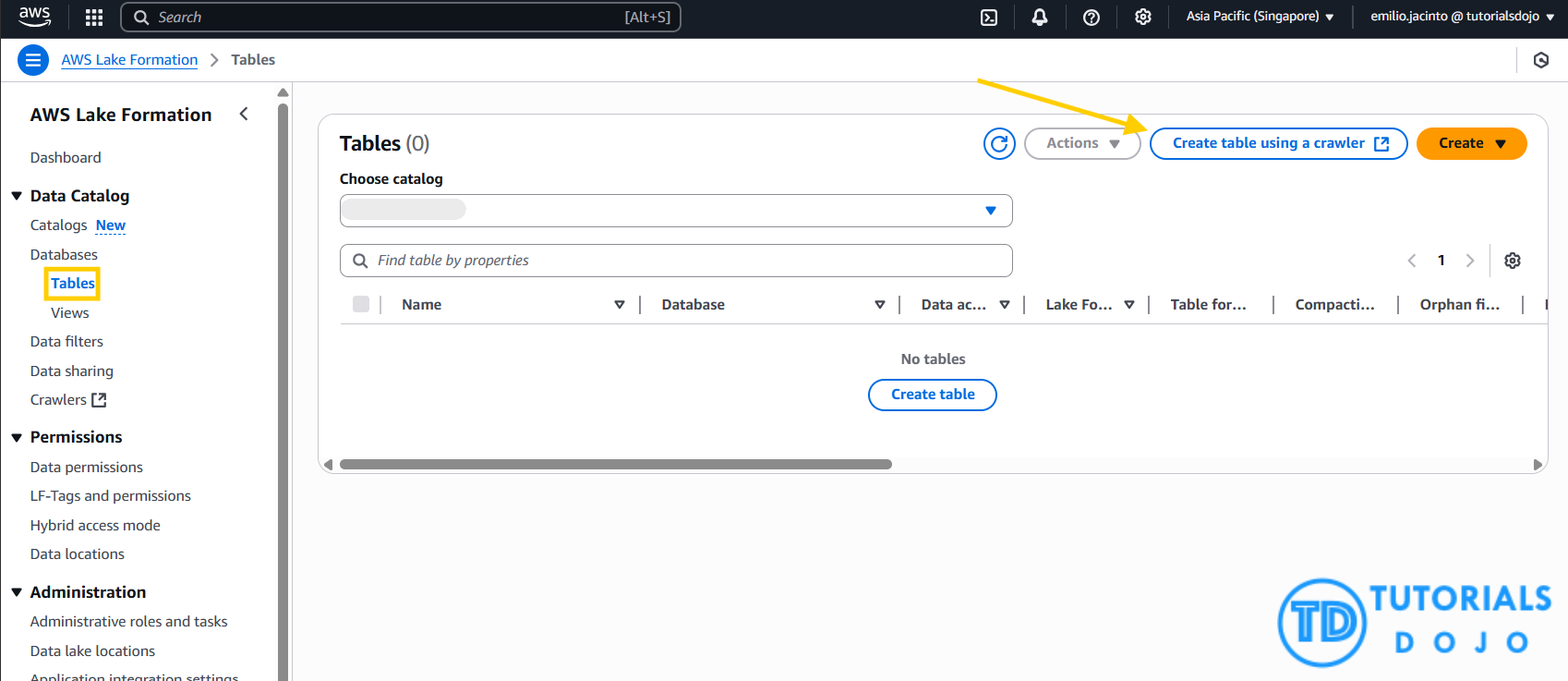
AWS Lake Formation is integrated with AWS Glue which you can use to create a data catalog that describes available datasets and their appropriate business applications. Lake Formation lets you define policies and control data access with simple “grant and revoke permissions to data” sets at granular levels. You can assign permissions to IAM users, roles, groups, and Active Directory users using federation. You specify permissions on catalog objects (like tables and columns) rather than on buckets and objects.
Thus, the correct answer is: Use AWS Lake Formation to consolidate data from multiple accounts into a single account.
The option that says: Use Amazon Data Firehose to consolidate data from multiple accounts into a single account is incorrect because setting up a Data Firehose in each and every account to move data into a single location is just costly and impractical. A better approach is to set up cross-account sharing which is free with AWS Lake Formation.
The option that says: Create a scheduled AWS Lambda function using Amazon EventBridge for transferring data from multiple accounts to the S3 buckets of the central account is incorrect. This could be done by utilizing the AWS SDK, but implementation would be difficult and quite challenging to manage. Remember that the scenario explicitly mentioned that the solution must minimize management overhead.
The option that says: Use AWS Control Tower to centrally manage each account’s S3 buckets is incorrect because the AWS Central Tower service is primarily used to manage and govern multiple AWS accounts and not just S3 buckets. Using the AWS Lake Formation service is a more suitable choice.
References:
https://docs.aws.amazon.com/lake-formation/latest/dg/how-it-works.html
Check out this AWS Lake Formation Cheat Sheet:
Question 18
Phần tiêu đề “Question 18”Type: Single answer · Câu gốc: #53
A company has a web application that uses Internet Information Services (IIS) for Windows Server. A file share is used to store the application data on the network-attached storage of the company’s on-premises data center. To achieve a highly available system, the company plans to migrate the application and file share to AWS. The team considered using Logical Volume Management (LVM) stripe on Amazon EC2, but this approach would not provide a managed, highly available SMB file service.
Which of the following can be used to fulfill this requirement?
- A. Migrate the existing file share configuration to AWS Storage Gateway.
- B. Migrate the existing file share configuration to Amazon FSx for Windows File Server.
- C. Migrate the existing file share configuration to Amazon EFS.
- D. Migrate the existing file share configuration to Amazon EBS.
Answer & explanation
Correct answer: B
Amazon FSx for Windows File Server provides fully managed Microsoft Windows file servers, backed by a fully native Windows file system. Amazon FSx for Windows File Server has the features, performance, and compatibility to easily lift and shift enterprise applications to the AWS Cloud. It is accessible from Windows, Linux, and macOS compute instances and devices. Thousands of compute instances and devices can access a file system concurrently.
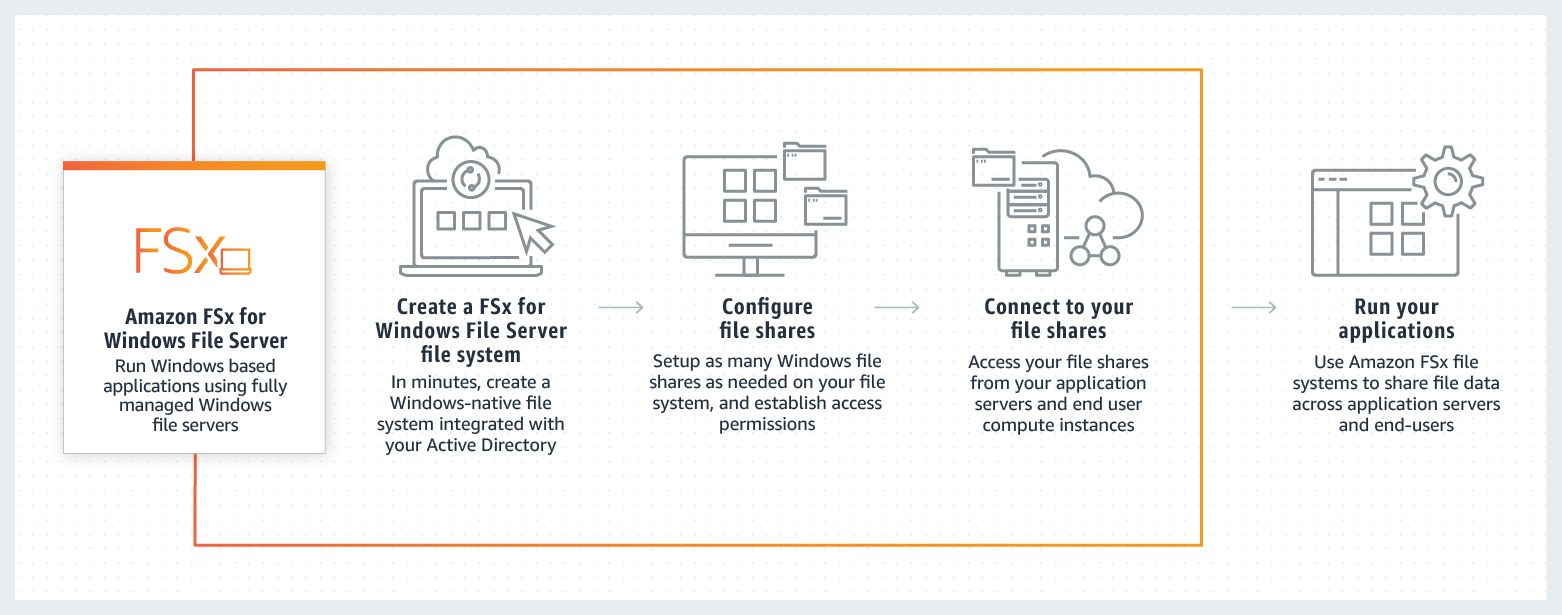
In this scenario, you need to migrate your existing file share configuration to the cloud. Among the options given, the best possible answer is Amazon FSx. A file share is a specific folder in your file system, including the folder’s subfolders, which you make accessible to your compute instances via the SMB protocol. To migrate file share configurations from your on-premises file system, you must migrate your files first to Amazon FSx before migrating your file share configuration.
Hence, the correct answer is: Migrate the existing file share configuration to Amazon FSx for Windows File Server.
The option that says: Migrate the existing file share configuration to AWS Storage Gateway is incorrect because AWS Storage Gateway is primarily used to integrate your on-premises network to AWS, but not for migrating your applications. Using a file share in Storage Gateway implies that you will still keep your on-premises systems, and not entirely migrate it.
The option that says: Migrate the existing file share configuration to Amazon EFS is incorrect because it is stated in the scenario that the company is using a file share that runs on a Windows server. Remember that Amazon EFS only supports Linux workloads.
The option that says: Migrate the existing file share configuration to Amazon EBS is incorrect because EBS is primarily used as block storage for EC2 instances and not as a shared file system. A file share is a specific folder in a file system that you can access using a server message block (SMB) protocol. Amazon EBS does not support SMB protocol.
References:
https://aws.amazon.com/fsx/windows/faqs/
https://docs.aws.amazon.com/fsx/latest/WindowsGuide/migrate-file-share-config-to-fsx.html
Check out this Amazon FSx Cheat Sheet:
Question 19
Phần tiêu đề “Question 19”Type: Single answer · Câu gốc: #56
A company collects atmospheric data such as temperature, air pressure, and humidity from different countries. Each site location is equipped with various weather instruments and a high-speed Internet connection. The average collected data in each location is around 500 GB and will be analyzed by a weather forecasting application hosted in Northern Virginia. The Solutions Architect must determine the fastest way to aggregate all the data. An AWS Direct Connect Partner would be too slow for a one-time aggregation.
Which of the following options can satisfy the given requirement?
- A. Enable Transfer Acceleration in the destination bucket and upload the collected data using Multipart Upload.
- B. Upload the data to the closest Amazon S3 bucket. Set up a cross-region replication and copy the objects to the destination bucket.
- C. Use AWS DataSync to transfer large amounts of data.
- D. Set up an AWS Site-to-Site VPN connection.
Answer & explanation
Correct answer: A
Amazon S3 is object storage built to store and retrieve any amount of data from anywhere on the Internet. It’s a simple storage service that offers industry-leading durability, availability, performance, security, and virtually unlimited scalability at very low costs. Amazon S3 is also designed to be highly flexible. Store any type and amount of data that you want; read the same piece of data a million times or only for emergency disaster recovery; build a simple FTP application or a sophisticated web application.
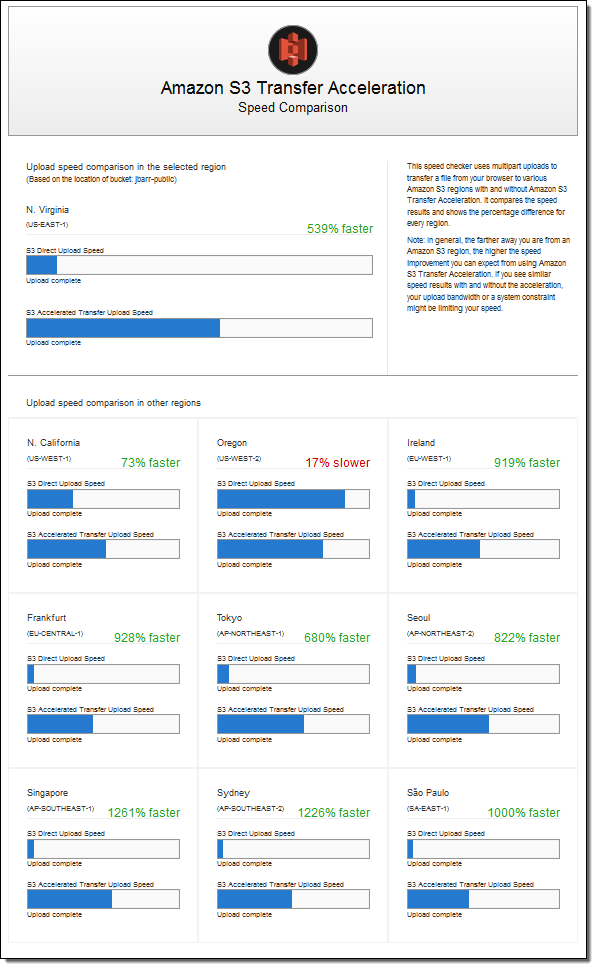
Since the weather forecasting application is located in N.Virginia, you need to transfer all the data in the same AWS Region. With Amazon S3 Transfer Acceleration, you can speed up content transfers to and from Amazon S3 by as much as 50-500% for long-distance transfer of larger objects. Multipart upload allows you to upload a single object as a set of parts. After all the parts of your object are uploaded, Amazon S3 then presents the data as a single object. This approach is the fastest way to aggregate all the data.
Hence, the correct answer is: Enable Transfer Acceleration in the destination bucket and upload the collected data using Multipart Upload.
The option that says: Upload the data to the closest Amazon S3 bucket. Set up a cross-region replication and copy the objects to the destination bucket is incorrect because replicating the objects to the destination bucket typically takes about 15 minutes. Take note that the requirement in the scenario is to aggregate the data in the fastest way.
The option that says: Use AWS DataSync to transfer large amounts of data is incorrect because DataSync requires configuring source and destination locations and, for on-premises sources, a DataSync agent. This only adds setup overhead for a one-time transfer from multiple global sites and is not the fastest direct upload method for the scenario.
The option that says: Set up an AWS Site-to-Site VPN connection is incorrect because setting up a VPN connection is not needed in this scenario. Site-to-Site VPN is just used for establishing secure connections between an on-premises network and an Amazon VPC. Also, this approach is not the fastest way to transfer your data. You must use Amazon S3 Transfer Acceleration.
References:
https://docs.aws.amazon.com/AmazonS3/latest/dev/replication.html
https://docs.aws.amazon.com/AmazonS3/latest/dev/transfer-acceleration.html
Check out this Amazon S3 Cheat Sheet:
Question 20
Phần tiêu đề “Question 20”Type: Single answer · Câu gốc: #59
A car dealership website hosted in Amazon EC2 stores car listings in an Amazon Aurora database managed by Amazon RDS. Once a vehicle has been sold, its data must be removed from the current listings and forwarded to a distributed processing system.
Which of the following options can satisfy the given requirement?
- A. Create an RDS event subscription and send the notifications to Amazon SQS. Configure the SQS queues to fan out the event notifications to multiple Amazon SNS topics. Process the data using AWS Lambda functions.
- B. Create an RDS event subscription and send the notifications to AWS Lambda. Configure the Lambda function to fan out the event notifications to multiple Amazon SQS queues to update the processing system.
- C. Create an RDS event subscription and send the notifications to Amazon SNS. Configure the SNS topic to fan out the event notifications to multiple Amazon SQS queues. Process the data using AWS Lambda functions.
- D. Use an Aurora MySQL native function to invoke an AWS Lambda function whenever a vehicle listing is deleted. Configure the Lambda function to send the data to an Amazon SQS queue for the distributed processing system to consume.
Answer & explanation
Correct answer: D
You can invoke an AWS Lambda function from an Amazon Aurora MySQL-Compatible Edition DB cluster using a native function (lambda_sync or lambda_async). This approach can be useful when you want to integrate your database running on Aurora MySQL with other AWS services. For example, you might want to capture data changes whenever a row in a table is modified in your database.
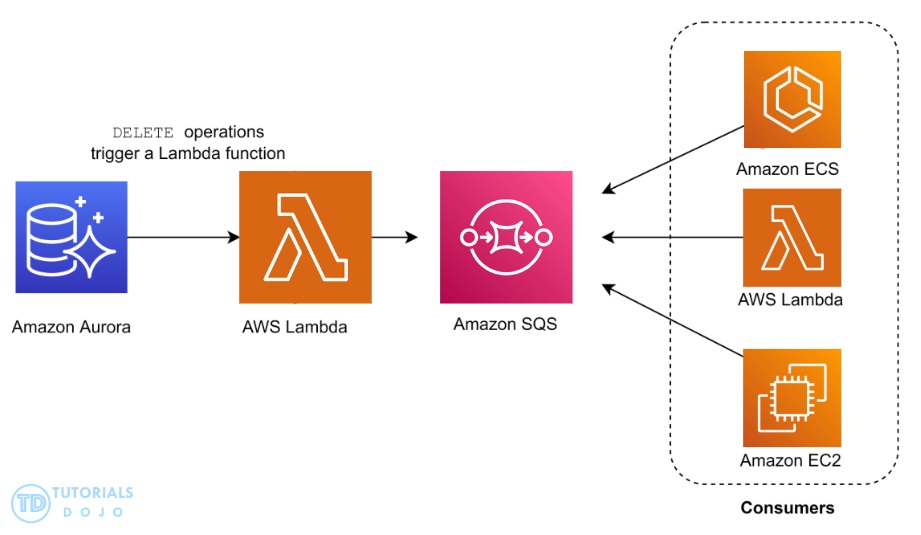
In the scenario, you can trigger a Lambda function using a native function whenever a listing is deleted from the database. You can then write the logic of the function to send the listing data to an SQS queue and have different processes consume it.
Hence, the correct answer is: Use an Aurora MySQL native function to invoke an AWS Lambda function whenever a vehicle listing is deleted. Configure the Lambda function to send the data to an Amazon SQS queue for the distributed processing system to consume.
The option that says: Create an RDS event subscription and send the notifications to Amazon SQS. Configure the SQS queues to fan out the event notifications to multiple Amazon SNS topics. Process the data using AWS Lambda functions is incorrect because RDS event subscriptions typically notify about operational changes rather than data modifications. This method does not capture database modifications like INSERT, DELETE, or UPDATE.
The option that says: Create an RDS event subscription and send the notifications to AWS Lambda. Configure the Lambda function to fan out the event notifications to multiple Amazon SQS queues to update the processing system is incorrect because RDS event subscriptions primarily focus on operational-level changes rather than capturing direct data modifications.
The option that says: Create an RDS event subscription and send the notifications to Amazon SNS. Configure the SNS topic to fan out the event notifications to multiple Amazon SQS queues. Process the data using AWS Lambda functions is incorrect because RDS event subscriptions only track infrastructure-related events and not actual database changes.
References:
https://docs.aws.amazon.com/AmazonRDS/latest/AuroraUserGuide/AuroraMySQL.Integrating.Lambda.html
https://aws.amazon.com/blogs/database/capturing-data-changes-in-amazon-aurora-using-aws-lambda/
Check out this Amazon Aurora Cheat Sheet:
Question 21
Phần tiêu đề “Question 21”Type: Multi-select · Câu gốc: #63
An online learning company hosts its Microsoft .NET e-Learning application on a Windows Server in its on-premises data center. The application uses an Oracle Database Standard Edition as its backend database.
The company wants a high-performing solution to migrate this workload to the AWS cloud to take advantage of the cloud’s high availability. The migration process should minimize development changes, and the environment should be easier to manage.
Which of the following options should be implemented to meet the company requirements? (Select TWO.)
- A. Perform a homogeneous migration by moving the Oracle database to Amazon RDS for Oracle in a Multi-AZ deployment using AWS Database Migration Service (AWS DMS).
- B. Refactor the application to .NET Core and run it as a serverless container service using Amazon Elastic Kubernetes Service (Amazon EKS) with AWS Fargate.
- C. Use AWS Transform MGN to migrate the on-premises Oracle database server to a new Amazon EC2 instance.
- D. Rehost the on-premises .NET application to an AWS Elastic Beanstalk Multi-AZ environment which runs in multiple Availability Zones.
- E. Provision and replatform the application to Amazon Elastic Container Service (Amazon ECS) with Amazon EC2 worker nodes. Use the Windows Server Amazon Machine Image (AMI) and deploy the .NET application using to the ECS cluster via the ECS Anywhere service.
Answer & explanation
Correct answer: A, D
AWS Database Migration Service (AWS DMS) is a cloud service that makes it easy to migrate relational databases, data warehouses, NoSQL databases, and other types of data stores. You can use AWS DMS to migrate your data into the AWS Cloud or between combinations of cloud and on-premises setups.
With AWS DMS, you can perform one-time migrations, and you can replicate ongoing changes to keep sources and targets in sync. If you want to migrate to a different database engine, you can use the AWS Schema Conversion Tool (AWS SCT) to translate your database schema to the new platform. You then use AWS DMS to migrate the data.
AWS Elastic Beanstalk reduces management complexity without restricting choice or control. You simply upload your application, and Elastic Beanstalk automatically handles the details of capacity provisioning, load balancing, scaling, and application health monitoring. Elastic Beanstalk supports applications developed in Go, Java, .NET, Node.js, PHP, Python, and Ruby. When you deploy your application, Elastic Beanstalk builds the selected supported platform version and provisions one or more AWS resources, such as Amazon EC2 instances, to run your application.
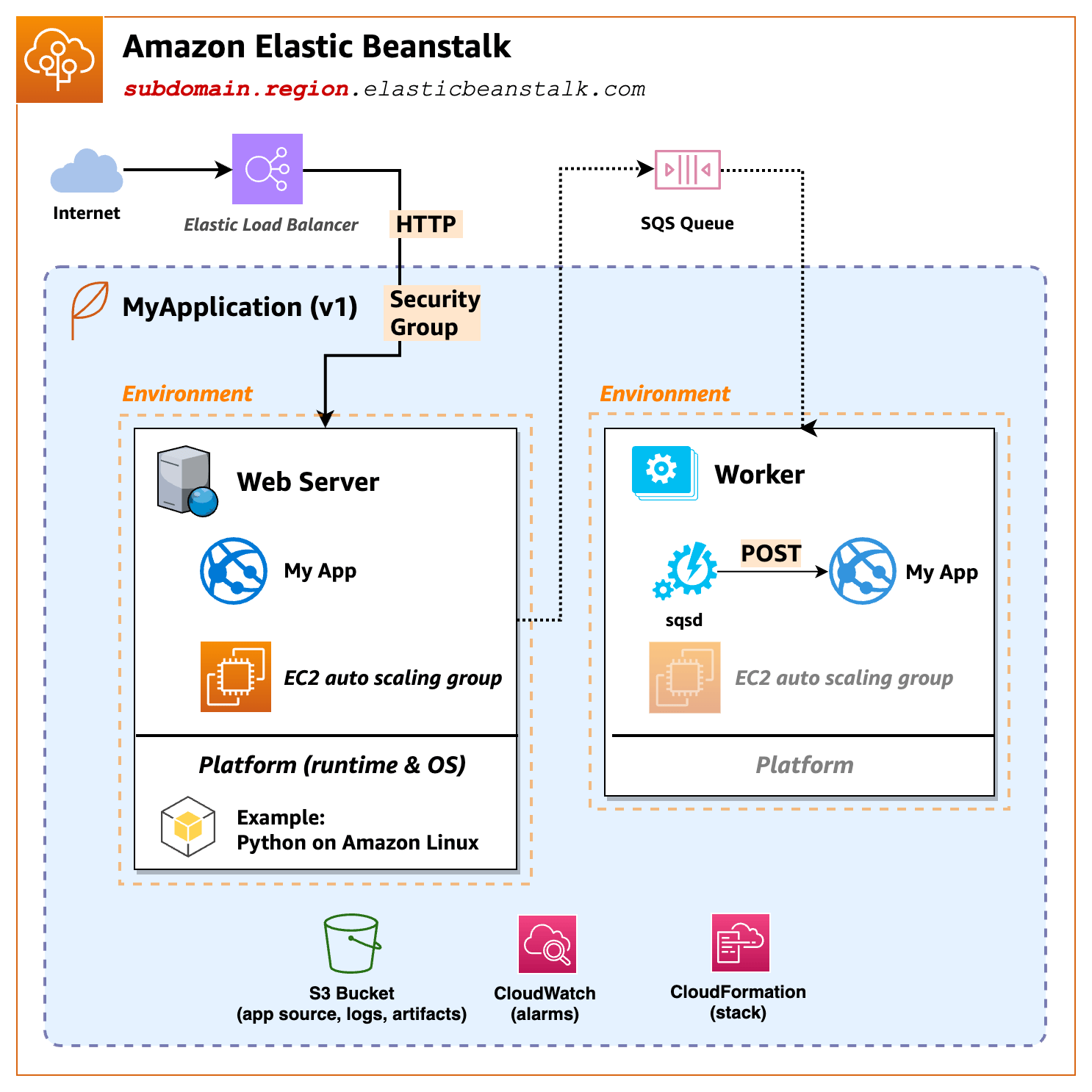
AWS Elastic Beanstalk for .NET makes it easier to deploy, manage, and scale your ASP.NET web applications that use Amazon Web Services. Elastic Beanstalk for .NET is available to anyone who is developing or hosting a web application that uses IIS.
Hence, the correct answers are:
- Perform a homogeneous migration by moving the Oracle database to Amazon RDS for Oracle in a Multi-AZ deployment using AWS Database Migration Service (AWS DMS).
- Rehost the on-premises .NET application to an AWS Elastic Beanstalk Multi-AZ environment which runs in multiple Availability Zones.
The option that says: Refactor the application to .NET Core and run it as a serverless container service using Amazon Elastic Kubernetes Service (Amazon EKS) with AWS Fargate is incorrect. This will take significant changes to the application as you will refactor, or do a code change to, the codebase in order for it to become a serverless container application. Remember that the scenario explicitly mentioned that the migration process should minimize development changes. A better solution is to simply rehost the on-premises .NET application to an AWS Elastic Beanstalk Multi-AZ environment, which doesn’t require any code changes.
The option that says: Use AWS Transform MGN to migrate the on-premises Oracle database server to a new Amazon EC2 instance is incorrect. Amazon RDS primarily supports standard Oracle databases so it would be better to use AWS DMS for the database migration, not AWS Transform MGN.
The option that says: Provision and replatform the application to Amazon Elastic Container Service (Amazon ECS) with Amazon EC2 worker nodes. Use the Windows Server Amazon Machine Image (AMI) and deploy the .NET application using to the ECS cluster via the ECS Anywhere service is incorrect. This may be possible, but it is not recommended for this scenario because you will have to manage the underlying EC2 instances of your Amazon ECS cluster that will run the application. It would be better just to use Elastic Beanstalk to take care of provisioning the resources for your .NET application. Keep in mind that doing a replatform-type migration like this one entails significant development changes, which is not suitable with the requirements given in the scenario.
References:
https://docs.aws.amazon.com/dms/latest/userguide/Welcome.html
https://docs.aws.amazon.com/elasticbeanstalk/latest/dg/create_deploy_NET.html
https://docs.aws.amazon.com/elasticbeanstalk/latest/dg/Welcome.html
Check out these AWS DMS and AWS Elastic Beanstalk Cheat Sheets: