Design Secure Architectures
Domain này chiếm 30% đề thi thật và là phần nặng ký nhất của SAA-C03. Điều đề thi thực sự kiểm tra không phải bạn có thuộc tên dịch vụ hay không, mà là bạn có chọn đúng lớp bảo mật cho đúng yêu cầu hay không: mã hóa ở đâu, ai giữ khóa, chặn ở tầng mạng hay tầng ứng dụng, và dữ liệu phải bất biến tới mức nào. Đọc kỹ các từ khóa ràng buộc trong đề — “never sent to AWS”, “root user cũng không được sửa”, “IP thay đổi liên tục”, “outbound only” — vì chúng gần như luôn là thứ loại bỏ ba phương án còn lại.
Trọng tâm của domain
Phần tiêu đề “Trọng tâm của domain”- Mã hóa và quản lý khóa: phân biệt S3 client-side encryption (client-side master key so với AWS KMS key) với server-side encryption (SSE-KMS, SSE-C), KMS key trong custom key store gắn AWS CloudHSM, và encryption helpers cho environment variables của AWS Lambda.
- Identity và federation: đọc hiểu IAM Policy dạng JSON, SAML 2.0-Based Federation qua Microsoft AD FS, AWS STS cấp temporary token, IAM Role thay cho việc tạo hàng loạt IAM user, và IAM DB Authentication cho Amazon RDS.
- Bảo vệ dữ liệu bất biến trên S3: S3 Object Lock (governance mode, compliance mode, Legal Hold, retention period), S3 Versioning kết hợp MFA Delete, và S3 Access Point để giới hạn truy cập về một Amazon VPC.
- Phòng thủ tầng ứng dụng và edge: AWS WAF với rate-based rule và managed rule chống SQL injection, AWS Shield Advanced cho DDoS, AWS Firewall Manager để dùng lại rule across accounts, CloudFront Signed URL so với Signed Cookies.
- Ranh giới mạng: Security Group inbound rule (TCP, port 22, /32), Egress-Only Internet Gateway cho IPv6, AWS Network Firewall để traffic inspection, và CORS configuration trên S3 bucket.
- Phát hiện và tuân thủ: Amazon Macie cho PII trong S3, AWS Artifact cho báo cáo compliance, cùng các lựa chọn ở tầng dữ liệu như Redis AUTH của Amazon ElastiCache, RDS Multi-AZ, và chọn Amazon DynamoDB khi đề đòi scale toàn cầu cùng schema thay đổi thường xuyên mà không được downtime.
Bẫy hay gặp
Phần tiêu đề “Bẫy hay gặp”- Thay dịch vụ đúng bằng một dịch vụ “nghe cũng bảo mật”: Amazon Kendra, Amazon Polly hay Amazon Fraud Detector đứng thế chỗ Amazon Macie; Amazon Inspector, AWS Security Hub hay IAM đứng thế chỗ AWS Artifact; Amazon GuardDuty hoặc AWS Network Firewall đứng thế chỗ AWS WAF.
- Lệch tầng mã hóa: đề đòi at-rest nhưng phương án đưa SSL/in-transit hoặc AWS CloudHSM đơn thuần; đề cấm gửi master key lên AWS nhưng phương án đưa SSE-KMS hoặc client-side encryption với AWS KMS key; phương án “Lambda đã mã hóa mặc định rồi” bỏ qua việc default KMS key vẫn để lộ giá trị cho người khác.
- Sai biến thể trong cùng một feature: governance mode thay cho compliance mode, Legal Hold thay cho retention period cố định một năm; Signed URL thay cho Signed Cookies khi không được đổi URL; RDS Read Replica (asynchronous) thay cho Multi-AZ (synchronous); regular rule của AWS WAF thay cho rate-based rule.
- Chọn sai họ database cho ràng buộc của đề: RDS Multi-AZ, Aurora kèm Read Replica hay Redshift thay cho DynamoDB khi thứ bị chấm là schema linh hoạt và scale toàn cầu, không phải tính sẵn sàng.
- Đúng hướng nhưng thiếu mắt xích: gán IAM Role cho EC2 mà quên bật IAM DB Authentication; ghép IAM với AWS STS chung chung cho RDS; tạo IAM user cho toàn bộ 1200 nhân viên thay vì federation; bật Object Lock nhưng tắt Object Versioning.
- Chọn nhầm construct mạng: NAT Gateway, Internet Gateway hay AWS PrivateLink thay cho Egress-Only Internet Gateway ở IPv6; AWS Network Firewall hoặc bucket policy thay cho S3 Access Point khi cần giới hạn theo VPC; outbound rule thay cho inbound rule, UDP thay cho TCP ở Security Group.
Thông tin bộ câu hỏi
Phần tiêu đề “Thông tin bộ câu hỏi”| Thông tin | Giá trị |
|---|---|
| Tỉ trọng trong đề thi | 30% |
| Số câu trong trang | 22 |
| Một đáp án | 19 |
| Nhiều đáp án | 3 |
Đáp án đúng và giải thích đầy đủ nằm trong khối gập lại. Làm hết trang rồi mới mở, để đo đúng năng lực ở domain này.
Question 1
Phần tiêu đề “Question 1”Type: Single answer · Câu gốc: #2
An online medical system hosted in AWS stores sensitive Personally Identifiable Information (PII) of the users in an Amazon S3 bucket. Both the master keys and the unencrypted data should never be sent to AWS to comply with the strict compliance and regulatory requirements of the company.
Which S3 encryption technique should the Architect use?
- A. Use S3 client-side encryption with an AWS KMS key.
- B. Use S3 client-side encryption with a client-side master key.
- C. Use S3 server-side encryption with an AWS KMS key.
- D. Use S3 server-side encryption with customer provided key.
Answer & explanation
Correct answer: B
Client-side encryption is the act of encrypting data before sending it to Amazon S3. To enable client-side encryption, you have the following options:
-
Use an AWS KMS key.
-
Use a client-side master key.
When using an AWS KMS key to enable client-side data encryption, you provide an AWS KMS key identifier (KeyId) to AWS. On the other hand, when you use client-side master key for client-side data encryption, your client-side master keys and your unencrypted data are never sent to AWS. It’s important that you safely manage your encryption keys because if you lose them, you can’t decrypt your data.

This is how client-side encryption using a client-side master key works:
When uploading an object - You provide a client-side master key to the Amazon S3 encryption client. The client uses the master key only to encrypt the data encryption key that it generates randomly. The process works like this:
-
The Amazon S3 encryption client generates a one-time-use symmetric key (also known as a data encryption key or data key) locally. It uses the data key to encrypt the data of a single Amazon S3 object. The client generates a separate data key for each object.
-
The client encrypts the data encryption key using the master key that you provide. The client uploads the encrypted data key and its material description as part of the object metadata. The client uses the material description to determine which client-side master key to use for decryption.
-
The client uploads the encrypted data to Amazon S3 and saves the encrypted data key as object metadata (
x-amz-meta-x-amz-key) in Amazon S3.
When downloading an object - The client downloads the encrypted object from Amazon S3. Using the material description from the object’s metadata, the client determines which master key to use to decrypt the data key. The client uses that master key to decrypt the data key and then uses the data key to decrypt the object.
Hence, the correct answer is: Use S3 client-side encryption with a client-side master key.
The option that says: Use S3 client-side encryption with an AWS KMS key is incorrect because, in client-side encryption with a KMS key, you provide an AWS KMS key identifier (KeyId) to AWS. The scenario clearly indicates that both the master keys and the unencrypted data should never be sent to AWS.
The option that says: Use S3 server-side encryption with an AWS KMS key is incorrect because the scenario mentioned that the unencrypted data should never be sent to AWS, which means that you have to use client-side encryption in order to encrypt the data first before sending to AWS. In this way, you can only ensure that there is no unencrypted data being uploaded to AWS. In addition, the master key used by Server-Side Encryption with AWS KMS Key (SSE-KMS) is uploaded and managed by AWS, which directly violates the requirement of not uploading the master key.
The option that says: Use S3 server-side encryption with customer provided key is incorrect because, just as mentioned above, you have to use client-side encryption in this scenario instead of server-side encryption. For the S3 server-side encryption with a customer-provided key (SSE-C), you actually provide the encryption key as part of your request to upload the object to S3. Using this key, Amazon S3 manages both the encryption (as it writes to disks) and decryption (when you access your objects).
References:
https://docs.aws.amazon.com/AmazonS3/latest/dev/UsingEncryption.html
https://docs.aws.amazon.com/AmazonS3/latest/dev/UsingClientSideEncryption.html
Check out this Amazon S3 Cheat Sheet:
Question 2
Phần tiêu đề “Question 2”Type: Single answer · Câu gốc: #3
A Solutions Architect is hosting a website in an Amazon S3 bucket named tutorialsdojo. The users load the website using the following URL: http://tutorialsdojo.s3-website-us-east-1.amazonaws.com. A new requirement has been introduced to add JavaScript on the webpages to make authenticated HTTP GET requests against the same bucket using the S3 API endpoint (tutorialsdojo.s3.amazonaws.com). However, upon testing, the web browser blocks JavaScript from allowing those requests.
Which of the following options is the MOST suitable solution to implement for this scenario?
- A. Enable cross-account access.
- B. Enable Cross-Zone Load Balancing.
- C. Enable Cross-origin resource sharing (CORS) configuration in the bucket.
- D. Enable Cross-Region Replication (CRR).
Answer & explanation
Correct answer: C
Cross-origin resource sharing (CORS) defines a way for client web applications that are loaded in one domain to interact with resources in a different domain. With CORS support, you can build rich client-side web applications with Amazon S3 and selectively allow cross-origin access to your Amazon S3 resources.
 Suppose that you are hosting a website in an Amazon S3 bucket named
 your-website and your users load the website endpoint http://your-website.s3-website-us-east-1.amazonaws.com. Now you want to use JavaScript on the webpages that are stored in this bucket to be able to make authenticated GET and PUT requests against the same bucket by using the Amazon S3 API endpoint for the bucket, your-website.s3.amazonaws.com. A browser would normally block JavaScript from allowing those requests, but with CORS you can configure your bucket to explicitly enable cross-origin requests from your-website.s3-website-us-east-1.amazonaws.com.
Hence, the correct answer is: Enable Cross-origin resource sharing (CORS) configuration in the bucket.
The option that says: Enable cross-account access is incorrect because cross-account access is just a feature in IAM and not in Amazon S3.
The option that says: Enable Cross-Zone Load Balancing is incorrect because Cross-Zone Load Balancing is only used in ELB and not in S3.
The option that says: Enable Cross-Region Replication (CRR) is incorrect because CRR is a bucket-level configuration that enables automatic, asynchronous copying of objects across buckets in different AWS Regions.
References:
http://docs.aws.amazon.com/AmazonS3/latest/dev/cors.html
https://docs.aws.amazon.com/AmazonS3/latest/dev/ManageCorsUsing.html
Check out this Amazon S3 Cheat Sheet:
Question 3
Phần tiêu đề “Question 3”Type: Single answer · Câu gốc: #4
A company is in the process of migrating their applications to AWS. One of their systems requires a database that can scale globally and handle frequent schema changes. The application should not have any downtime or performance issues whenever there is a schema change in the database. It should also provide a low latency response to high-traffic queries.
Which is the most suitable database solution to use to achieve this requirement?
- A. An Amazon RDS instance in Multi-AZ Deployments configuration
- B. Amazon DynamoDB
- C. An Amazon Aurora database with Read Replicas
- D. Redshift
Answer & explanation
Correct answer: B
Before we proceed in answering this question, we must first be clear with the actual definition of a “schema”. Basically, the english definition of a schema is: a representation of a plan or theory in the form of an outline or model.
Just think of a schema as the “structure” or a “model” of your data in your database. Since the scenario requires that the schema, or the structure of your data, changes frequently, then you have to pick a database which provides a non-rigid and flexible way of adding or removing new types of data. This is a classic example of choosing between a relational database and non-relational (NoSQL) database.
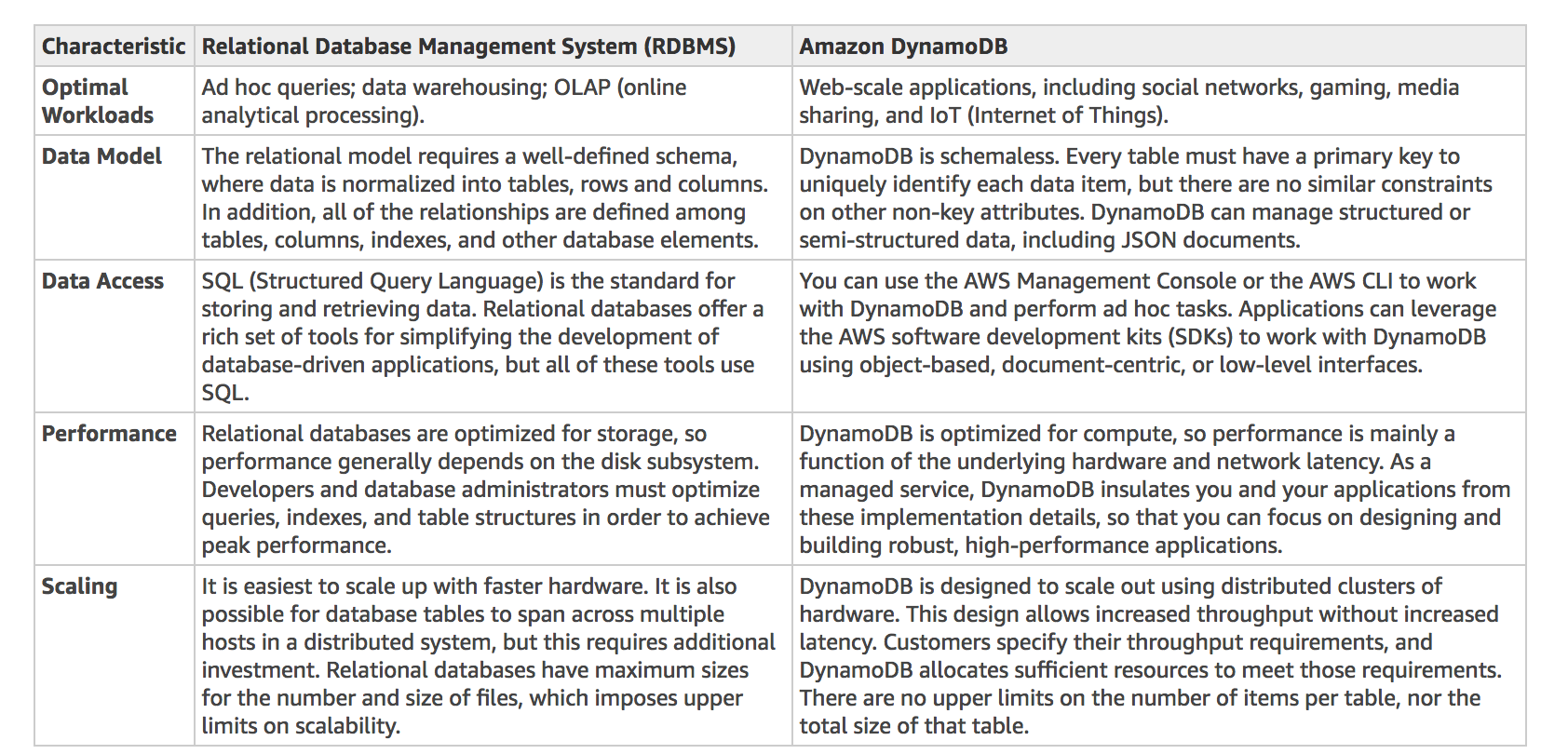
A relational database is known for having a rigid schema, with a lot of constraints and limits as to which (and what type of ) data can be inserted or not. It is primarily used for scenarios where you have to support complex queries which fetch data across a number of tables. It is best for scenarios where you have complex table relationships but for use cases where you need to have a flexible schema, this is not a suitable database to use.
For NoSQL, it is not as rigid as a relational database because you can easily add or remove rows or elements in your table/collection entry. It also has a more flexible schema because it can store complex hierarchical data within a single item which, unlike a relational database, does not entail changing multiple related tables. Hence, the best answer to be used here is a NoSQL database, like DynamoDB. When your business requires a low-latency response to high-traffic queries, taking advantage of a NoSQL system generally makes technical and economic sense.
Amazon DynamoDB helps solve the problems that limit the relational system scalability by avoiding them. In DynamoDB, you design your schema specifically to make the most common and important queries as fast and as inexpensive as possible. Your data structures are tailored to the specific requirements of your business use cases.
Remember that a relational database system does not scale well for the following reasons:
-
It normalizes data and stores it on multiple tables that require multiple queries to write to disk.
-
It generally incurs the performance costs of an ACID-compliant transaction system.
-
It uses expensive joins to reassemble required views of query results.
For DynamoDB, it scales well due to these reasons:
-
Its schema flexibility lets DynamoDB store complex hierarchical data within a single item. DynamoDB is not a totally schemaless database since the very definition of a schema is just the model or structure of your data.
-
Composite key design lets it store related items close together on the same table.
An Amazon RDS instance in Multi-AZ Deployments configuration and an Amazon Aurora database with Read Replicas are incorrect because both of them are a type of relational database.
Redshift is incorrect because it is primarily used for OLAP systems.
References:
https://docs.aws.amazon.com/amazondynamodb/latest/developerguide/bp-general-nosql-design.html
https://docs.aws.amazon.com/amazondynamodb/latest/developerguide/bp-relational-modeling.html
https://docs.aws.amazon.com/amazondynamodb/latest/developerguide/SQLtoNoSQL.html
Also check the AWS Certified Solutions Architect Official Study Guide: Associate Exam 1st Edition and turn to page 161 which talks about NoSQL Databases.
Check out this Amazon DynamoDB Cheat Sheet:
https://tutorialsdojo.com/amazon-dynamodb
Tutorials Dojo’s AWS Certified Solutions Architect Associate Exam Study Guide:
https://tutorialsdojo.com/aws-certified-solutions-architect-associate/
Question 4
Phần tiêu đề “Question 4”Type: Single answer · Câu gốc: #5
A government entity is conducting a population and housing census in the city. Each household’s information uploaded to its online portal is stored in encrypted files in Amazon S3. The government assigned its Solutions Architect to set compliance policies that verify data containing personally identifiable information (PII) in a manner that meets its compliance standards. It should also be alerted if there are potential policy violations with the privacy of its S3 buckets, beyond the object listing that S3 Inventory provides.
Which of the following should the Architect implement to satisfy this requirement?
- A. Set up and configure Amazon Macie to monitor their S3 data.
- B. Set up and configure Amazon Kendra to monitor malicious activity on their S3 data
- C. Set up and configure Amazon Polly to scan for usage patterns on S3 data
- D. Set up and configure Amazon Fraud Detector to send out alert notifications whenever a security violation is detected on their S3 data.
Answer & explanation
Correct answer: A
Amazon Macie is an ML-powered security service that helps you prevent data loss by automatically discovering, classifying, and protecting sensitive data stored in Amazon S3. Amazon Macie uses machine learning to recognize sensitive data such as personally identifiable information (PII) or intellectual property, assigns a business value, and provides visibility into where this data is stored and how it is being used in your organization.
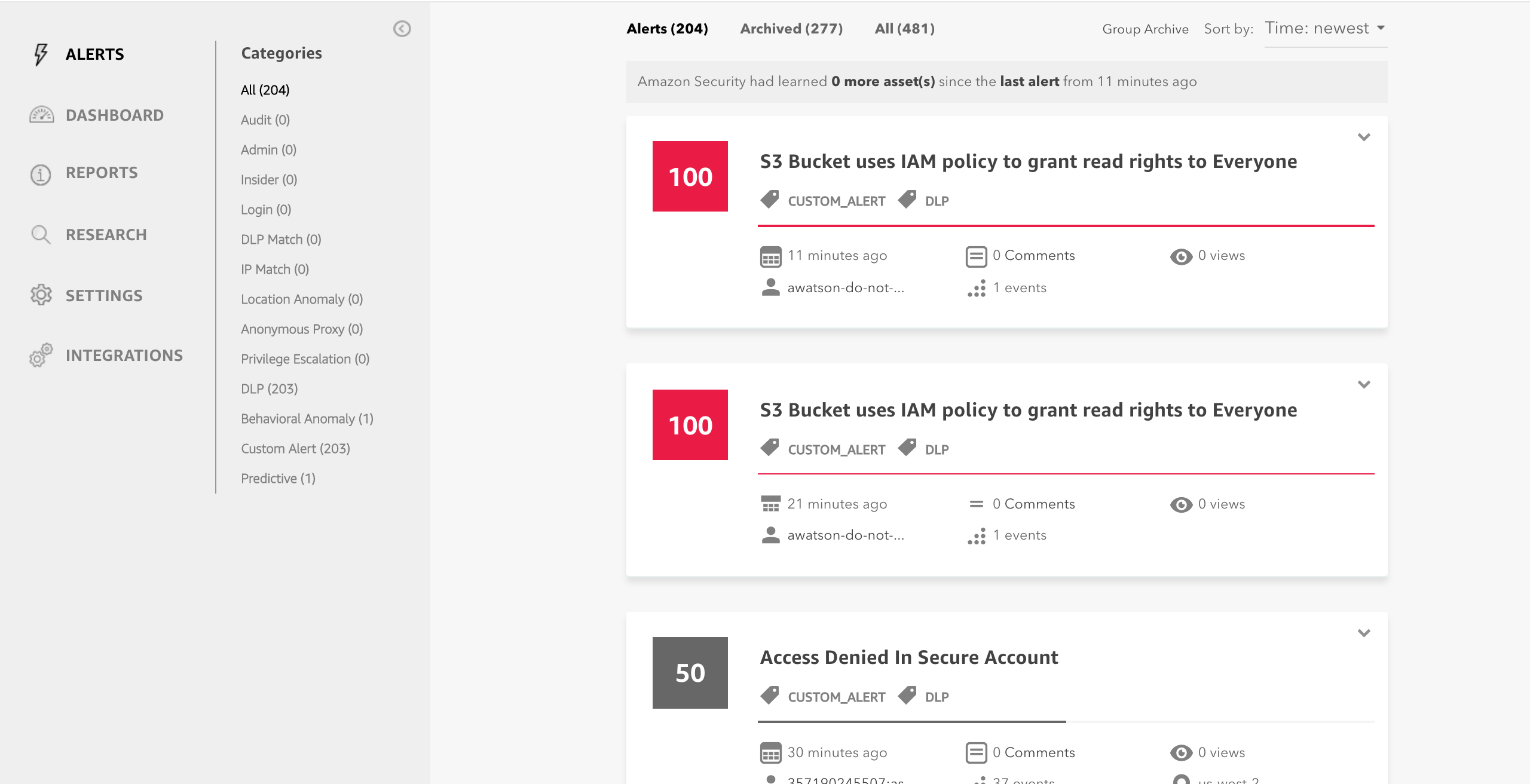
Amazon Macie generates two categories of findings: policy findings and sensitive data findings. A policy finding is a detailed report of a potential policy violation or issue with the security or privacy of an Amazon S3 bucket. Macie generates these findings as part of its ongoing monitoring activities for your Amazon S3 data. A sensitive data finding is a detailed report of sensitive data in an S3 object. Macie generates these findings when it discovers sensitive data in S3 objects that you configure a sensitive data discovery job to analyze.
Hence, the correct answer is:* *Set up and configure Amazon Macie to monitor their S3 data.
The option that says: Set up and configure Amazon Polly to scan for usage patterns on S3 data is incorrect because Amazon Polly is simply a service that turns text into lifelike speech, allowing you to create applications that talk, and build entirely new categories of speech-enabled products. Polly can’t be used to scan usage patterns on your S3 data.
The option that says: Set up and configure Amazon Kendra to monitor malicious activity on their S3 data is incorrect. Amazon Kendra is just an enterprise search service that allows developers to add search capabilities to their applications. This enables their end users to discover information stored within the vast amount of content spread across their company, but not monitor malicious activity on their S3 buckets.
The option that says: Set up and configure Amazon Fraud Detector to send out alert notifications whenever a security violation is detected on their S3 data* *is incorrect because the Amazon Fraud Detector is only a fully managed service for identifying potentially fraudulent activities and catching more online fraud faster. It does not check any S3 data containing personally identifiable information (PII), unlike Amazon Macie.
References:
https://docs.aws.amazon.com/macie/latest/userguide/what-is-macie.html
https://aws.amazon.com/macie/faq/
https://docs.aws.amazon.com/macie/index.html
Check out this Amazon Macie Cheat Sheet:
Question 5
Phần tiêu đề “Question 5”Type: Single answer · Câu gốc: #8
A financial application consists of an Auto Scaling group of Amazon EC2 instances, an Application Load Balancer, and a MySQL RDS instance set up in a Multi-AZ Deployment configuration. To protect customers’ confidential data, it must be ensured that the Amazon RDS database is only accessible using an authentication token specific to the profile credentials of EC2 instances.
Which of the following actions should be taken to meet this requirement?
- A. Enable the IAM DB Authentication.
- B. Configure SSL in your application to encrypt the database connection to RDS.
- C. Create an IAM Role and assign it to your EC2 instances which will grant exclusive access to your RDS instance.
- D. Use a combination of IAM and STS to enforce restricted access to your RDS instance using a temporary authentication token.
Answer & explanation
Correct answer: A
You can authenticate to your DB instance using AWS Identity and Access Management (IAM) database authentication. IAM database authentication works with MySQL and PostgreSQL. With this authentication method, you don’t need to use a password when you connect to a DB instance. Instead, you use an authentication token.
An authentication token is a unique string of characters that Amazon RDS generates on request. Authentication tokens are generated using AWS Signature Version 4. Each token has a lifetime of 15 minutes. You don’t need to store user credentials in the database, because authentication is managed externally using IAM. You can also still use standard database authentication.

IAM database authentication provides the following benefits:
- Network traffic to and from the database is encrypted using Secure Sockets Layer (SSL).
- You can use IAM to centrally manage access to your database resources, instead of managing access individually on each DB instance.
- For applications running on Amazon EC2, you can use profile credentials specific to your EC2 instance to access your database instead of a password, for greater security
Hence, the correct answer is: Enable the IAM DB Authentication.
The option that says: Configuring SSL in your application to encrypt the database connection to RDS is incorrect because an SSL connection is not just using an authentication token from IAM. Although configuring SSL to your application can improve the security of your data in flight, it is still not a suitable option to use in this scenario.
The option that says: Creating an IAM Role and assigning it to your EC2 instances which will grant exclusive access to your RDS instance is incorrect because although you can create and assign an IAM Role to your EC2 instances, you still need to configure your RDS to use IAM DB Authentication.
The option that says: Use a combination of IAM and STS to enforce restricted access to your RDS instance using a temporary authentication token is incorrect because you have to use IAM DB Authentication for this scenario, and not simply a combination of an IAM and STS. Although STS is used to send temporary tokens for authentication, this is not a compatible use case for RDS.
References:
https://docs.aws.amazon.com/AmazonRDS/latest/UserGuide/UsingWithRDS.IAMDBAuth.html
Check out this Amazon RDS cheat sheet:
https://tutorialsdojo.com/amazon-relational-database-service-amazon-rds/
Question 6
Phần tiêu đề “Question 6”Type: Single answer · Câu gốc: #10
A software development company is using serverless computing with AWS Lambda to build and run applications without having to set up or manage servers. The company has a Lambda function that connects to a MongoDB Atlas, which is a popular Database as a Service (DBaaS) platform, and also uses a third-party API to fetch certain data for its application. One of the developers was instructed to create the environment variables for the MongoDB database hostname, username, and password, as well as the API credentials that will be used by the Lambda function for DEV, SIT, UAT, and PROD environments.
Considering that the Lambda function is storing sensitive database and API credentials, how can this information be secured to prevent other developers on the team, or anyone, from seeing these credentials in plain text? Select the best option that provides maximum security.
- A. There is no need to do anything because, by default, Lambda already encrypts the environment variables using the AWS Key Management Service.
- B. Enable SSL encryption that leverages on AWS CloudHSM to store and encrypt the sensitive information.
- C. Lambda does not provide encryption for the environment variables. Deploy your code to an Amazon EC2 instance instead.
- D. Create a new AWS KMS key and use it to enable encryption helpers that leverage on AWS Key Management Service to store and encrypt the sensitive information.
Answer & explanation
Correct answer: D
When you create or update Lambda functions that use environment variables, AWS Lambda encrypts them using the AWS Key Management Service. When your Lambda function is invoked, those values are decrypted and made available to the Lambda code.
The first time you create or update Lambda functions that use environment variables in a region, a default service key is created for you automatically within AWS KMS. This key is used to encrypt environment variables. However, if you wish to use encryption helpers and use KMS to encrypt environment variables after your Lambda function is created, you must create your own AWS KMS key and choose it instead of the default key. The default key will give errors when chosen. Creating your own key gives you more flexibility, including the ability to create, rotate, disable, and define access controls, and to audit the encryption keys used to protect your data.

Hence, the correct answer is: Create a new AWS KMS key and use it to enable encryption helpers that leverage on AWS Key Management Service to store and encrypt the sensitive information.
The option that says: There is no need to do anything because, by default, Lambda already encrypts the environment variables using the AWS Key Management Service is incorrect. Although Lambda encrypts the environment variables in your function by default, the sensitive information would still be visible to other users who have access to the Lambda console. This is because Lambda uses a default KMS key to encrypt the variables, which is usually accessible by other users. The best option in this scenario is to use encryption helpers to secure your environment variables.
The option that says: Enable SSL encryption that leverages on AWS CloudHSM to store and encrypt the sensitive information is also incorrect since enabling SSL would encrypt data only when in-transit. Your other teams would still be able to view the plaintext at-rest. Typically, AWS KMS is the recommended choice for encrypting sensitive data at rest.
The option that says: Lambda does not provide encryption for the environment variables. Deploy your code to an Amazon EC2 instance instead is incorrect since, as mentioned, Lambda does provide encryption functionality of environment variables.
References:
https://docs.aws.amazon.com/lambda/latest/dg/env_variables.html#env_encrypt
https://docs.aws.amazon.com/lambda/latest/dg/tutorial-env_console.html
Check out this AWS Lambda Cheat Sheet:
Question 7
Phần tiêu đề “Question 7”Type: Multi-select · Câu gốc: #14
A government agency plans to store confidential tax documents on AWS. Due to the sensitive information in the files, the Solutions Architect must restrict the data access requests made to the storage solution to a specific Amazon VPC only. The solution should also prevent the files from being deleted or overwritten to meet the regulatory requirement of having a write-once-read-many (WORM) storage model.
Which combination of the following options should the Architect implement? (Select TWO.)
- A. Set up a new Amazon S3 bucket to store the tax documents and integrate it with AWS Network Firewall. Configure the Network Firewall to only accept data access requests from a specific VPC.
- B. Configure an Amazon S3 Access Point for the S3 bucket to restrict data access to a particular VPC only.
- C. Create a new Amazon S3 bucket with the S3 Object Lock feature enabled. Store the documents in the bucket and set the Legal Hold option for object retention.
- D. Store the tax documents in the Amazon S3 Glacier Instant Retrieval storage class. Use the
PutBucketPolicyAPI to apply a bucket policy that restricts access requests to a specific VPC. - E. Enable Object Lock but disable Object Versioning on the new Amazon S3 bucket to comply with the write-once-read-many (WORM) storage model requirement.
Answer & explanation
Correct answer: B, C
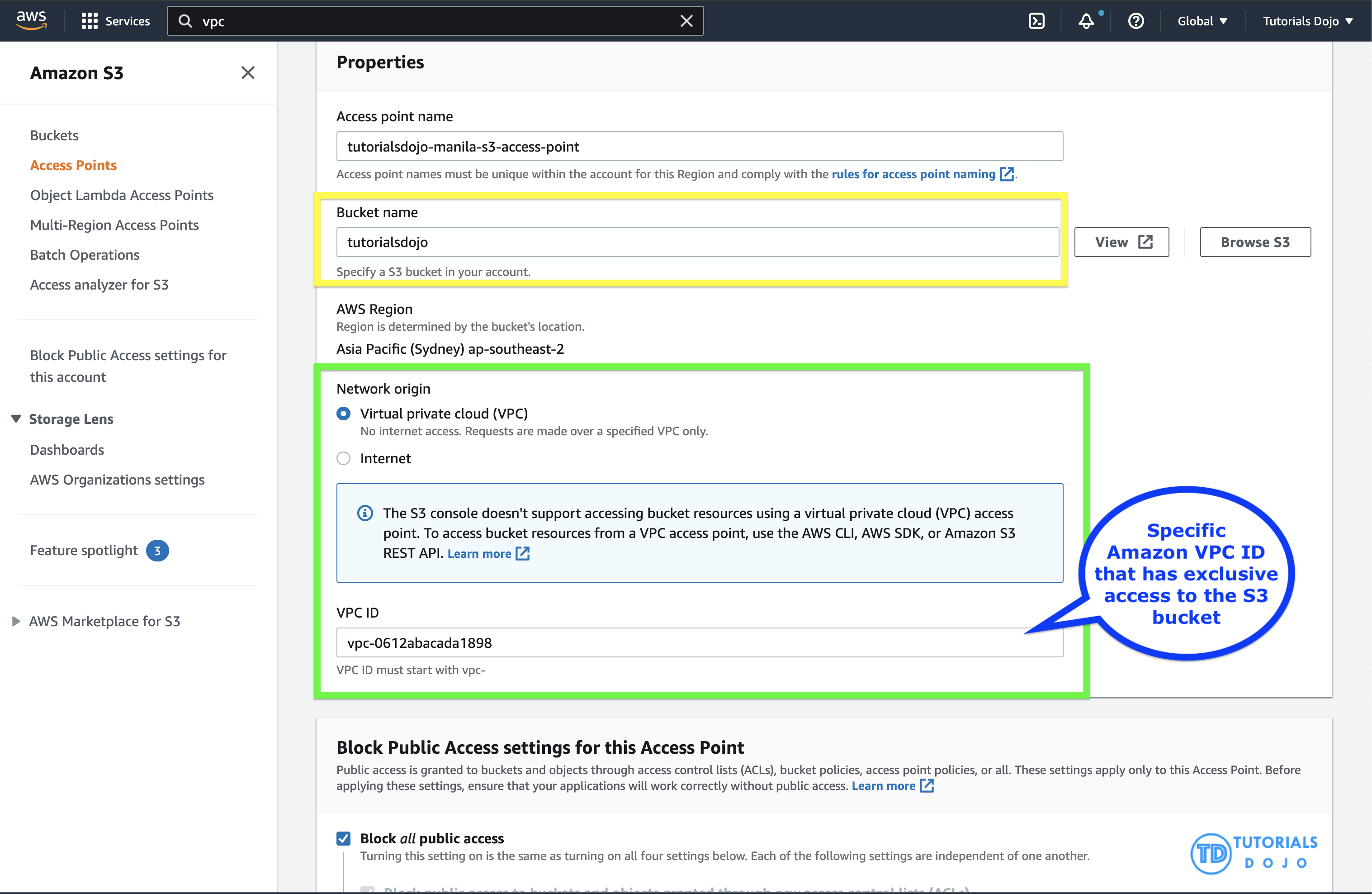
Amazon S3 access points simplify data access for any AWS service or customer application that stores data in S3. Access points are named network endpoints that are attached to buckets that you can use to perform S3 object operations, such as GetObject and PutObject.
Each access point has distinct permissions and network controls that S3 applies for any request that is made through that access point. Each access point enforces a customized access point policy that works in conjunction with the bucket policy that is attached to the underlying bucket. You can configure any access point to accept requests only from a virtual private cloud (VPC) to restrict Amazon S3 data access to a private network. You can also configure custom block public access settings for each access point.
You can also use Amazon S3 Multi-Region Access Points to provide a global endpoint that applications can use to fulfill requests from S3 buckets located in multiple AWS Regions. You can use Multi-Region Access Points to build multi-Region applications with the same simple architecture used in a single Region, and then run those applications anywhere in the world. Instead of sending requests over the congested public internet, Multi-Region Access Points provide built-in network resilience with acceleration of internet-based requests to Amazon S3. Application requests made to a Multi-Region Access Point global endpoint use AWS Global Accelerator to automatically route over the AWS global network to the S3 bucket with the lowest network latency.
With S3 Object Lock, you can store objects using a write-once-read-many (WORM) model. Object Lock can help prevent objects from being deleted or overwritten for a fixed amount of time or indefinitely. You can use Object Lock to help meet regulatory requirements that require WORM storage, or to simply add another layer of protection against object changes and deletion.
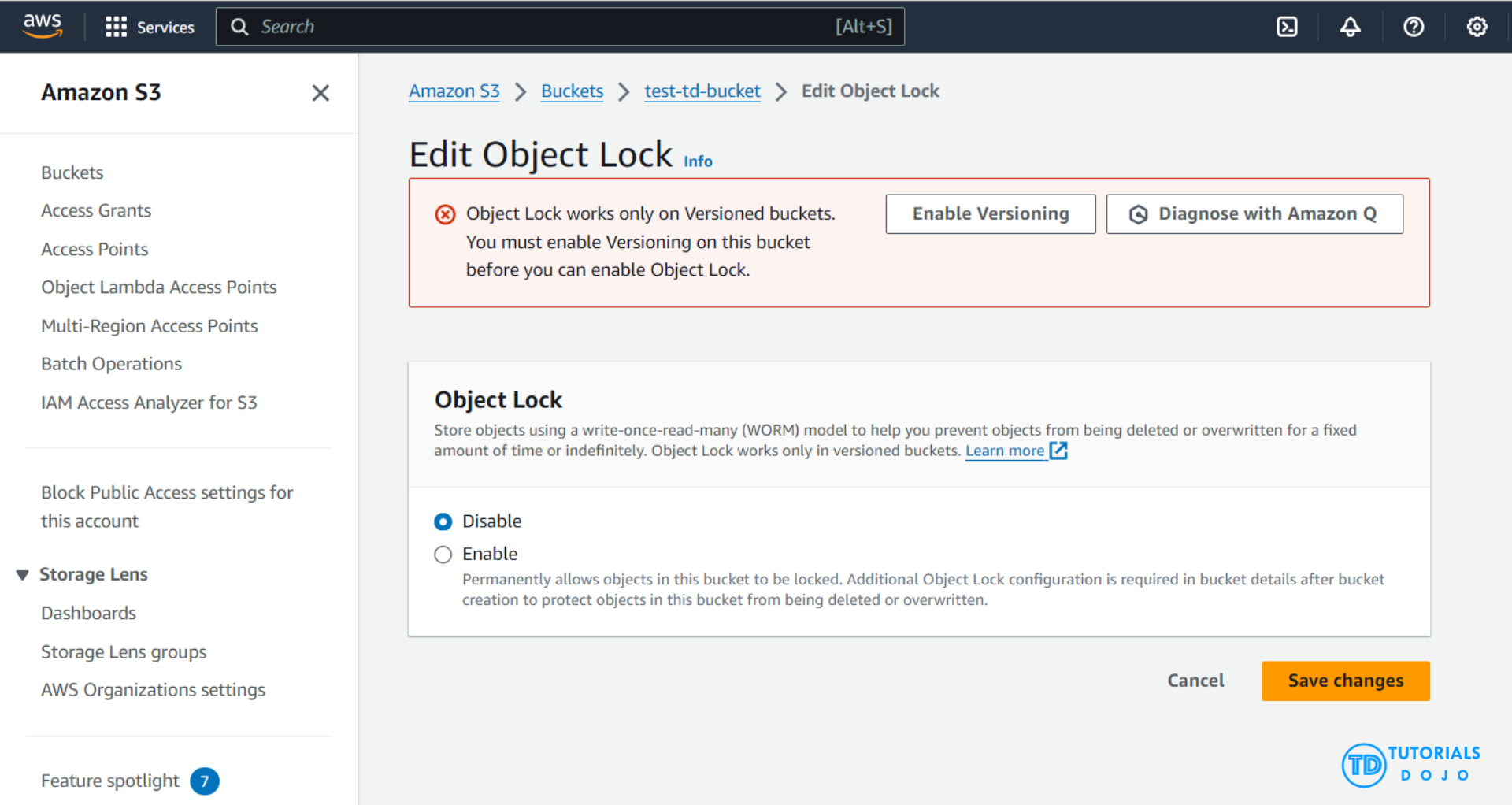
Before locking any objects, it is essential to enable S3 Object Lock on a bucket. Previously, Object Lock could only be enabled at the time of bucket creation, but now, Amazon S3 allows you to enable S3 Object Lock for existing buckets with just a few clicks. Once S3 Object Lock is enabled on a bucket, it allows you to lock objects within that bucket to prevent them from being deleted or overwritten for a fixed amount of time or indefinitely. While Object Lock can now be enabled on existing buckets, it is important to note that once enabled, Object Lock itself cannot be disabled. However, you can still manage and configure object lock settings, including retention periods and legal holds, but the core feature of Object Lock remains active and irreversible. Also, versioning, which is required for Object Lock, cannot be suspended or disabled once Object Lock is enabled on the bucket.
Hence, the correct answers are:
- Configure an Amazon S3 Access Point for the S3 bucket to restrict data access to a particular VPC only.
- Create a new Amazon S3 bucket with the S3 Object Lock feature enabled. Store the documents in the bucket and set the Legal Hold option for object retention.
The option that says: Set up a new Amazon S3 bucket to store the tax documents and integrate it with AWS Network Firewall. Configure the Network Firewall to only accept data access requests from a specific VPC is incorrect because you cannot directly use an AWS Network Firewall to restrict S3 bucket data access requests to a specific Amazon VPC only. You have to use an Amazon S3 Access Point instead for this particular use case. An AWS Network Firewall is commonly integrated to your Amazon VPC and not to an S3 bucket.
The option that says: Store the tax documents in the Amazon S3 Glacier Instant Retrieval storage class. Use the PutBucketPolicy API to apply a bucket policy that restricts access requests to a specific VPC is incorrect because Amazon S3 Glacier Instant Retrieval is just an archive storage class that delivers the lowest-cost storage for long-lived data that is rarely accessed and requires retrieval in milliseconds. Additionally, using a bucket policy to restrict access from a VPC is less efficient compared to using an S3 Access Point.
The option that says: Enable Object Lock but disable Object Versioning on the new Amazon S3 bucket to comply with the write-once-read-many (WORM) storage model requirement is incorrect. Although the Object Lock feature does provide write-once-read-many (WORM) storage, the Object Versioning feature must also be enabled in order for this to work. In fact, you cannot manually disable the Object Versioning feature if you have already selected the Object Lock option.
References:
https://docs.aws.amazon.com/AmazonS3/latest/userguide/access-points.html
https://docs.aws.amazon.com/AmazonS3/latest/userguide/object-lock.html
Check out this Amazon S3 Cheat Sheet:
Question 8
Phần tiêu đề “Question 8”Type: Single answer · Câu gốc: #15
A pharmaceutical company has resources hosted on both its on-premises network and in the AWS cloud. The company requires all Software Architects to access resources in both environments using on-premises credentials, which are stored in Active Directory, rather than through an Amazon Cognito identity pool.
In this scenario, which of the following can be used to fulfill this requirement?
- A. Set up SAML 2.0-Based Federation by using a Web Identity Federation.
- B. Set up SAML 2.0-Based Federation by using a Microsoft Active Directory Federation Service.
- C. Use IAM users
- D. Use Amazon VPC
Answer & explanation
Correct answer: B
Since the company is using Microsoft Active Directory, which implements Security Assertion Markup Language (SAML), you can set up a SAML-Based Federation for API Access to your AWS cloud. In this way, you can easily connect to AWS using the login credentials of your on-premises network.
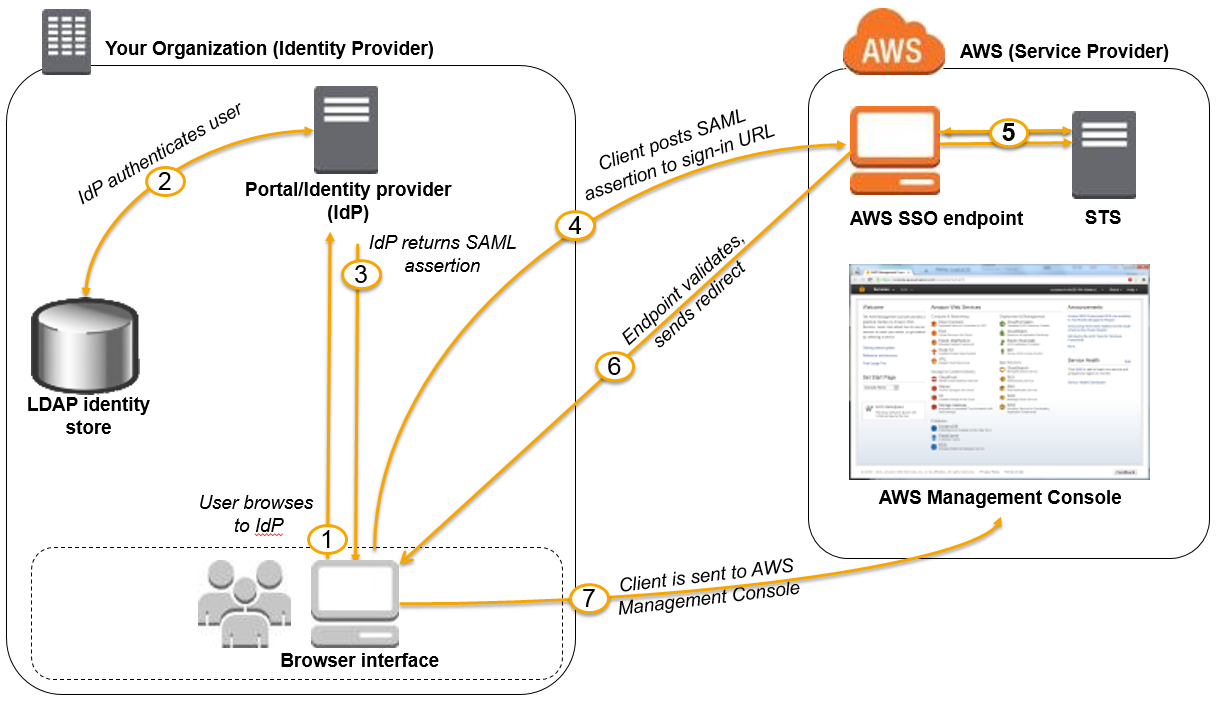
AWS supports identity federation with SAML 2.0, an open standard that many identity providers (IdPs) use. This feature enables federated single sign-on (SSO), so users can log into the AWS Management Console or call the AWS APIs without you having to create an IAM user for everyone in your organization. By using SAML, you can simplify the process of configuring federation with AWS, because you can use the IdP’s service instead of writing custom identity proxy code.
Before you can use SAML 2.0-based federation as described in the preceding scenario and diagram, you must configure your organization’s IdP and your AWS account to trust each other. The general process for configuring this trust is described in the following steps. Inside your organization, you must have an IdP that supports SAML 2.0, like Microsoft Active Directory Federation Service (AD FS, part of Windows Server), Shibboleth, or another compatible SAML 2.0 provider.
Hence, the correct answer is: Set up SAML 2.0-Based Federation by using a Microsoft Active Directory Federation Service.
The option that says: Setting up SAML 2.0-Based Federation by using a Web Identity Federation is incorrect because this is primarily used to let users sign in via a well-known external identity provider (IdP), such as Login with Amazon, Facebook, or Google. It does not utilize Active Directory.
The option that says: Using IAM users is incorrect because the situation requires you to use the existing credentials stored in their Active Directory, and not user accounts that will be generated by IAM.
The option that says: Using Amazon VPC is incorrect because this only lets you provision a logically isolated section of the AWS Cloud where you can launch AWS resources in a virtual network that you define. This has nothing to do with user authentication or Active Directory.
References:
http://docs.aws.amazon.com/IAM/latest/UserGuide/id_roles_providers_saml.html
https://docs.aws.amazon.com/IAM/latest/UserGuide/id_roles_providers.html
Check out this AWS IAM Cheat Sheet:
https://tutorialsdojo.com/aws-identity-and-access-management-iam/
Question 9
Phần tiêu đề “Question 9”Type: Single answer · Câu gốc: #17
An application that records weather data every minute is deployed in a fleet of Amazon EC2 Spot instances and uses a MySQL RDS database instance. Currently, there is only one Amazon RDS instance running in one Availability Zone. The database needs to be improved to ensure high availability by enabling synchronous data replication to another RDS instance.
Which of the following performs synchronous data replication in RDS?
- A. RDS DB instance running as a Multi-AZ deployment
- B. RDS Read Replica
- C. Amazon DynamoDB Read Replica
- D. Amazon CloudFront running as a Multi-AZ deployment
Answer & explanation
Correct answer: A
When you create or modify your DB instance to run as a Multi-AZ deployment, Amazon RDS automatically provisions and maintains a synchronous standby replica in a different Availability Zone. Updates to your DB Instance are synchronously replicated across Availability Zones to the standby in order to keep both in sync and protect your latest database updates against DB instance failure.
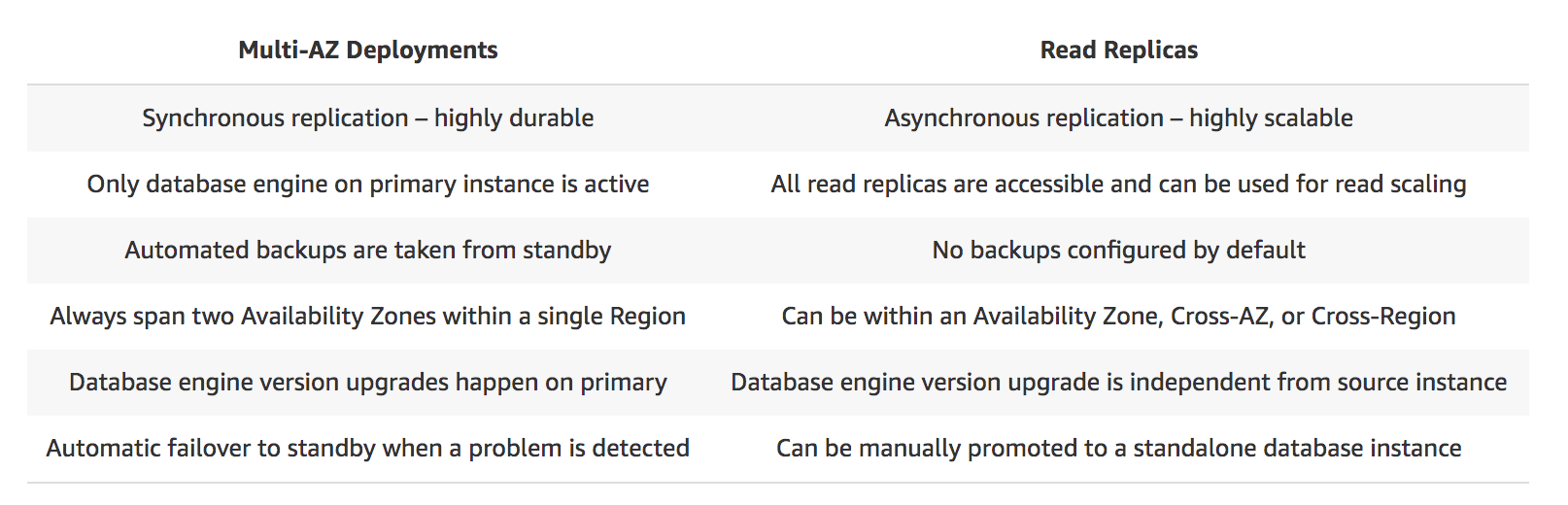
Therefore, the correct answer is: RDS DB instance running as a Multi-AZ deployment
RDS Read Replica is incorrect as a Read Replica primarily provides an asynchronous replication instead of synchronous.
Amazon DynamoDB Read Replica is incorrect since it does not offer a Read Replica feature. It typically uses global tables to replicate data across multiple AWS Regions.
Amazon CloudFront running as a Multi-AZ deployment is incorrect as it also does not have a Read Replica feature. It simply caches content at edge locations rather than replicating data in the database.
References:
https://aws.amazon.com/rds/details/multi-az/
https://aws.amazon.com/rds/features/multi-az/
Check out this Amazon RDS Cheat Sheet:
https://tutorialsdojo.com/amazon-relational-database-service-amazon-rds/
Question 10
Phần tiêu đề “Question 10”Type: Single answer · Câu gốc: #20
A Solutions Architect needs to make sure that the On-Demand Amazon EC2 instance can only be accessed from this IP address (110.238.98.71) via an SSH connection.
Which configuration below will satisfy this requirement?
- A. Security Group Inbound Rule: Protocol – TCP. Port Range – 22, Source 110.238.98.71/32
- B. Security Group Inbound Rule: Protocol – UDP, Port Range – 22, Source 110.238.98.71/32
- C. Security Group Outbound Rule: Protocol – TCP, Port Range – 22, Destination 110.238.98.71/32
- D. Security Group Outbound Rule: Protocol – UDP, Port Range – 22, Destination 0.0.0.0/0
Answer & explanation
Correct answer: A
A security group acts as a virtual firewall for your instance to control inbound and outbound traffic. When you launch an instance in a VPC, you can assign up to five security groups to the instance. Security groups act at the instance level, not the subnet level. Therefore, each instance in a subnet in your VPC can be assigned to a different set of security groups.
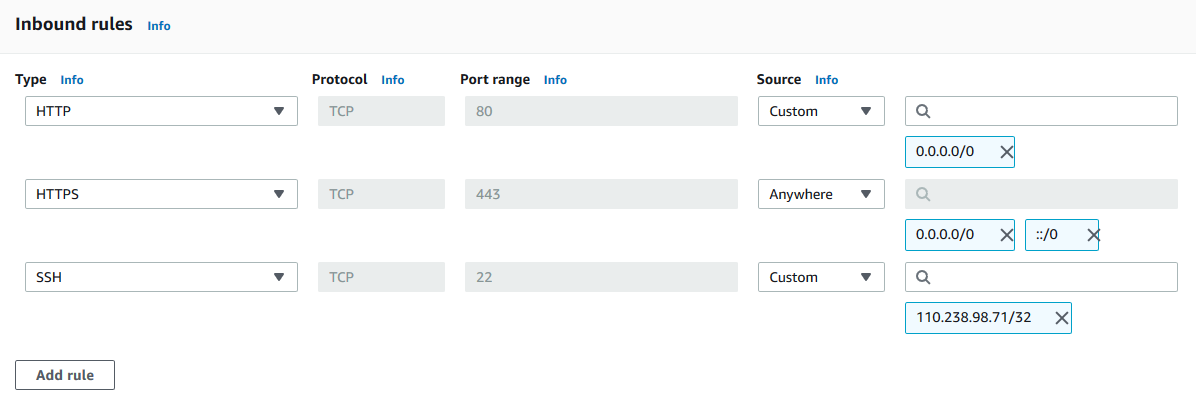
The requirement is to only allow the individual IP of the client and not the entire network. The /32 CIDR notation denotes a single IP address. Take note that the SSH protocol uses TCP, not UDP, and runs on port 22 (default). In the scenario, we can create a security group with an inbound rule allowing incoming traffic from the specified IP address on port 22.
Security groups are stateful, meaning they automatically allow return traffic associated with the client who initiated the connection to the instance. Therefore, any return traffic from the specified IP address on port 22 will be allowed to pass through the security group, regardless of whether or not there is an explicit outbound rule allowing it.
Hence, the correct answer is: Security Group Inbound Rule: Protocol – TCP, Port Range – 22, Source 110.238.98.71/32
The option that says: Security Group Inbound Rule: Protocol – UDP, Port Range – 22, Source 110.238.98.71/32 is incorrect because it typically uses UDP instead of TCP. SSH runs over the TCP protocol, so specifying UDP would not allow the desired access.
The option that says: Security Group Outbound Rule: Protocol – TCP, Port Range – 22, Destination 110.238.98.71/32 is incorrect because it’s an outbound rule, not an inbound rule. Outbound rules control traffic leaving the instance. In the scenario, we need to limit inbound traffic coming from a specific address.
The option that says: Security Group Outbound Rule: Protocol – UDP, Port Range – 22, Destination 0.0.0.0/0 is incorrect because it is an outbound rule rather than an inbound rule. Moreover, SSH connections only require TCP.
References:
https://docs.aws.amazon.com/AWSEC2/latest/UserGuide/using-network-security.html#security-group-rules
https://docs.aws.amazon.com/vpc/
Tutorials Dojo’s AWS Certified Solutions Architect Associate Exam Study Guide:
https://tutorialsdojo.com/aws-certified-solutions-architect-associate/
Check out this Amazon EC2 Cheat Sheet:
https://tutorialsdojo.com/amazon-elastic-compute-cloud-amazon-ec2/
Question 11
Phần tiêu đề “Question 11”Type: Multi-select · Câu gốc: #21
A tech company that you are working for has undertaken a Total Cost Of Ownership (TCO) analysis evaluating the use of Amazon S3 versus acquiring more storage hardware. The result was that all 1200 employees would be granted access to use Amazon S3 for the storage of their personal documents.
Which of the following will you need to consider so you can set up a solution that incorporates a single sign-on feature from your corporate AD or LDAP directory and also restricts access for each individual user to a designated user folder in an S3 bucket? (Select TWO.)
- A. Use 3rd party Single Sign-On solutions such as Atlassian Crowd, OKTA, OneLogin and many others.
- B. Set up a Federation proxy or an Identity provider, and use AWS Security Token Service to generate temporary tokens.
- C. Map each individual user to a designated user folder in S3 using Amazon WorkDocs to access their personal documents.
- D. Configure an IAM role and an IAM Policy to access the bucket.
- E. Set up a matching IAM user for each of the 1200 users in your corporate directory that needs access to a folder in the S3 bucket.
Answer & explanation
Correct answer: B, D
The question refers to one of the common scenarios for temporary credentials in AWS. Temporary credentials are useful in scenarios that involve identity federation, delegation, cross-account access, and IAM roles. In this example, it is called enterprise identity federation, considering that you also need to set up a single sign-on (SSO) capability.
The correct answers are:
- Setup a Federation proxy or an Identity provider, and use AWS Security Token Service to generate temporary tokens
- Configure an IAM role and an IAM Policy to access the bucket.
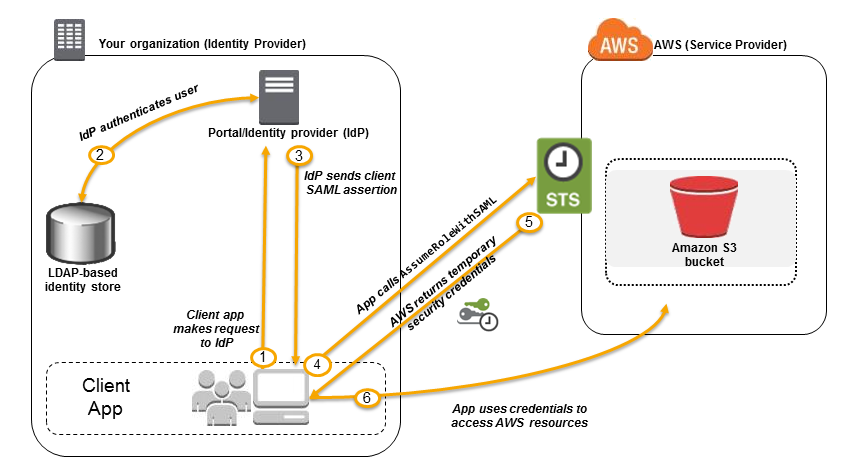 In an enterprise identity federation, you can authenticate users in your organization’s network, and then provide those users access to AWS without creating new AWS identities for them and requiring them to sign in with a separate user name and password. This is known as the single sign-on (SSO) approach to temporary access. AWS STS supports open standards like Security Assertion Markup Language (SAML) 2.0, with which you can use Microsoft AD FS to leverage your Microsoft Active Directory. You can also use SAML 2.0 to manage your own solution for federating user identities.
Using 3rd party Single Sign-On solutions such as Atlassian Crowd, OKTA, OneLogin and many others is incorrect since you don’t have to use 3rd party solutions to provide the access. AWS already provides the necessary tools that you can use in this situation.
Mapping each individual user to a designated user folder in S3 using Amazon WorkDocs to access their personal documents is incorrect as there is no direct way of integrating Amazon S3 with Amazon WorkDocs for this particular scenario. Amazon WorkDocs is simply a fully managed, secure content creation, storage, and collaboration service. With Amazon WorkDocs, you can easily create, edit, and share content. And because it’s stored centrally on AWS, you can access it from anywhere on any device.
Setting up a matching IAM user for each of the 1200 users in your corporate directory that needs access to a folder in the S3 bucket is incorrect since creating that many IAM users would be unnecessary. Also, you want the account to integrate with your AD or LDAP directory, hence, IAM Users does not fit these criteria.
References:
https://docs.aws.amazon.com/IAM/latest/UserGuide/id_roles_providers_saml.html
https://docs.aws.amazon.com/IAM/latest/UserGuide/id_roles_providers_oidc.html
https://aws.amazon.com/premiumsupport/knowledge-center/iam-s3-user-specific-folder/
Check out this AWS IAM Cheat Sheet:
https://tutorialsdojo.com/aws-identity-and-access-management-iam/
Question 12
Phần tiêu đề “Question 12”Type: Single answer · Câu gốc: #30
A business has recently migrated its applications to AWS. The audit team must be able to assess whether the services the company is using meet common security and regulatory standards. A solutions architect needs to provide the team with a report of all compliance-related documents for their account.
Which action should a solutions architect consider?
- A. Run an Amazon Inspector assessment job to download all of the AWS compliance-related information.
- B. Use AWS Artifact to view the security reports as well as other AWS compliance-related information.
- C. Use AWS Identity and Access Management to retrieve the required compliance reports for the account.
- D. Access all AWS security compliance reports through AWS Security Hub.
Answer & explanation
Correct answer: B
AWS Artifact is your go-to, central resource for compliance-related information that matters to you. It provides on-demand access to AWS’s security and compliance reports and select online agreements. Reports available in AWS Artifact include our Service Organization Control (SOC) reports, Payment Card Industry (PCI) reports, and certifications from accreditation bodies across geographies and compliance verticals that validate the implementation and operating effectiveness of AWS security controls. Agreements available in AWS Artifact include the Business Associate Addendum (BAA) and the Nondisclosure Agreement (NDA).
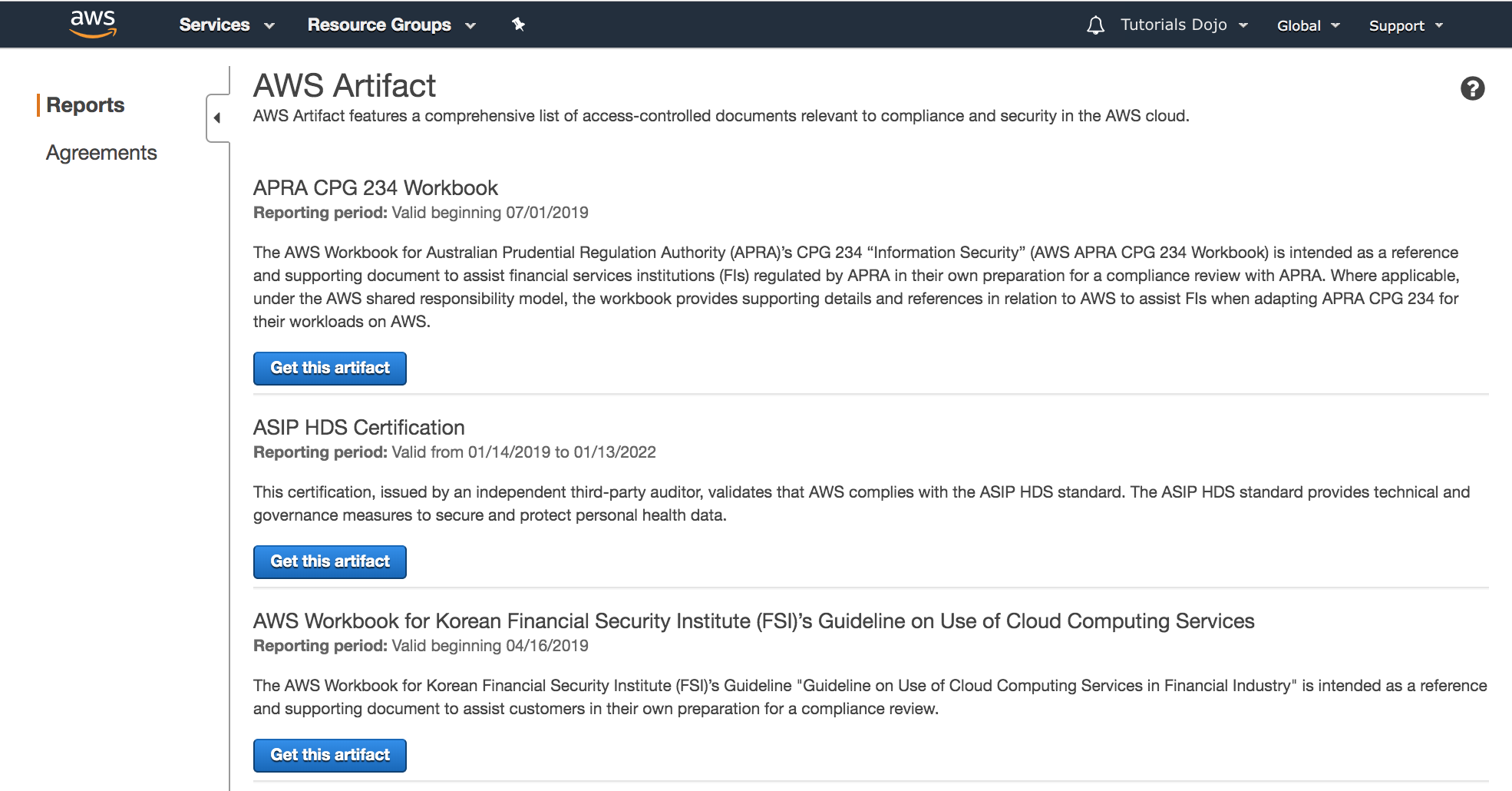
All AWS Accounts have access to AWS Artifact. Root users and IAM users with admin permissions can download all audit artifacts available to their accounts by agreeing to the associated terms and conditions. You will need to grant IAM users with non-admin permissions access to AWS Artifact using IAM permissions. This allows you to grant a user access to AWS Artifact while restricting access to other services and resources within your AWS Account.
Hence, the correct answer is: Use AWS Artifact to view the security reports as well as other AWS compliance-related information.
The option that says: Run an Amazon Inspector assessment job to download all of the AWS compliance-related information is incorrect. Amazon Inspector is simply a security tool for detecting vulnerabilities in AWS workloads. For this scenario, it is better to use the readily available security reports in AWS Artifact instead.
The option that says: Use AWS Identity and Access Management to retrieve the required compliance reports for the account is incorrect because AWS Identity and Access Management is a service for controlling access to AWS resources through users, roles, and permissions. It does not store, generate, or provide access to security compliance reports.
The option that says: Access all AWS security compliance reports through AWS Security Hub is incorrect because AWS Security Hub only provides you with a comprehensive view of your high-priority security alerts and security posture across your AWS accounts.
References:
https://aws.amazon.com/artifact/getting-started/
https://docs.aws.amazon.com/artifact/latest/ug/what-is-aws-artifact.html
Check out this AWS Artifact Cheat Sheet:
Question 13
Phần tiêu đề “Question 13”Type: Multi-select · Câu gốc: #32
A newly hired Solutions Architect is assigned to manage a set of CloudFormation templates that are used in the company’s cloud architecture in AWS. The Architect accessed the templates and tried to analyze the configured IAM policy for an S3 bucket.
{ "Version": "2012-10-17", "Statement": [ { "Effect": "Allow", "Action": [ "s3:Get*", "s3:List*" ], "Resource": "*" }, { "Effect": "Allow", "Action": "s3:PutObject", "Resource": "arn:aws:s3:::boracay/*" } ]}What does the above IAM policy allow? (Select THREE.)
- A. An IAM user with this IAM policy is allowed to read objects from all S3 buckets owned by the account.
- B. An IAM user with this IAM policy is allowed to write objects into the
boracayS3 bucket. - C. An IAM user with this IAM policy is allowed to change access rights for the
boracayS3 bucket. - D. An IAM user with this IAM policy is allowed to read objects in the
boracayS3 bucket but not allowed to list the objects in the bucket. - E. An IAM user with this IAM policy is allowed to read objects from the
boracayS3 bucket. - F. An IAM user with this IAM policy is allowed to read and delete objects from the
boracayS3 bucket.
Answer & explanation
Correct answer: A, B, E
You manage access in AWS by creating policies and attaching them to IAM identities (users, groups of users, or roles) or AWS resources. A policy is an object in AWS that, when associated with an identity or resource, defines their permissions. AWS evaluates these policies when an IAM principal (user or role) makes a request. Permissions in the policies determine whether the request is allowed or denied. Most policies are stored in AWS as JSON documents. AWS supports six types of policies: identity-based policies, resource-based policies, permissions boundaries, AWS Organizations SCPs, ACLs, and session policies.
IAM policies define permissions for action regardless of the method that you use to perform the operation. For example, if a policy allows the GetUser action, then a user with that policy can get user information from the AWS Management Console, the AWS CLI, or the AWS API. When you create an IAM user, you can choose to allow console or programmatic access. If console access is allowed, the IAM user can sign in to the console using a user name and password. Or if programmatic access is allowed, the user can use access keys to work with the CLI or API.
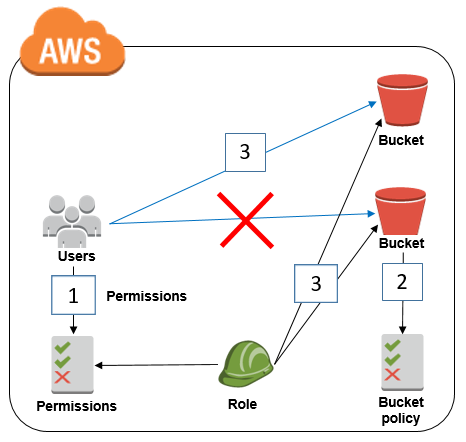
Based on the provided IAM policy, the user is only allowed to get, write, and list all of the objects for the boracay s3 bucket. The s3:PutObject basically means that you can submit a PUT object request to the S3 bucket to store data.
Hence, the correct answers are:
- An IAM user with this IAM policy is allowed to read objects from all S3 buckets owned by the account.
- An IAM user with this IAM policy is allowed to write objects into the boracay S3 bucket.
- An IAM user with this IAM policy is allowed to read objects from the boracay S3 bucket.
The option that says: An IAM user with this IAM policy is allowed to change access rights for the boracay S3 bucket is incorrect because the template does not have any statements which allow the user to change access rights in the bucket.
The option that says: An IAM user with this IAM policy is allowed to read objects in the boracay S3 bucket but not allowed to list the objects in the bucket is incorrect because it can clearly be seen in the template that there is a s3:List* which permits the user to list objects.
The option that says: An IAM user with this IAM policy is allowed to read and delete objects from the boracay S3 bucket is incorrect. Although you can read objects from the bucket, you cannot delete any objects.
References:
https://docs.aws.amazon.com/AmazonS3/latest/API/RESTObjectOps.html
https://docs.aws.amazon.com/IAM/latest/UserGuide/access_policies.html
Check out this Amazon S3 Cheat Sheet:
Question 14
Phần tiêu đề “Question 14”Type: Single answer · Câu gốc: #33
A company has a web application that uses Amazon CloudFront to distribute its images, videos, and other static content stored in its Amazon S3 bucket to users around the world. The company has recently introduced a new member-only access feature for some of its high-quality media files. There is a requirement to provide access to multiple private media files only to paying subscribers without having to change the current URLs.
Which of the following is the most suitable solution to implement to satisfy this requirement?
- A. Configure your CloudFront distribution to use Match Viewer as its Origin Protocol Policy which will automatically match the user request. This will allow access to the private content if the request is a paying member and deny it if it is not a member.
- B. Create a Signed URL with a custom policy which only allows the members to see the private files.
- C. Configure your CloudFront distribution to use Field-Level Encryption to protect your private data and only allow access to members.
- D. Use Signed Cookies to control who can access the private files in your CloudFront distribution by modifying your application to determine whether a user should have access to your content. For members, send the required
Set-Cookieheaders to the viewer which will unlock the content only to them.
Answer & explanation
Correct answer: D
Many companies that distribute content over the internet want to restrict access to documents, business data, media streams, or content that is intended for selected users, for example, users who have paid a fee. To securely serve this private content by using CloudFront, you can do the following:
-
Require that your users access your private content by using special CloudFront signed URLs or signed cookies.
-
Require that your users access your content by using CloudFront URLs, not URLs that access content directly on the origin server (for example, Amazon S3 or a private HTTP server). Requiring CloudFront URLs isn’t necessary, but we recommend it to prevent users from bypassing the restrictions that you specify in signed URLs or signed cookies.
CloudFront signed URLs and signed cookies provide the same basic functionality: they allow you to control who can access your content.
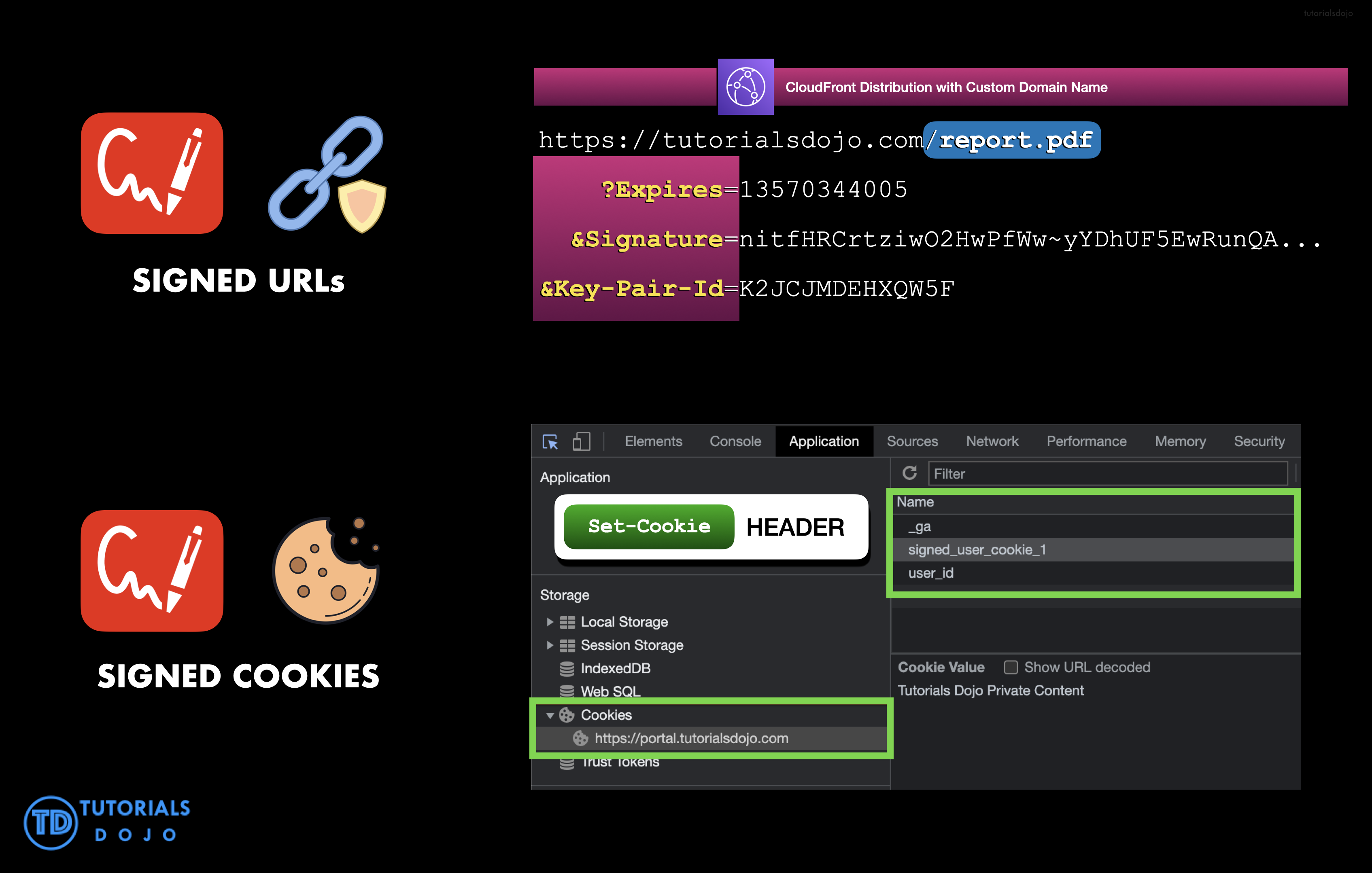
If you want to serve private content through CloudFront and you’re trying to decide whether to use signed URLs or signed cookies, consider the following:
Use signed URLs for the following cases:
-
You want to use an RTMP distribution. Signed cookies aren’t supported for RTMP distributions.
-
You want to restrict access to individual files, for example, an installation download for your application.
-
Your users are using a client (for example, a custom HTTP client) that doesn’t support cookies.
Use signed cookies for the following cases:
-
You want to provide access to multiple restricted files, for example, all of the files for a video in HLS format or all of the files in the subscribers’ area of a website.
-
You don’t want to change your current URLs.
Hence, the correct answer is: Use Signed Cookies to control who can access the private files in your CloudFront distribution by modifying your application to determine whether a user should have access to your content. For members, send the required Set-Cookie headers to the viewer which will unlock the content only to them.
The option that says: Configure your CloudFront distribution to use Match Viewer as its Origin Protocol Policy which will automatically match the user request. This will allow access to the private content if the request is a paying member and deny it if it is not a member is incorrect because a Match Viewer is an Origin Protocol Policy that configures CloudFront to communicate with your origin using HTTP or HTTPS, depending on the protocol of the viewer request. CloudFront caches the object only once even if viewers make requests using both HTTP and HTTPS protocols.
The option that says: Create a Signed URL with a custom policy which only allows the members to see the private files is incorrect because Signed URLs are primarily used for providing access to individual files, as shown in the above explanation. In addition, the scenario explicitly says that they don’t want to change their current URLs which is why implementing Signed Cookies is more suitable than Signed URLs.
The option that says: Configure your CloudFront distribution to use Field-Level Encryption to protect your private data and only allow access to members is incorrect because Field-Level Encryption only allows you to securely upload user-submitted sensitive information to your web servers. It does not provide access to download multiple private files.
References:
Check out this Amazon CloudFront Cheat Sheet:
Question 15
Phần tiêu đề “Question 15”Type: Single answer · Câu gốc: #38
A company has 3 DevOps engineers that are handling its software development and infrastructure management processes. One of the engineers accidentally deleted a file hosted in Amazon S3 which has caused disruption of service.
What can the DevOps engineers do to prevent this from happening again?
- A. Use S3 Infrequently Accessed storage to store the data.
- B. Enable S3 Versioning and Multi-Factor Authentication Delete on the bucket.
- C. Set up a signed URL for all users.
- D. Create an IAM bucket policy that disables delete operation.
Answer & explanation
Correct answer: B
To enhance data protection and meet best practices for securing stored objects, AWS recommends implementing safeguards against accidental deletions. To avoid accidental deletion in an Amazon S3 bucket, you can:
- Enable Versioning
- Enable MFA (Multi-Factor Authentication) Delete
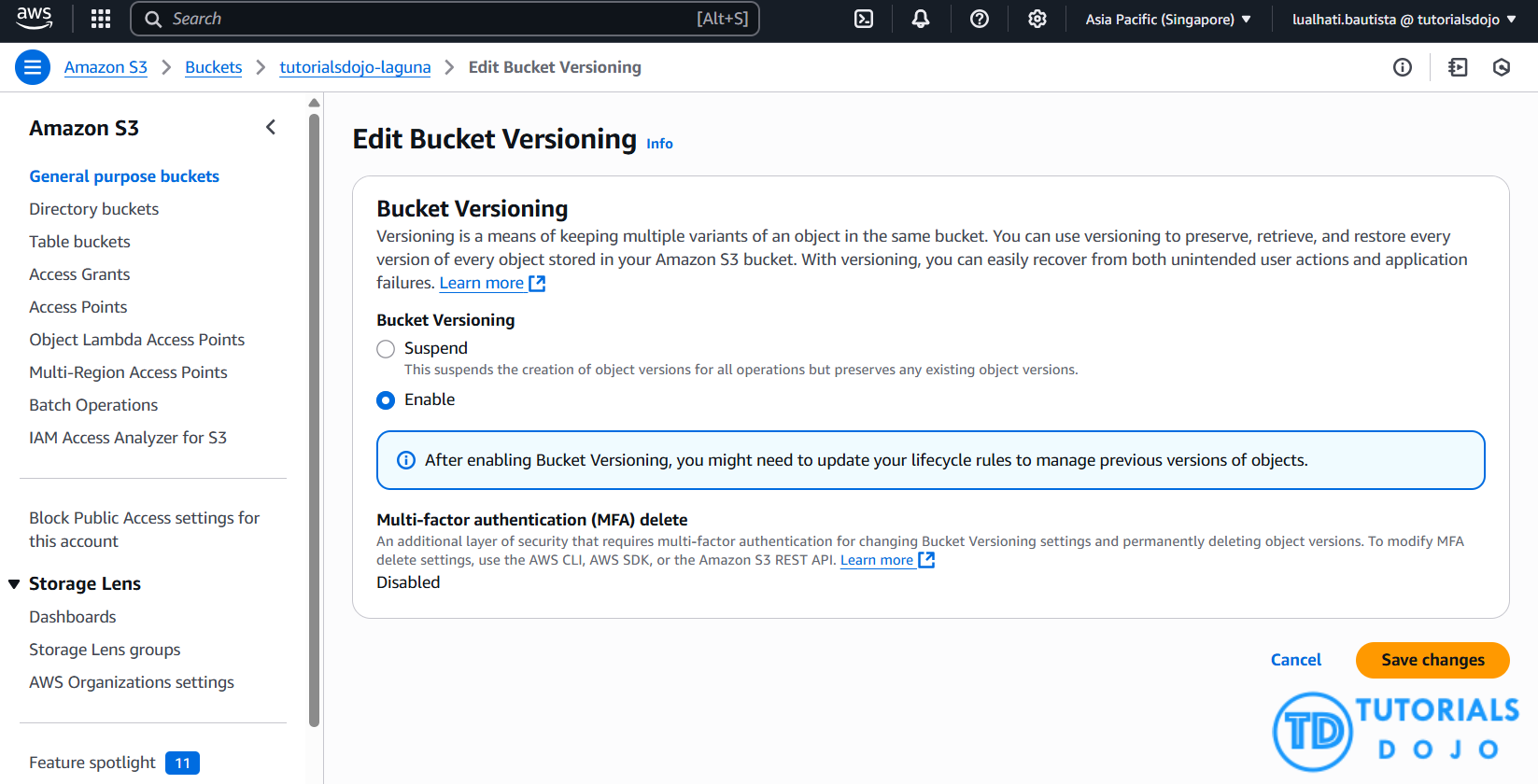
Versioning is a means of keeping multiple variants of an object in the same bucket. You can use versioning to preserve, retrieve, and restore every version of every object stored in your Amazon S3 bucket. With versioning, you can easily recover from both unintended user actions and application failures.

If the MFA (Multi-Factor Authentication) Delete is enabled, it requires additional authentication for either of the following operations:
-
Change the versioning state of your bucket
-
Permanently delete an object version
Hence, the correct answer is: Enable S3 Versioning and Multi-Factor Authentication Delete on the bucket.
Using S3 Infrequently Accessed storage to store the data is incorrect. Switching your storage class to S3 Infrequent Access won’t help mitigate accidental deletions.
Setting up a signed URL for all users is incorrect. Signed URLs give you more control over access to your content, so this feature primarily deals more with accessing rather than deletion.
Creating an IAM bucket policy that disables delete operation is incorrect. If you create a bucket policy preventing deletion, other users won’t be able to delete objects that should be deleted. You only want to prevent accidental deletion, not disable the action itself.
References:
http://docs.aws.amazon.com/AmazonS3/latest/dev/Versioning.html
https://docs.aws.amazon.com/AmazonS3/latest/userguide/MultiFactorAuthenticationDelete.html
Check out this Amazon S3 Cheat Sheet:
Question 16
Phần tiêu đề “Question 16”Type: Single answer · Câu gốc: #43
A company is designing a banking portal that uses Amazon ElastiCache for Redis as its distributed session management component. To secure session data and ensure that Cloud Engineers must authenticate before executing Redis commands, specifically MULTI EXEC commands, the system should enforce strong authentication by requiring users to enter a password. Additionally, access should be managed with long-lived credentials while supporting robust security practices.
Which of the following actions should be taken to meet the above requirement?
- A. Generate an IAM authentication token using AWS credentials and provide this token as a password.
- B. Set up a Redis replication group and enable the
AtRestEncryptionEnabledparameter. - C. Authenticate the users using Redis AUTH by creating a new Redis Cluster with both the
--transit-encryption-enabledand--auth-tokenparameters enabled. - D. Enable the in-transit encryption for Redis replication groups.
Answer & explanation
Correct answer: C
Using Redis AUTH command can improve data security by requiring the user to enter a password before they are granted permission to execute Redis commands on a password-protected Redis server.
Hence, the correct answer is: Authenticate the users using Redis AUTH by creating a new Redis Cluster with both the --transit-encryption-enabled and --auth-token parameters enabled.
To require that users enter a password on a password-protected Redis server, include the parameter --auth-token with the correct password when you create your replication group or cluster and on all subsequent commands to the replication group or cluster.

The option that says: Generate an IAM authentication token using AWS credentials and provide this token as a password is incorrect. IAM authentication is simply not supported for executing Redis commands like MULTI EXEC, and IAM tokens expire every 12 hours, which does not align with the need for long-lived credentials.
The option that says: Set up a Redis replication group and enable the AtRestEncryptionEnabled parameter is incorrect because the Redis At-Rest Encryption feature only secures the data inside the in-memory data store. You have to use Redis AUTH option instead.
The option that says: Enable the in-transit encryption for Redis replication groups is incorrect. Although in-transit encryption is part of the solution, it is missing the most important thing which is the Redis AUTH option.
References:
https://docs.aws.amazon.com/AmazonElastiCache/latest/red-ug/auth.html
https://docs.aws.amazon.com/AmazonElastiCache/latest/red-ug/encryption.html
Check out this Amazon Elasticache Cheat Sheet:
https://tutorialsdojo.com/amazon-elasticache/
Redis (cluster mode enabled vs disabled) vs Memcached:
https://tutorialsdojo.com/redis-cluster-mode-enabled-vs-disabled-vs-memcached/
Question 17
Phần tiêu đề “Question 17”Type: Single answer · Câu gốc: #44
A Solutions Architect identified a series of DDoS attacks while monitoring the Amazon VPC, where applications are fronted by Elastic Load Balancing. The Architect needs to fortify the current cloud infrastructure to protect the data of the clients.
Which of the following is the most suitable solution to mitigate these kinds of attacks?
- A. Use AWS Shield Advanced to detect and mitigate DDoS attacks.
- B. Using the AWS Firewall Manager, set up a security layer that will prevent SYN floods, UDP reflection attacks, and other DDoS attacks.
- C. Set up a web application firewall using AWS WAF to filter, monitor, and block HTTP traffic.
- D. Use both Security Groups and Network Access Control Lists to restrict VPC traffic to authorized sources only.
Answer & explanation
Correct answer: A
For higher levels of protection against attacks targeting your applications running on Amazon Elastic Compute Cloud (EC2), Elastic Load Balancing(ELB), Amazon CloudFront, and Amazon Route 53 resources, you can subscribe to AWS Shield Advanced. In addition to the network and transport layer protections that come with Standard, AWS Shield Advanced provides additional detection and mitigation against large and sophisticated DDoS attacks, near real-time visibility into attacks, and integration with AWS WAF, a web application firewall.
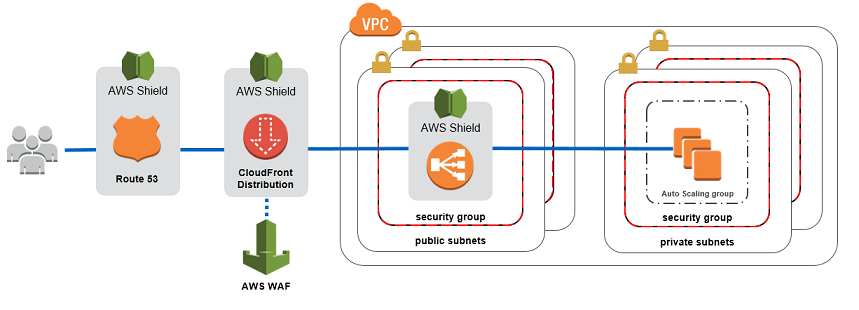
AWS Shield Advanced also gives you 24/7 access to the AWS DDoS Response Team (DRT) and protection against DDoS-related spikes in your Amazon Elastic Compute Cloud (EC2), Elastic Load Balancing(ELB), Amazon CloudFront, and Amazon Route 53 charges.
Hence, the correct answer is: Use AWS Shield Advanced to detect and mitigate DDoS attacks.
The option that says: Using the AWS Firewall Manager, set up a security layer that will prevent SYN floods, UDP reflection attacks and other DDoS attacks is incorrect because AWS Firewall Manager is mainly used to simplify your AWS WAF administration and maintenance tasks across multiple accounts and resources. It does not protect your VPC against DDoS attacks.
The option that says: Set up a web application firewall using AWS WAF to filter, monitor, and block HTTP traffic is incorrect. Even though AWS WAF can help you block common attack patterns to your VPC, such as SQL injection or cross-site scripting, this is still not enough to withstand DDoS attacks. It is just better to use AWS Shield in this scenario.
The option that says: Use both Security Groups and Network Access Control Lists to restrict VPC traffic to authorized sources only is incorrect. Although using a combination of Security Groups and NACLs is valid to provide security to your VPC, this is not enough to mitigate a DDoS attack. You should use AWS Shield for better security protection.
References:
https://aws.amazon.com/shield/
Check out this AWS Shield Cheat Sheet:
Question 18
Phần tiêu đề “Question 18”Type: Single answer · Câu gốc: #49
A medical records company is planning to store sensitive clinical trial data in an Amazon S3 repository with the object-level versioning feature enabled. The Solutions Architect is tasked with ensuring that no object can be overwritten or deleted by any user for a period of one year only. To meet the strict compliance requirements, the root user of the company’s AWS account must also be restricted from making any changes to an object in the S3 bucket. Backup Vault Lock offers similar immutability, but the company requires object-level protection in S3.
Which of the following is the most secure way of storing the data in S3?
- A. Enable S3 Object Lock in governance mode with a retention period of one year.
- B. Enable S3 Object Lock in compliance mode with a retention period of one year.
- C. Enable S3 Object Lock in governance mode with a legal hold of one year.
- D. Enable S3 Object Lock in compliance mode with a legal hold of one year.
Answer & explanation
Correct answer: B
With S3 Object Lock, you can store objects using a write-once-read-many (WORM) model. Object Lock can help prevent objects from being deleted or overwritten for a fixed amount of time or indefinitely. You can use Object Lock to help meet regulatory requirements that require WORM storage or to simply add another layer of protection against object changes and deletion.
Before you lock any objects, you have to enable a bucket to use S3 Object Lock. You enable Object Lock when you create a bucket. After you enable Object Lock on a bucket, you can lock objects in that bucket. When you create a bucket with Object Lock enabled, you can’t disable Object Lock or suspend versioning for that bucket.
S3 Object Lock provides two retention modes:
-Governance mode
-Compliance mode
These retention modes apply different levels of protection to your objects. You can apply either retention mode to any object version that is protected by Object Lock.
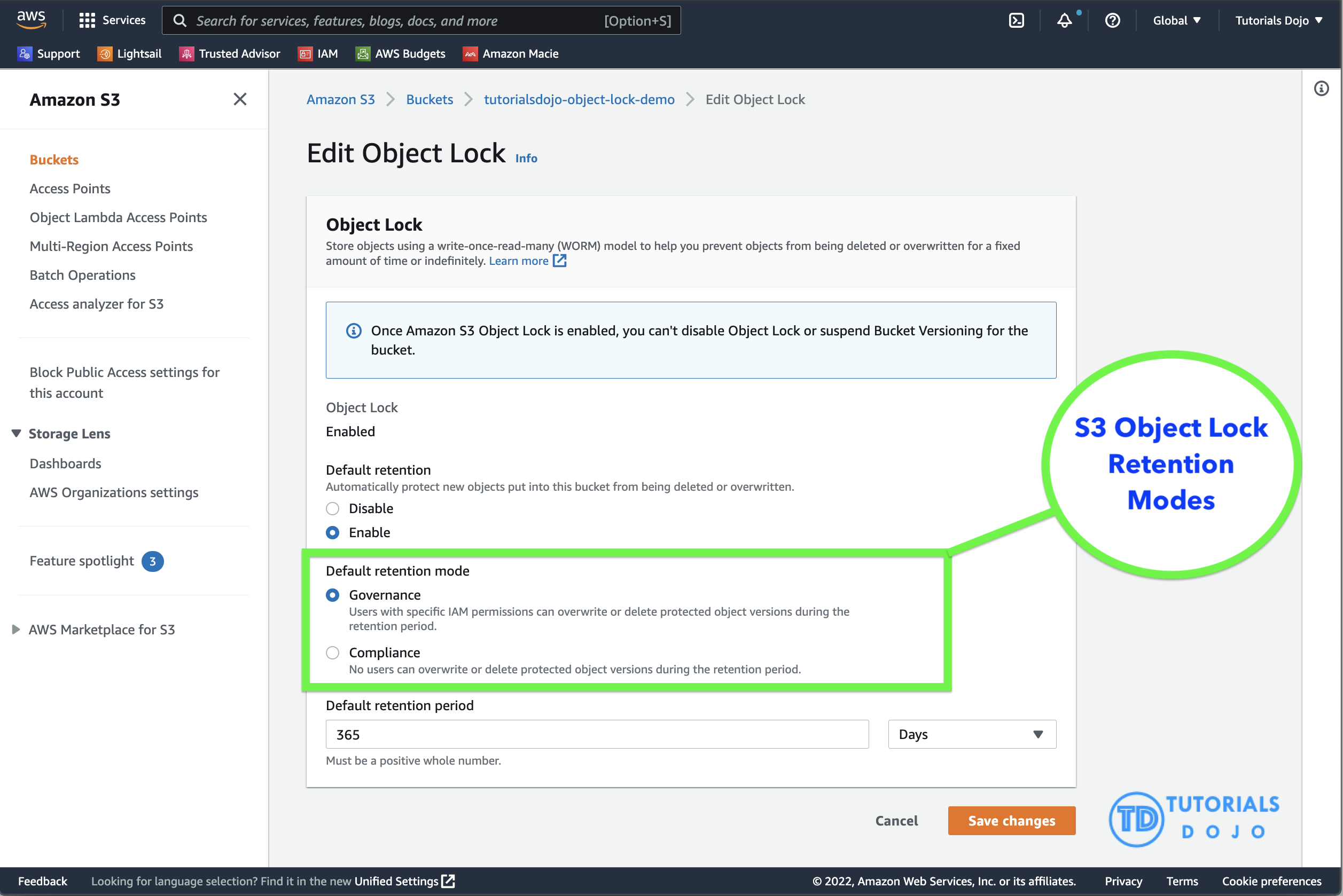
In governance mode, users can’t overwrite or delete an object version or alter its lock settings unless they have special permissions. With governance mode, you protect objects against being deleted by most users, but you can still grant some users permission to alter the retention settings or delete the object if necessary. You can also use governance mode to test retention-period settings before creating a compliance-mode retention period.
In compliance mode, a protected object version can’t be overwritten or deleted by any user, including the root user in your AWS account. When an object is locked in compliance mode, its retention mode can’t be changed, and its retention period can’t be shortened. Compliance mode helps ensure that an object version can’t be overwritten or deleted for the duration of the retention period.
To override or remove governance-mode retention settings, a user must have the s3:BypassGovernanceRetention permission and must explicitly include x-amz-bypass-governance-retention:true as a request header with any request that requires overriding governance mode.
Legal Hold vs. Retention Period
With Object Lock, you can also place a legal hold on an object version. Like a retention period, a legal hold prevents an object version from being overwritten or deleted. However, a legal hold doesn’t have an associated retention period and remains in effect until removed. Legal holds can be freely placed and removed by any user who has the s3:PutObjectLegalHold permission.
Legal holds are independent from retention periods. As long as the bucket that contains the object has Object Lock enabled, you can place and remove legal holds regardless of whether the specified object version has a retention period set. Placing a legal hold on an object version doesn’t affect the retention mode or retention period for that object version.
For example, suppose that you place a legal hold on an object version while the object version is also protected by a retention period. If the retention period expires, the object doesn’t lose its WORM protection. Rather, the legal hold continues to protect the object until an authorized user explicitly removes it. Similarly, if you remove a legal hold while an object version has a retention period in effect, the object version remains protected until the retention period expires.
Hence, the correct answer is: Enable S3 Object Lock in compliance mode with a retention period of one year.
The option that says: Enable S3 Object Lock in governance mode with a retention period of one year is incorrect because in the governance mode, users typically can’t overwrite or delete an object version or alter its lock settings unless they have special permissions or if a user has access to the root AWS user account. A better option to choose here is to use the compliance mode.
The option that says: Enable S3 Object Lock in governance mode with a legal hold of one year is incorrect. You cannot set a time period for a legal hold. You can only do this using the “retention period” option. Take note that a legal hold will still restrict users from changing the S3 objects even after the one-year retention period has elapsed. In addition, a governance mode will allow the root user to modify your S3 objects and override any existing settings.
The option that says: Enable S3 Object Lock in compliance mode with a legal hold of one year is incorrect. Although the choice of using the compliance mode is right, you still cannot set a one-year time period for the legal hold option. Keep in mind that the legal hold is independent of the retention period.
References:
https://docs.aws.amazon.com/AmazonS3/latest/userguide/object-lock.html
https://docs.aws.amazon.com/AmazonS3/latest/userguide/object-lock-overview.html
Check out this Amazon S3 Cheat Sheet:
Question 19
Phần tiêu đề “Question 19”Type: Single answer · Câu gốc: #50
A company requires all the data stored in the cloud to be encrypted at rest. To easily integrate this with other AWS services, they must have full control over the encryption of the created keys and also the ability to immediately remove the key material from AWS KMS. The solution should also be able to audit the key usage independently of AWS CloudTrail.
Which of the following options will meet this requirement?
- A. Use AWS Key Management Service to create AWS owned Keys and store the non-extractable key material in AWS CloudHSM.
- B. Use AWS Key Management Service to create a KMS key in a custom key store and store the non-extractable key material in Amazon S3.
- C. Use AWS Key Management Service to create AWS managed keys and store the non-extractable key material in AWS CloudHSM.
- D. Use AWS Key Management Service to create a KMS key in a custom key store and store the non-extractable key material in AWS CloudHSM.
Answer & explanation
Correct answer: D
The AWS Key Management Service (KMS) custom key store feature combines the controls provided by AWS CloudHSM with the integration and ease of use of AWS KMS. You can configure your own CloudHSM cluster and authorize AWS KMS to use it as a dedicated key store for your keys rather than the default AWS KMS key store. When you create keys in AWS KMS you can choose to generate the key material in your CloudHSM cluster. KMS Keys that are generated in your custom key store never leave the HSMs in the CloudHSM cluster in plaintext and all AWS KMS operations that use those KMS keys are only performed on your HSMs.
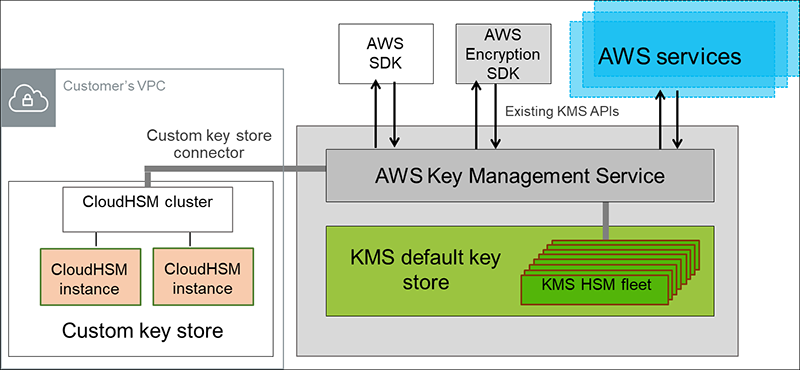
AWS KMS can help you integrate with other AWS services to encrypt the data that you store in these services and control access to the keys that decrypt it. To immediately remove the key material from AWS KMS, you can use a custom key store. Take note that each custom key store is associated with an AWS CloudHSM cluster in your AWS account. Therefore, when you create an AWS KMS Key in a custom key store, AWS KMS generates and stores the non-extractable key material for the KMS key in an AWS CloudHSM cluster that you own and manage. This is also suitable if you want to be able to audit the usage of all your keys independently of AWS KMS or AWS CloudTrail.
Since you control your AWS CloudHSM cluster, you have the option to manage the lifecycle of your KMS keys independently of AWS KMS. Here are the criteria why you might find a custom key store useful:
- You have encryption keys that must be safeguarded within a dedicated hardware security module (HSM) under your direct control, adhering to strict single-tenancy requirements.
- You require the capability to promptly and independently revoke and remove key material from AWS KMS, exercising complete control over the key lifecycle.
- Your compliance obligations mandate independent auditing and monitoring of all key usage activities, beyond the logging provided by AWS KMS and AWS CloudTrail.
Hence, the correct answer in this scenario is: Use AWS Key Management Service to create a KMS key in a custom key store and store the non-extractable key material in AWS CloudHSM.
The option that says: Use AWS Key Management Service to create a KMS key in a custom key store and store the non-extractable key material in Amazon S3 is incorrect. Amazon S3 is primarily for general storage purposes and does not provide the required level of security and control needed for cryptographic key management. You have to use AWS CloudHSM instead.
The options that says: Use AWS Key Management Service to create AWS owned Keys and store the non-extractable key material in AWS CloudHSM and Use AWS Key Management Service to create AWS managed Keys and store the non-extractable key material in AWS CloudHSM are both incorrect because the scenario primarily requires you to have full control over the encryption of the created key. AWS owned Keys, and AWS managed Keys are managed by AWS. Moreover, these options do not allow you to audit the key usage independently of AWS CloudTrail.
References:
https://docs.aws.amazon.com/kms/latest/developerguide/custom-key-store-overview.html
https://docs.aws.amazon.com/kms/latest/developerguide/keystore-cloudhsm.html
https://aws.amazon.com/blogs/security/are-kms-custom-key-stores-right-for-you/
Check out this AWS KMS Cheat Sheet:
https://tutorialsdojo.com/aws-key-management-service-aws-kms/
Question 20
Phần tiêu đề “Question 20”Type: Single answer · Câu gốc: #58
A company hosted an e-commerce website on an Auto Scaling group of Amazon EC2 instances behind an Application Load Balancer. The Solutions Architect noticed that the website is receiving a high number of illegitimate external requests from multiple systems with frequently changing IP addresses. To address the performance issues, the Solutions Architect must implement a solution that would block these requests while having minimal impact on legitimate traffic.
Which of the following options fulfills this requirement?
- A. Create a regular rule in AWS WAF and associate the web ACL to an Application Load Balancer.
- B. Create a custom network ACL and associate it with the subnet of the Application Load Balancer to block the offending requests.
- C. Create a rate-based rule in AWS WAF and associate the web ACL to an Application Load Balancer.
- D. Create a private connection using AWS PrivateLink to block the offending requests.
Answer & explanation
Correct answer: C
AWS WAF is tightly integrated with Amazon CloudFront, the Application Load Balancer (ALB), Amazon API Gateway, and AWS AppSync – services that AWS customers commonly use to deliver content for their websites and applications. When you use AWS WAF on Amazon CloudFront, your rules run in all AWS Edge Locations, located around the world close to your end-users. This means security doesn’t come at the expense of performance. Blocked requests are stopped before they reach your web servers. When you use AWS WAF on regional services, such as Application Load Balancer, Amazon API Gateway, and AWS AppSync, your rules run in the region and can be used to protect Internet-facing resources as well as internal resources.
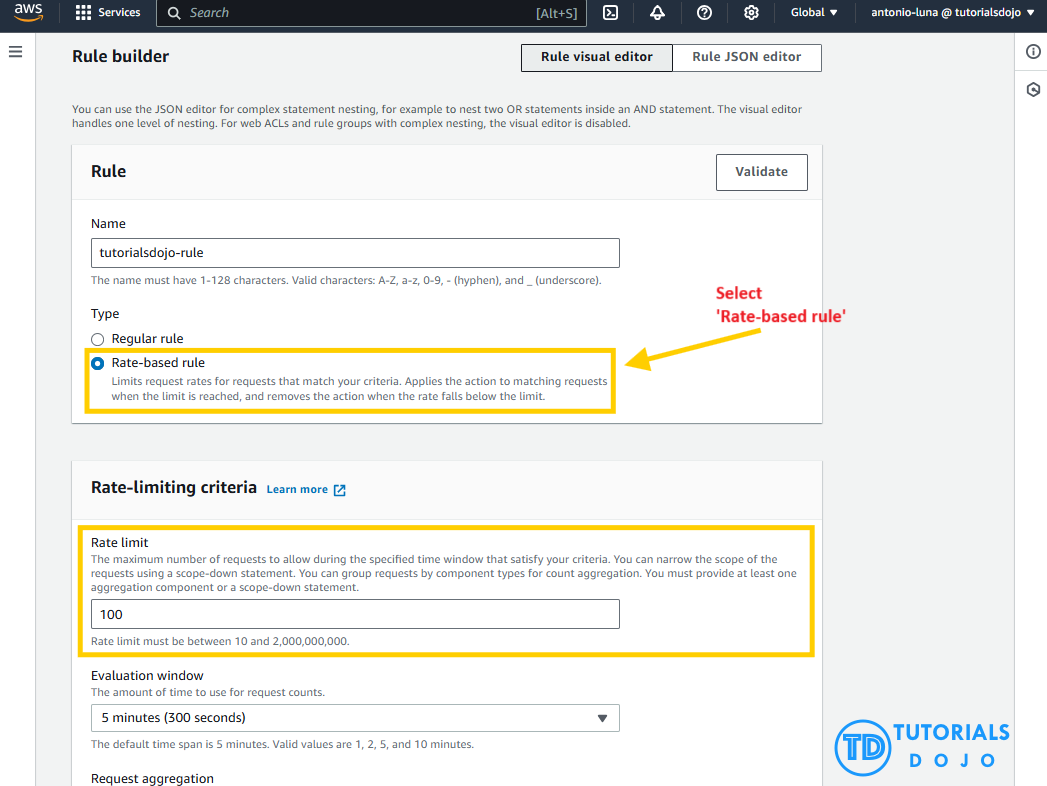
A rate-based rule tracks the rate of requests for each originating IP address and triggers the rule action on IPs with rates that go over a limit. You set the limit as the number of requests per 5-minute time span. You can use this type of rule to put a temporary block on requests from an IP address that’s sending excessive requests.
Based on the given scenario, the requirement is to limit the number of requests from the illegitimate requests without affecting the genuine requests. To accomplish this requirement, you can use AWS WAF web ACL. There are two types of rules in creating your own web ACL rule: regular and rate-based rules. You need to select the latter to add a rate limit to your web ACL. After creating the web ACL, you can associate it with ALB. When the rule action triggers, AWS WAF applies the action to additional requests from the IP address until the request rate falls below the limit.
Hence, the correct answer is: Create a rate-based rule in AWS WAF and associate the web ACL to an Application Load Balancer.
The option that says: Create a regular rule in AWS WAF and associate the web ACL to an Application Load Balancer is incorrect because a regular rule typically matches the statement defined in the rule. If you need to add a rate limit to your rule, you should create a rate-based rule.
The option that says: Create a custom network ACL and associate it with the subnet of the Application Load Balancer to block the offending requests is incorrect. Although NACLs can help you block incoming traffic, this option wouldn’t be able to limit the number of requests from a single IP address that is dynamically changing.
The option that says: Create a private connection using AWS PrivateLink to block the offending requests is incorrect because it simply is a networking service that provides private connectivity between VPCs and AWS services, not a request‑filtering solution. It cannot inspect HTTP traffic, track request rates, or block malicious IPs
References:
https://docs.aws.amazon.com/waf/latest/developerguide/waf-rule-statement-type-rate-based.html
https://aws.amazon.com/waf/faqs/
Check out this AWS WAF Cheat Sheet:
Question 21
Phần tiêu đề “Question 21”Type: Single answer · Câu gốc: #61
A company uses an Application Load Balancer (ALB) for its public-facing multi-tier web applications. The security team has recently reported that there has been a surge of SQL injection attacks lately, which causes critical data discrepancy issues. The same issue is also encountered by its other web applications in other AWS accounts that are behind an ALB. An immediate solution is required to prevent the remote injection of unauthorized SQL queries and protect their applications hosted across multiple accounts.
As a Solutions Architect, what solution would you recommend?
- A. Use AWS Network Firewall to filter web vulnerabilities and brute force attacks using stateful rule groups across all Application Load Balancers on all AWS accounts. Refactor the web application to be less susceptible to SQL injection attacks based on the security assessment.
- B. Use AWS WAF and set up a managed rule to block request patterns associated with the exploitation of SQL databases, like SQL injection attacks. Associate it with the Application Load Balancer. Integrate AWS WAF with AWS Firewall Manager to reuse the rules across all the AWS accounts.
- C. Use Amazon Macie to scan for vulnerabilities and unintended network exposure. Refactor the web application to be less susceptible to SQL injection attacks based on the security assessment. Utilize the AWS Audit Manager to reuse the security assessment across all AWS accounts.
- D. Use Amazon GuardDuty and set up a managed rule to block request patterns associated with the exploitation of SQL databases, like SQL injection attacks. Associate it with the Application Load Balancer and utilize the AWS Security Hub service to reuse the managed rules across all the AWS accounts
Answer & explanation
Correct answer: B
AWS WAF is a web application firewall that lets you monitor the HTTP(S) requests that are forwarded to an Amazon CloudFront distribution, an Amazon API Gateway REST API, an Application Load Balancer, or an AWS AppSync GraphQL API.
-Web ACLs – You use a web access control list (ACL) to protect a set of AWS resources. You create a web ACL and define its protection strategy by adding rules. Rules define criteria for inspecting web requests and specify how to handle requests that match the criteria. You set a default action for the web ACL that indicates whether to block or allow through those requests that pass the rules inspections.
-Rules – Each rule contains a statement that defines the inspection criteria and an action to take if a web request meets the criteria. When a web request meets the criteria, that’s a match. You can configure rules to block matching requests, allow them through, count them, or run CAPTCHA controls against them.
-Rules groups – You can use rules individually or in reusable rule groups. AWS Managed Rules and AWS Marketplace sellers provide managed rule groups for your use. You can also define your own rule groups.
AWSManagedRulesSQLiRuleSet - The SQL database rule group contains rules to block request patterns associated with the exploitation of SQL databases, like SQL injection attacks. This can help prevent remote injection of unauthorized queries. Evaluate this rule group for use if your application interfaces with an SQL database.
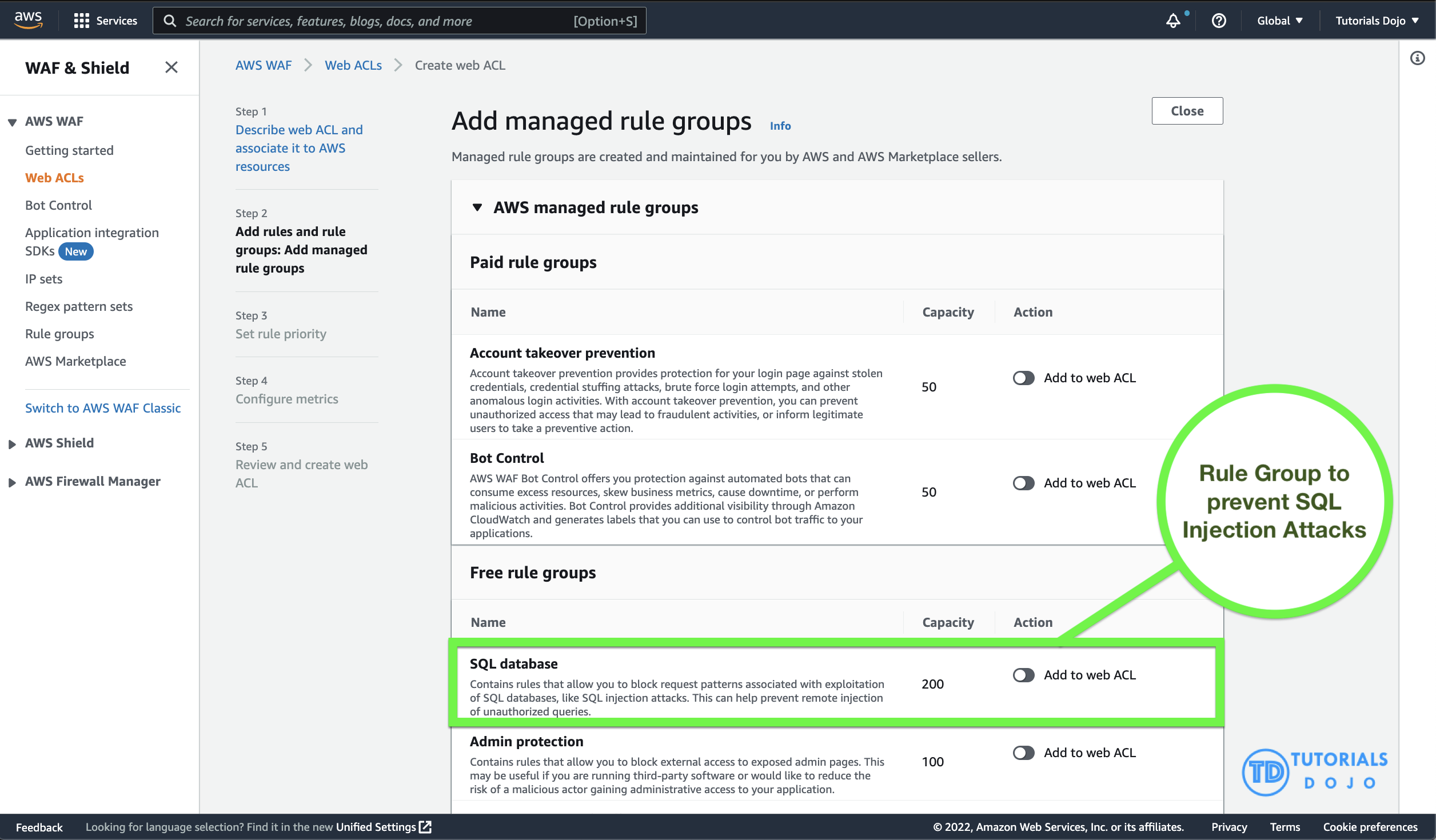
AWS WAF is easy to deploy and protect applications deployed on either Amazon CloudFront as part of your CDN solution, the Application Load Balancer that fronts all your origin servers, Amazon API Gateway for your REST APIs, or AWS AppSync for your GraphQL APIs. There is no additional software to deploy, DNS configuration, SSL/TLS certificate to manage, or need for a reverse proxy setup.
With AWS Firewall Manager integration, you can centrally define and manage your rules and reuse them across all the web applications that you need to protect.
Therefore, the correct answer is: Use AWS WAF and set up a managed rule to block request patterns associated with the exploitation of SQL databases, like SQL injection attacks. Associate it with the Application Load Balancer. Integrate AWS WAF with AWS Firewall Manager to reuse the rules across all the AWS accounts.
The option that says: Use Amazon GuardDuty and set up a managed rule to block request patterns associated with the exploitation of SQL databases, like SQL injection attacks. Associate it with the Application Load Balancer and utilize the AWS Security Hub service to reuse the managed rules across all the AWS accountsis incorrect because Amazon GuardDuty is only a threat detection service and cannot directly be integrated with the Application Load Balancer.
The options that says: Use AWS Network Firewall to filter web vulnerabilities and brute force attacks using stateful rule groups across all Application Load Balancers on all AWS accounts. Refactor the web application to be less susceptible to SQL injection attacks based on the security assessmentis incorrect because AWS Network Firewall is a managed service that is primarily used to deploy essential network protections for all of your Amazon Virtual Private Clouds (VPCs) and not particularly to your Application Load Balancers. Take note that the AWS Network Firewall is account-specific by default and needs to be integrated with the AWS Firewall Manager to easily share the firewall across your other AWS accounts. In addition, refactoring the web application will require an immense amount of time.
The options that says: Use Amazon Macie to scan for vulnerabilities and unintended network exposure. Refactor the web application to be less susceptible to SQL injection attacks based on the security assessment. Utilize the AWS Audit Manager to reuse the security assessment across all AWS accounts is incorrect because Amazon Macie is only used for data security and data privacy service that uses machine learning and pattern matching to discover and protect your sensitive data. Just like before, refactoring the web application will require an immense amount of time. The use of the AWS Audit Manager is not relevant as well. The AWS Audit Manager simply helps you continually audit your AWS usage to simplify how you manage risk and compliance with regulations and industry standards.
References:
https://docs.aws.amazon.com/waf/latest/developerguide/how-aws-waf-works.html
https://docs.aws.amazon.com/waf/latest/developerguide/fms-chapter.html
Check out this AWS Web Application Firewall Cheat Sheet:
Question 22
Phần tiêu đề “Question 22”Type: Single answer · Câu gốc: #62
A payment processing company plans to migrate its on-premises application to an Amazon EC2 instance. An IPv6 CIDR block is attached to the company’s Amazon VPC. Strict security policy mandates that the production VPC must only allow outbound communication over IPv6 between the instance and the internet but should prevent the internet from initiating an inbound IPv6 connection. The new architecture should also allow traffic flow inspection and traffic filtering.
What should a solutions architect do to meet these requirements?
- A. Launch the EC2 instance to a public subnet and attach an Internet Gateway to the VPC to allow outbound IPv6 communication to the internet. Use Traffic Mirroring to set up the required rules for traffic inspection and traffic filtering.
- B. Launch the EC2 instance to a private subnet and attach AWS PrivateLink interface endpoint to the VPC to control outbound IPv6 communication to the internet. Use Amazon GuardDuty to set up the required rules for traffic inspection and traffic filtering.
- C. Launch the EC2 instance to a private subnet and attach a NAT Gateway to the VPC to allow outbound IPv6 communication to the internet. Use AWS Firewall Manager to set up the required rules for traffic inspection and traffic filtering.
- D. Launch the EC2 instance to a private subnet and attach an Egress-Only Internet Gateway to the VPC to allow outbound IPv6 communication to the internet. Use AWS Network Firewall to set up the required rules for traffic inspection and traffic filtering.
Answer & explanation
Correct answer: D
An egress-only internet gateway is a horizontally scaled, redundant, and highly available VPC component that allows outbound communication over IPv6 from instances in your VPC to the internet and prevents it from initiating an IPv6 connection with your instances.
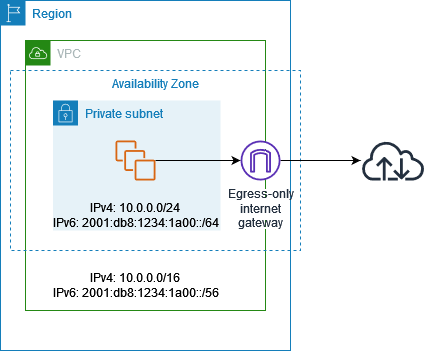
IPv6 addresses are globally unique and are therefore public by default. If you want your instance to be able to access the internet, but you want to prevent resources on the internet from initiating communication with your instance, you can use an egress-only internet gateway.
A subnet is a range of IP addresses in your VPC. You can launch AWS resources into a specified subnet. Use a public subnet for resources that must be connected to the internet and a private subnet for resources that won’t be connected to the internet.
AWS Network Firewall is a managed service that makes it easy to deploy essential network protections for all of your Amazon Virtual Private Clouds (VPCs). The service can be set up with just a few clicks and scales automatically with your network traffic, so you don’t have to worry about deploying and managing any infrastructure. AWS Network Firewall includes features that provide protection from common network threats.
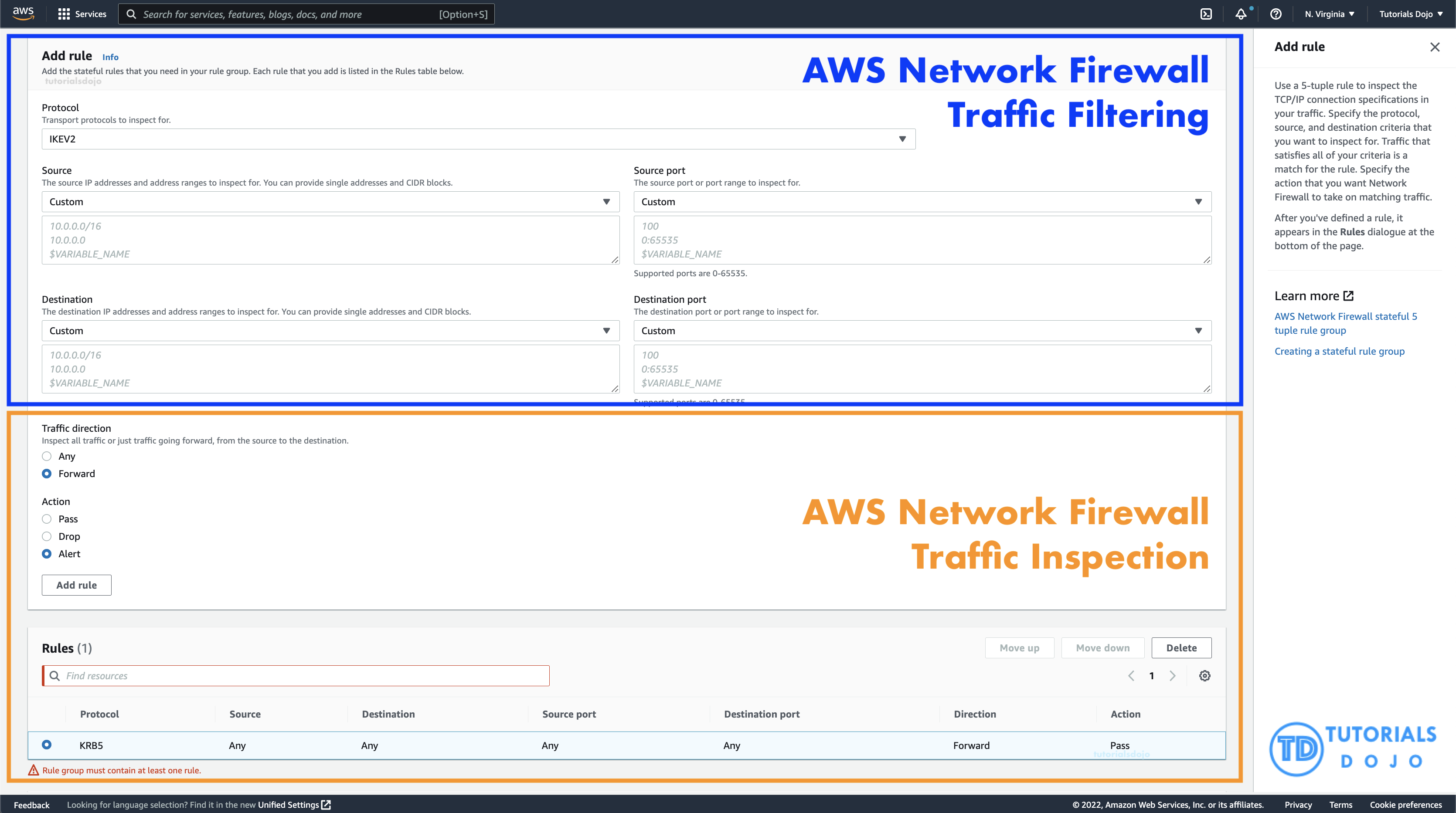
AWS Network Firewall’s stateful firewall can incorporate context from traffic flows, like tracking connections and protocol identification, to enforce policies such as preventing your VPCs from accessing domains using an unauthorized protocol. AWS Network Firewall’s intrusion prevention system (IPS) provides active traffic flow inspection so you can identify and block vulnerability exploits using signature-based detection. AWS Network Firewall also offers web filtering that can stop traffic to known bad URLs and monitor fully qualified domain names.
In this scenario, you can use an egress-only internet gateway to allow outbound IPv6 communication to the internet and then use the AWS Network Firewall to set up the required rules for traffic inspection and traffic filtering.
Hence, the correct answer is: Launch the EC2 instance to a private subnet and attach an Egress-Only Internet Gateway to the VPC to allow outbound IPv6 communication to the internet. Use AWS Network Firewall to set up the required rules for traffic inspection and traffic filtering.
The option that says: Launch the EC2 instance to a private subnet and attach AWS PrivateLink interface endpoint to the VPC to control outbound IPv6 communication to the internet. Use Amazon GuardDuty to set up the required rules for traffic inspection and traffic filtering is incorrect because the AWS PrivateLink (which is also known as VPC Endpoint) is just a highly available, scalable technology that enables you to privately connect your VPC to the AWS services as if they were in your VPC. This service is not capable of controlling outbound IPv6 communication to the Internet. Furthermore, the Amazon GuardDuty service doesn’t have the features to do traffic inspection or filtering.
The option that says: Launch the EC2 instance to a public subnet and attach an Internet Gateway to the VPC to allow outbound IPv6 communication to the internet. Use Traffic Mirroring to set up the required rules for traffic inspection and traffic filtering is incorrect because an Internet Gateway does not limit or control any outgoing IPv6 connection. Take note that the requirement is to prevent the Internet from initiating an inbound IPv6 connection to your instance. This solution allows all kinds of traffic to initiate a connection to your EC2 instance hence, this option is wrong. In addition, the use of Traffic Mirroring is not appropriate as well. This is just an Amazon VPC feature that you can use to copy network traffic from an elastic network interface of type interface, not to filter or inspect the incoming/outgoing traffic.
The option that says: Launch the EC2 instance to a private subnet and attach a NAT Gateway to the VPC to allow outbound IPv6 communication to the internet. Use AWS Firewall Manager to set up the required rules for traffic inspection and traffic filtering is incorrect. While NAT Gateway has a NAT64 feature that translates an IPv6 address to IPv4, it will not prevent inbound IPv6 traffic from reaching the EC2 instance. You have to use the egress-only Internet Gateway instead. Moreover, the AWS Firewall Manager is neither capable of doing traffic inspection nor traffic filtering.
References:
https://docs.aws.amazon.com/vpc/latest/userguide/egress-only-internet-gateway.html
https://docs.aws.amazon.com/vpc/latest/userguide/configure-subnets.html
https://docs.aws.amazon.com/vpc/latest/userguide/VPC_Internet_Gateway.html
Check out this Amazon VPC Cheat Sheet: