Design Resilient Architectures
Domain Design Resilient Architectures chiếm 26% đề SAA-C03 và xoay quanh một câu hỏi duy nhất: khi một thành phần hoặc cả một Availability Zone gục, hệ thống còn phục vụ được không và mất bao nhiêu dữ liệu. Các câu ở đây hiếm khi hỏi định nghĩa dịch vụ — chúng đưa ra một ràng buộc nghiệp vụ (RPO/RTO, giao thức truy cập, chi phí, operational overhead) rồi bắt chọn đúng service và đúng cấu hình của service đó. Những tính từ in hoa trong đề (MOST cost-effective, LEAST operational overhead, MINIMAL data loss) thường là thứ phân định đáp án, chứ không phải kiến thức dịch vụ.
Trọng tâm của domain
Phần tiêu đề “Trọng tâm của domain”- Dư thừa ở mức AZ: RDS Multi-AZ failover, Auto Scaling Group trải trên nhiều Availability Zone với min/max capacity tính sẵn cho tình huống mất một AZ, và NAT Gateway đặt riêng từng AZ kèm route table của private subnet.
- Disaster recovery liên Region theo RPO/RTO cụ thể: Aurora Global Database đặt cạnh cross-region read replica của RDS for PostgreSQL và DynamoDB Global table.
- Bảo vệ và vòng đời dữ liệu trên S3: Versioning, MFA Delete, pre-signed URL, lifecycle policy chuyển object sang S3 Standard-IA hoặc S3 Glacier Flexible Retrieval.
- Chọn storage theo giao thức và hệ điều hành: AWS Storage Gateway file gateway (SMB, local cache), Amazon FSx for Windows File Server tích hợp Active Directory, AWS Transfer for SFTP ghi vào S3, EBS so với instance store.
- Giám sát sâu hơn mặc định: RDS Enhanced Monitoring cho metric mức OS, CloudWatch agent cho memory và disk utilization trên EC2 Linux lẫn Windows.
- Điều hướng kết nối và triển khai an toàn: custom endpoint của Aurora, canary release trên Amazon API Gateway, default termination policy của Auto Scaling Group.
- Danh tính và mã hoá: AD Connector cùng IAM Roles, secret encryption bằng AWS KMS cho etcd của Amazon EKS, AWS DMS khi migrate Oracle.
Bẫy hay gặp
Phần tiêu đề “Bẫy hay gặp”- CloudWatch “trần” hoặc custom script đẩy custom metric được dựng làm mồi cho nhu cầu metric mức OS; có phương án còn gán Enhanced Monitoring cho EC2, trong khi đó là tính năng của RDS.
- Với yêu cầu high availability, đề chen read replica, snapshot hoặc tăng instance size — không cái nào tự failover, chỉ Multi-AZ đạt.
- Lifecycle policy đúng ý nhưng sai đích: S3 One Zone-IA hay S3 Standard-IA thay cho S3 Glacier khi cần archival, hoặc EFS lifecycle (tối đa 365 ngày, và không xoá file) thay cho S3 lifecycle.
- Sai giao thức hoặc nền tảng: NFS file share và Amazon EFS cho workload Windows/SMB cần Active Directory, tape gateway thay file gateway, instance store cho dữ liệu cần bền.
- Phương án chạy được nhưng đắt hoặc nặng tay: blue-green thay canary, EC2 tự cài SFTP kèm cron job, nhân nhiều NAT Gateway mỗi AZ — loại ngay khi đề nhấn cost-effective hoặc least operational overhead.
Thông tin bộ câu hỏi
Phần tiêu đề “Thông tin bộ câu hỏi”| Thông tin | Giá trị |
|---|---|
| Tỉ trọng trong đề thi | 26% |
| Số câu trong trang | 19 |
| Một đáp án | 15 |
| Nhiều đáp án | 4 |
Đáp án đúng và giải thích đầy đủ nằm trong khối gập lại. Làm hết trang rồi mới mở, để đo đúng năng lực ở domain này.
Question 1
Phần tiêu đề “Question 1”Type: Multi-select · Câu gốc: #12
There was an incident in a production environment where user data stored in an Amazon S3 bucket was accidentally deleted by a Junior DevOps Engineer. The issue was escalated to management, and after a few days, an instruction was given to improve the security and protection of AWS resources.
What combination of the following options will protect the S3 objects in the bucket from both accidental deletion and overwriting? (Select TWO.)
- A. Enable Versioning
- B. Provide access to S3 data strictly through pre-signed URL only
- C. Disallow S3 Delete using an IAM bucket policy
- D. Enable S3 Intelligent-Tiering
- E. Enable Multi-Factor Authentication Delete
Answer & explanation
Correct answer: A, E
By using Versioning and enabling MFA (Multi-Factor Authentication) Delete, you can secure and recover your S3 objects from accidental deletion or overwrite.

Versioning is a means of keeping multiple variants of an object in the same bucket. Versioning-enabled buckets enable you to recover objects from accidental deletion or overwrite. You can use versioning to preserve, retrieve, and restore every version of every object stored in your Amazon S3 bucket. With versioning, you can easily recover from both unintended user actions and application failures.

You can also optionally add another layer of security by configuring a bucket to enable MFA (Multi-Factor Authentication) Delete, which requires additional authentication for either of the following operations:
-
Change the versioning state of your bucket
-
Permanently delete an object version
MFA Delete requires two forms of authentication together:
-
Your security credentials
-
The concatenation of a valid serial number, a space, and the six-digit code displayed on an approved authentication device.
Hence, the correct answers are:
- Enable Versioning
- Enable Multi-Factor Authentication Delete
The option that says: Providing access to S3 data strictly through pre-signed URL only is incorrect since a pre-signed URL gives access to the object identified in the URL. Pre-signed URLs are useful when customers perform an object upload to your S3 bucket, but does not help in preventing accidental deletes.
The option that says: Disallowing S3 Delete using an IAM bucket policy is incorrect since you still want users to be able to delete objects in the bucket, and you just want to prevent accidental deletions. Disallowing S3 Delete using an IAM bucket policy will restrict all delete operations to your bucket.
The option that says: Enabling S3 Intelligent-Tiering is incorrect since S3 intelligent tiering does not help in this situation.
References:
https://docs.aws.amazon.com/AmazonS3/latest/dev/Versioning.html
https://docs.aws.amazon.com/AmazonS3/latest/userguide/Welcome.html
Check out this Amazon S3 Cheat Sheet:
Question 2
Phần tiêu đề “Question 2”Type: Multi-select · Câu gốc: #16
A telecommunications company is planning to grant AWS Console access to its developers. Company policy requires the use of identity federation and role-based access control. Currently, the roles are already assigned via groups in the corporate Active Directory.
In this scenario, what combination of the following services can provide developers access to the AWS console? (Select TWO.)
- A. AWS Directory Service AD Connector
- B. AWS Directory Service Simple AD
- C. IAM Groups
- D. IAM Roles
- E. AWS Lambda
Answer & explanation
Correct answer: A, D
AWS Directory Service provides multiple ways to use Amazon Cloud Directory and Microsoft Active Directory (AD) with other AWS services. Directories store information about users, groups, and devices, and administrators use them to manage access to information and resources. AWS Directory Service provides multiple directory choices for customers who want to use existing Microsoft AD or Lightweight Directory Access Protocol (LDAP)–aware applications in the cloud. It also offers those same choices to developers who need a directory to manage users, groups, devices, and access.
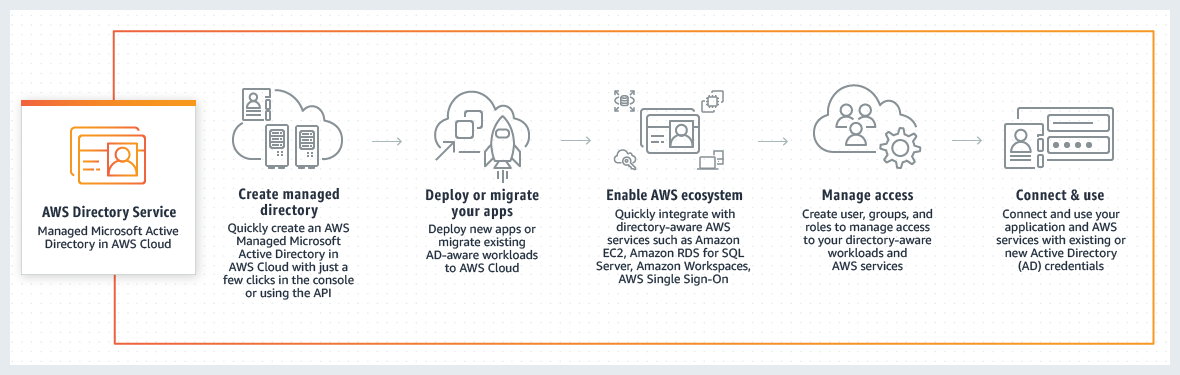
Considering that the company is using a corporate Active Directory, it is best to use AWS Directory Service AD Connector for easier integration. In addition, since the roles are already assigned using groups in the corporate Active Directory, it would be better to also use IAM Roles. Take note that you can assign an IAM Role to the users or groups from your Active Directory once it is integrated with your VPC via the AWS Directory Service AD Connector.
Hence, the correct answers are:
- AWS Directory Service AD Connector.
- IAM Roles.
AWS Directory Service Simple AD is incorrect because this only provides a subset of the features offered by AWS Managed Microsoft AD, including the ability to manage user accounts and group memberships, create and apply group policies, securely connect to Amazon EC2 instances, and provide Kerberos-based single sign-on (SSO). In this scenario, the more suitable component to use is the AD Connector since it is a directory gateway with which you can redirect directory requests to your on-premises Microsoft Active Directory.
IAM Groups is incorrect because this is just a collection of IAM users. Groups let you specify permissions for multiple users, which can make it easier to manage the permissions for those users. In this scenario, the more suitable one to use is IAM Roles in order for permissions to create AWS Directory Service resources.
AWS Lambda is incorrect because this is primarily used for serverless computing.
References:
https://docs.aws.amazon.com/directoryservice/latest/admin-guide/ad_connector_getting_started.html
Check out these AWS IAM and Directory Service Cheat Sheets:
https://tutorialsdojo.com/aws-identity-and-access-management-iam/
https://tutorialsdojo.com/aws-directory-service/
Here is a video tutorial on AWS Directory Service:
Question 3
Phần tiêu đề “Question 3”Type: Single answer · Câu gốc: #19
An online cryptocurrency exchange platform is hosted in AWS, utilizing an Amazon ECS Cluster and Amazon RDS in a Multi-AZ Deployments configuration. The application heavily uses the RDS instance to process complex read and write database operations. To maintain reliability, availability, and performance, it is necessary to closely monitor how the different processes or threads on a DB instance use the CPU, including the percentage of CPU bandwidth and total memory consumed by each process.
Which of the following is the most suitable solution to monitor the database properly?
- A. Use Amazon CloudWatch to monitor the CPU Utilization of your database.
- B. Create a script that collects and publishes custom metrics to Amazon CloudWatch, which tracks the real-time CPU Utilization of the RDS instance, and then set up a custom CloudWatch dashboard to view the metrics.
- C. Enable Enhanced Monitoring in RDS.
- D. Check the
CPU%andMEM%metrics which are readily available in the RDS console that shows the percentage of the CPU bandwidth and total memory consumed by each database process of your RDS instance.
Answer & explanation
Correct answer: C
Amazon RDS offers a powerful feature known as Enhanced Monitoring, which provides detailed metrics in real-time about the operating system (OS) underlying your database instances. This feature allows users to monitor performance at a granular level through the AWS Management Console or by accessing the Enhanced Monitoring JSON output via CloudWatch Logs. By default, these metrics are retained in CloudWatch Logs for 30 days, but this retention period can be adjusted by modifying the retention settings for the RDSOSMetrics log group in CloudWatch.
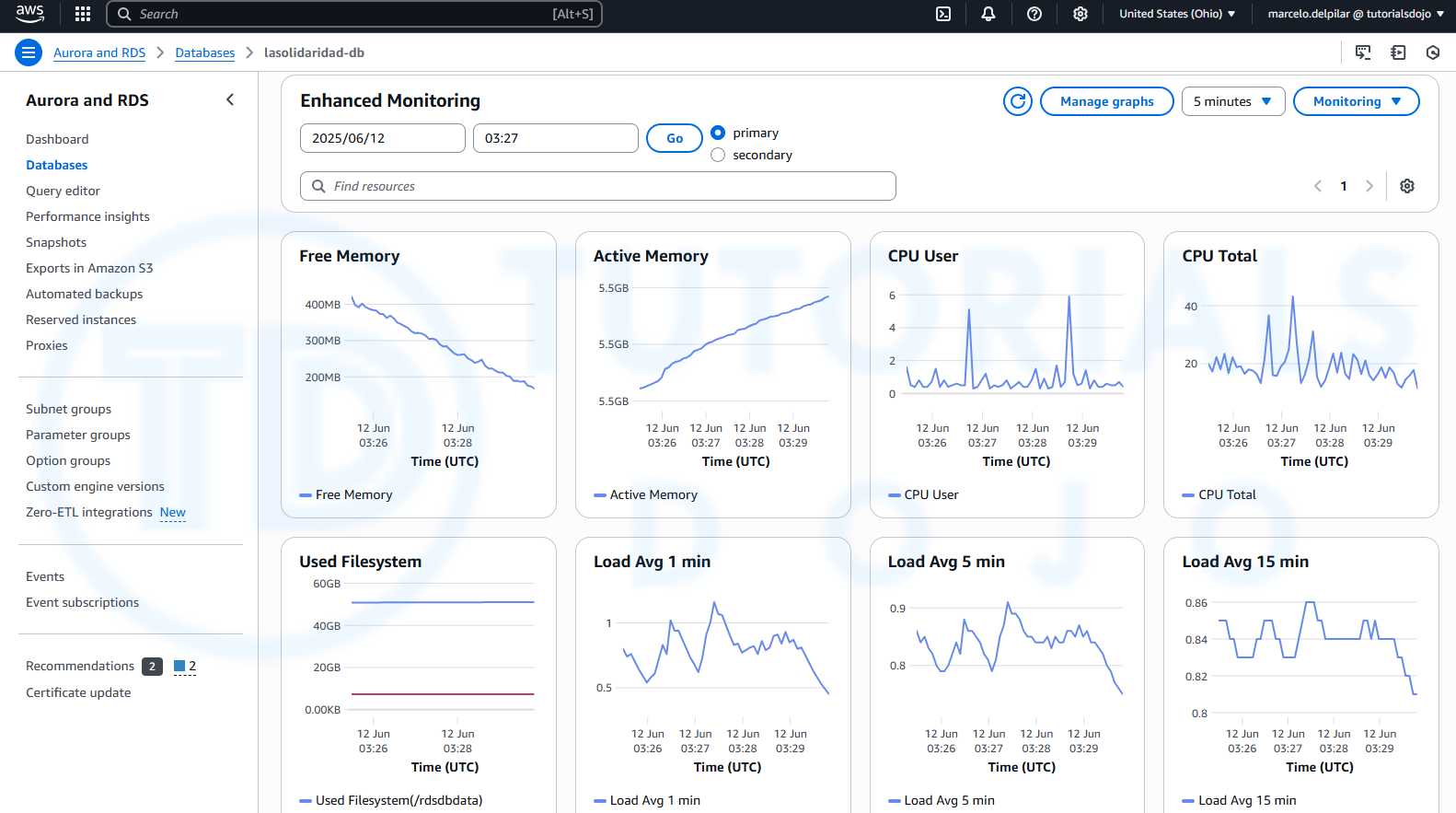
Enhanced Monitoring differs from standard CloudWatch metrics in that it gathers data directly from an agent installed on the instance, rather than from the hypervisor, which is used by CloudWatch. This distinction can lead to slight variations between the two sets of metrics. For instance, CloudWatch provides CPU utilization metrics based on the hypervisor’s view, while Enhanced Monitoring captures detailed insights from the instance itself, offering a more accurate representation of resource usage at the OS level.
This feature is particularly beneficial for users who need in-depth visibility into how individual processes or threads on a DB instance utilize CPU resources. The differences in metric data may become more pronounced when using smaller instance classes, as multiple virtual machines are often managed by the same hypervisor, affecting the accuracy of hypervisor-based metrics.
Hence, the correct answer is: Enable Enhanced Monitoring in RDS.
The option that says: Using Amazon CloudWatch to monitor the CPU Utilization of your database is incorrect. Although you can use this to monitor the CPU Utilization of your database instance, it does not provide the percentage of the CPU bandwidth and total memory consumed by each database process in your RDS instance. Take note that CloudWatch primarily gathers metrics about CPU utilization from the hypervisor for a DB instance while RDS Enhanced Monitoring gathers its metrics from an agent on the instance.
The option that says: Create a script that collects and publishes custom metrics to Amazon CloudWatch, which tracks the real-time CPU Utilization of the RDS instance, and then set up a custom CloudWatch dashboard to view the metrics is incorrect. Although you can use Amazon CloudWatch Logs and CloudWatch dashboard to monitor the CPU Utilization of the database instance, using CloudWatch alone is just not enough to get the specific percentage of the CPU bandwidth and total memory consumed by each database processes. The data provided by CloudWatch is not as detailed as compared with the Enhanced Monitoring feature in RDS. Take note as well that you do not have direct access to the instances/servers of your RDS database instance, unlike with your EC2 instances where you can install a CloudWatch agent or a custom script to get CPU and memory utilization of your instance.
The option that says: Check the CPU% and MEM% metrics which are readily available in the RDS console that shows the percentage of the CPU bandwidth and total memory consumed by each database process of your RDS instance is incorrect because the CPU% and MEM% metrics are not readily available in the Amazon RDS console, which is contrary to what is being stated in this option.
References:
https://docs.aws.amazon.com/AmazonRDS/latest/UserGuide/MonitoringOverview.html#monitoring-cloudwatch
Check out these Amazon CloudWatch and Amazon RDS Cheat Sheets:
https://tutorialsdojo.com/amazon-cloudwatch/
https://tutorialsdojo.com/amazon-relational-database-service-amazon-rds/
Question 4
Phần tiêu đề “Question 4”Type: Single answer · Câu gốc: #24
An e-commerce company utilizes a regional Amazon API Gateway to host its public REST APIs. The API Gateway endpoint is accessed through a custom domain name set up with an Amazon Route 53 alias record. To support continuous improvement, the company intends to launch a new version of its APIs with enhanced features and performance optimizations.
How can the company reduce customer disruption and ensure MINIMAL data loss during the update process in the MOST cost-effective way?
- A. Create a new API Gateway with the updated version of the APIs in OpenAPI JSON or YAML file format, but keep the same custom domain name for the new API Gateway.
- B. Implement a canary release deployment strategy for the API Gateway. Deploy the latest version of the APIs to a canary stage and direct a portion of the user traffic to this stage. Verify the new APIs. Gradually increase the traffic percentage, monitor for any issues, and, if successful, promote the canary stage to production.
- C. Modify the existing API Gateway with the updated version of the APIs, but keep the same custom domain name for the new API Gateway by using the import-to-update operation in either overwrite or merge mode.
- D. Implement a blue-green deployment strategy for the API Gateway, deploying the latest version of the APIs to the green environment. Route some user traffic to it, validate the new APIs, and once thoroughly validated, promote the green environment to production.
Answer & explanation
Correct answer: B
Amazon API Gateway is a fully managed service that makes it easy for developers to create, publish, maintain, monitor, and secure APIs at any scale. It is a front door for your APIs, enabling you to design and implement scalable, highly available, and secure APIs. With Amazon API Gateway, you can create RESTful APIs that any HTTP client, such as web browsers and mobile devices, can consume.
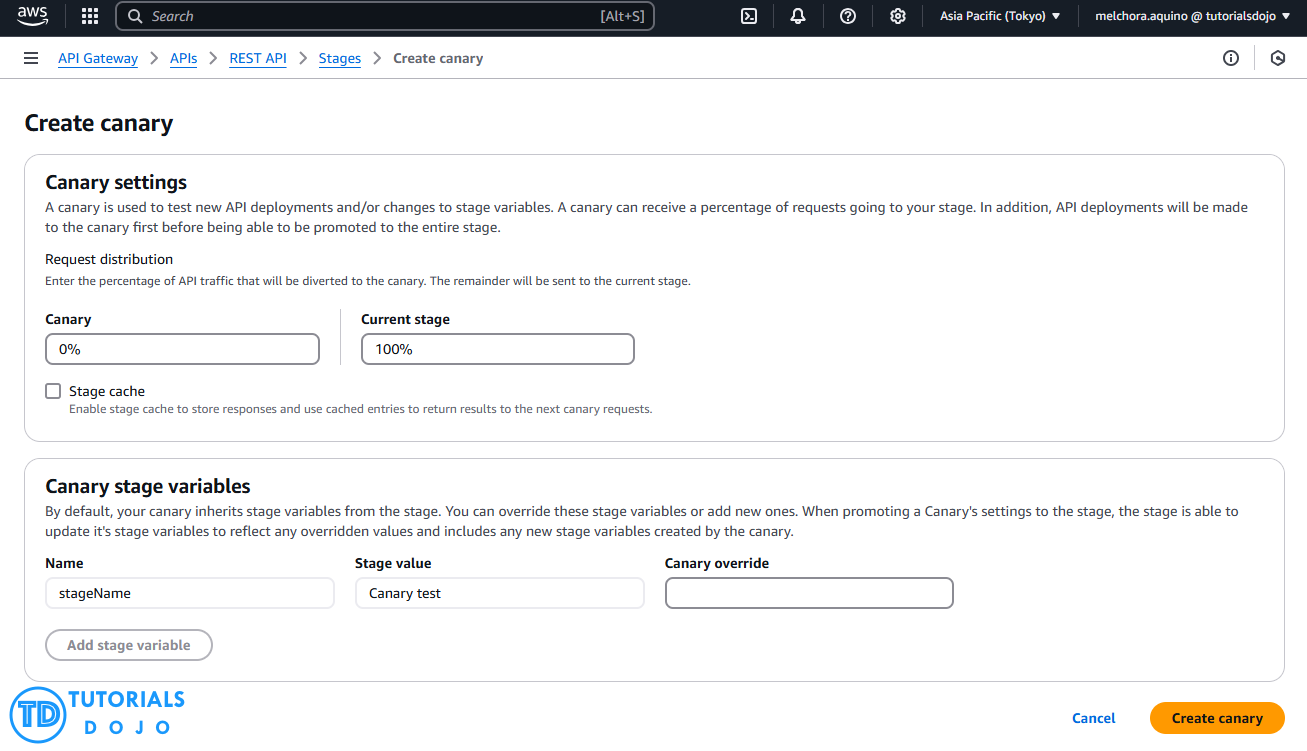
Implementing a canary release deployment strategy for the API Gateway is a great way to ensure your APIs remain stable and reliable. This strategy involves releasing a new version of your API to a small subset of users, allowing you to test the latest version in a controlled environment.
If the new version performs well, you can gradually roll out the update to the rest of your users. This approach lets you catch any issues before they affect your entire user base, minimizing the impact on your customers. By using Amazon API Gateway, you can quickly implement a canary release deployment strategy, ensuring that your APIs are always up-to-date and performing at their best.
Hence, the correct answer is: Implement a canary release deployment strategy for the API Gateway. Deploy the latest version of the APIs to a canary stage and direct a portion of the user traffic to this stage. Verify the new APIs. Gradually increase the traffic percentage, monitor for any issues, and, if successful, promote the canary stage to production.
The option that says: Create a new API Gateway with the updated version of the APIs in OpenAPI JSON or YAML file format, but keep the same custom domain name for the new API Gateway is incorrect. Upgrading to a new API Gateway using an updated version of the APIs in OpenAPI JSON or YAML file format while keeping the same custom domain name can typically result in downtime and confusion during the switch. This is because of DNS propagation delays, which can negatively affect users and even lead to data loss.
The option that says: Modify the existing API Gateway with the updated version of the APIs, but keep the same custom domain name for the new API Gateway by using the import-to-update operation in either overwrite or merge mode is incorrect. Using the import-to-update operation in either overwrite or merge mode may not provide enough isolation and control testing for the new version of the APIs. If something goes wrong during the update process, it could just lead to data loss on the existing API Gateway, potentially affecting all customers simultaneously.
The option that says: Implement a blue-green deployment strategy for the API Gateway, deploying the latest version of the APIs to the green environment. Route some user traffic to it, validate the new APIs, and once thoroughly validated, promote the green environment to production is incorrect. In a blue-green deployment, the blue (existing) and green (updated) environments must be provisioned and maintained. This adds complexity and cost to the update process, which breaks the cost requirement that’s explicitly mentioned in the scenario. Additionally, directing some user traffic to the green environment may only lead to issues for those users, especially if there are undiscovered bugs or performance problems in the updated APIs.
References:
https://docs.aws.amazon.com/apigateway/latest/developerguide/welcome.html
https://docs.aws.amazon.com/apigateway/latest/developerguide/canary-release.html
https://docs.aws.amazon.com/apigateway/latest/developerguide/api-gateway-import-api-update.html
Check out this Amazon API Gateway Cheat Sheet:
Question 5
Phần tiêu đề “Question 5”Type: Single answer · Câu gốc: #31
A company has a cloud architecture composed of Linux and Windows Amazon EC2 instances that process high volumes of financial data 24 hours a day, 7 days a week. To ensure high availability of the systems, the Solutions Architect must create a solution that enables monitoring of memory and disk utilization metrics for all instances.
Which of the following is the most suitable monitoring solution to implement?
- A. Use the default Amazon CloudWatch configuration to EC2 instances where the memory and disk utilization metrics are already available. Install the AWS Systems Manager (SSM) Agent on all the EC2 instances and enable AWS Systems Manager Inventory to track instance configuration and metadata.
- B. Install the Amazon CloudWatch agent to all the EC2 instances that gather the memory and disk utilization data. View the custom metrics in the CloudWatch console.
- C. Enable the Enhanced Monitoring option in EC2 and install Amazon CloudWatch agent to all the EC2 instances to be able to view the memory and disk utilization in the CloudWatch dashboard.
- D. Use Amazon Inspector and install the Inspector agent to all EC2 instances.
Answer & explanation
Correct answer: B
Amazon CloudWatch has available Amazon EC2 Metrics for you to use for monitoring CPU utilization, Network utilization, Disk performance, and Disk Reads/Writes. In case you need to monitor the below items, you need to prepare a custom metric using a Perl or other shell script, as there are no ready-to-use metrics for the following:
- Memory utilization
- Disk swap utilization
- Disk space utilization
- Page file utilization
- Log collection
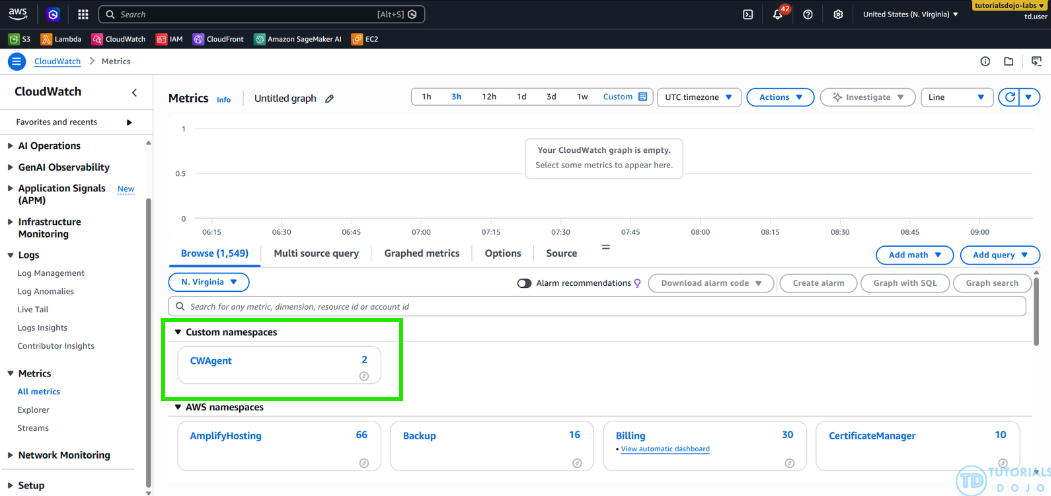
Take note that there is a multi-platform CloudWatch agent which can be installed on both Linux and Windows-based instances. You can use a single agent to collect both system metrics and log files from Amazon EC2 instances and on-premises servers. This agent supports both Windows Server and Linux and enables you to select the metrics to be collected, including sub-resource metrics such as per-CPU core. It is recommended that you use the new agent instead of the older monitoring scripts to collect metrics and logs.
Hence, the correct answer is: Install the Amazon CloudWatch agent to all the EC2 instances that gather the memory and disk utilization data. View the custom metrics in the CloudWatch console.
The option that says: Use the default Amazon CloudWatch configuration to EC2 instances where the memory and disk utilization metrics are already available. Install the AWS Systems Manager (SSM) Agent on all the EC2 instances and enable AWS Systems Manager Inventory to track instance configuration and metadata is incorrect because memory and disk utilization metrics are not available in the default CloudWatch configuration. These metrics are not natively collected by CloudWatch and require the CloudWatch agent to be installed on each instance. Furthermore, AWS Systems Manager Inventory is designed to collect instance metadata and configuration data, such as installed applications and OS details; it does not collect or report performance metrics, such as memory and disk utilization.
The option that says: Enable the Enhanced Monitoring option in EC2 and install Amazon CloudWatch agent to all the EC2 instances to be able to view the memory and disk utilization in the CloudWatch dashboard is incorrect because Enhanced Monitoring is only a feature of Amazon RDS. By default, Enhanced Monitoring metrics are only stored for 30 days in the CloudWatch Logs.
The option that says: Use Amazon Inspector and install the Inspector agent to all EC2 instances is incorrect because Amazon Inspector is primarily an automated security assessment service that helps you test the network accessibility of your Amazon EC2 instances and the security state of your applications running on the instances. It does not provide a custom metric to track the memory and disk utilization of each and every EC2 instance in your VPC.
References:
https://docs.aws.amazon.com/AWSEC2/latest/UserGuide/monitoring_ec2.html
https://docs.aws.amazon.com/AWSEC2/latest/UserGuide/mon-scripts.html#using_put_script
Check out this Amazon CloudWatch Cheat Sheet:
https://tutorialsdojo.com/amazon-cloudwatch/
CloudWatch Agent vs SSM Agent vs Custom Daemon Scripts:
https://tutorialsdojo.com/cloudwatch-agent-vs-ssm-agent-vs-custom-daemon-scripts/
Comparison of AWS Services Cheat Sheets:
Question 6
Phần tiêu đề “Question 6”Type: Single answer · Câu gốc: #34
A suite of web applications is hosted in an Auto Scaling group of Amazon EC2 instances across three Availability Zones and is configured with default settings. There is an Application Load Balancer that forwards the request to the respective target group on the URL path. The scale-in policy has been triggered due to the low number of incoming traffic to the application.
Which EC2 instance will be the first one to be terminated by the Auto Scaling group?
- A. The EC2 instance which has the least number of user sessions
- B. The EC2 instance which has been running for the longest time
- C. The EC2 instance launched from the oldest launch template.
- D. The instance will be randomly selected by the Auto Scaling group
Answer & explanation
Correct answer: C
The default termination policy is designed to help ensure that your network architecture spans Availability Zones evenly. With the default termination policy, the behavior of the Auto Scaling group is as follows:
-
If there are instances in multiple Availability Zones, choose the Availability Zone with the most instances and at least one instance that is not protected from scale in. If there is more than one Availability Zone with this number of instances, choose the Availability Zone with the instances that use the oldest launch template.
-
Determine which unprotected instances in the selected Availability Zone use the oldest launch template. If there is one such instance, terminate it.
-
If there are multiple instances to terminate based on the above criteria, determine which unprotected instances are closest to the next billing hour. (This helps you maximize the use of your EC2 instances and manage your Amazon EC2 usage costs.) If there is one such instance, terminate it.
-
If there is more than one unprotected instance closest to the next billing hour, choose one of these instances at random.
The following flow diagram illustrates how the default termination policy works:
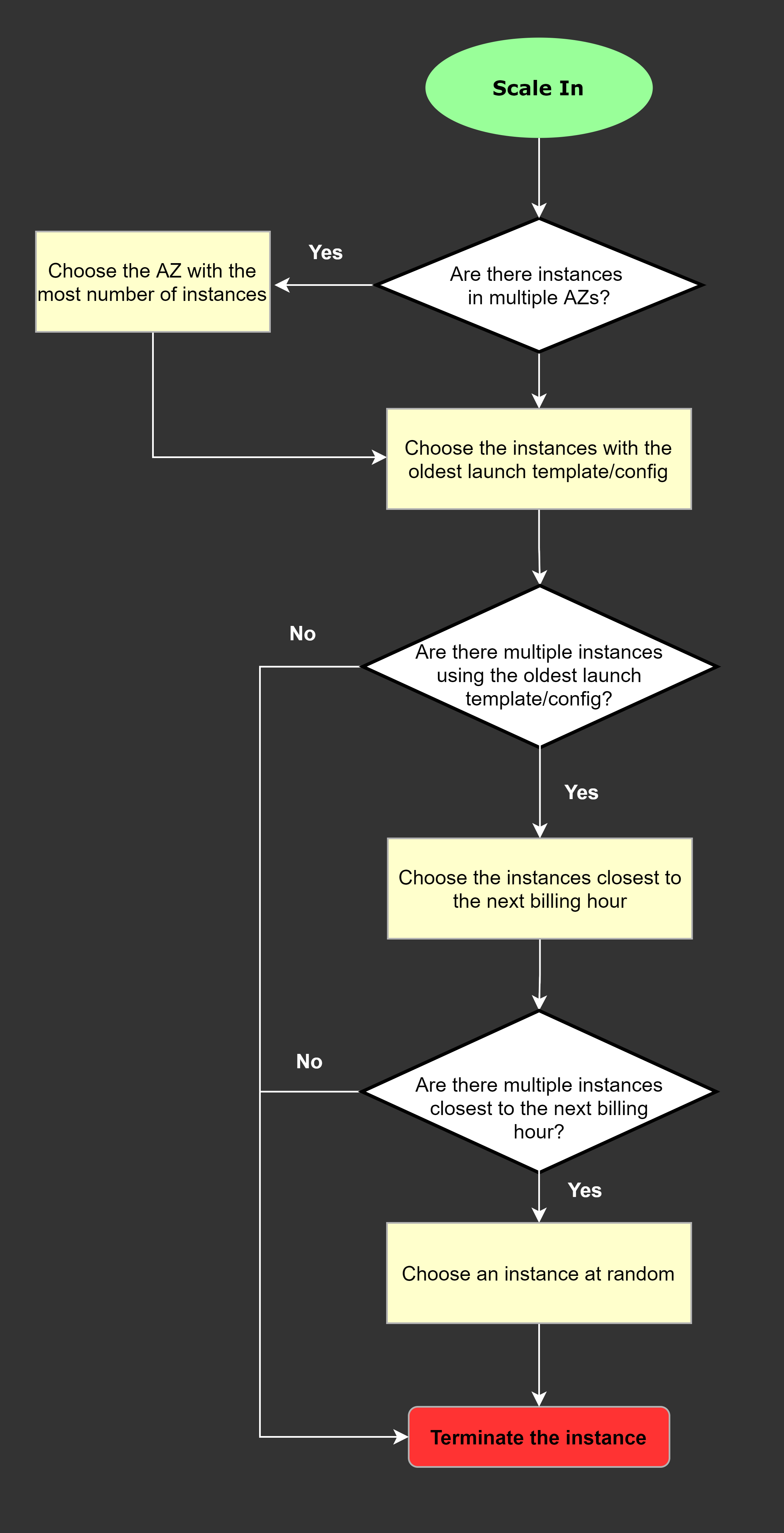 Hence, the correct answer is: The EC2 instance launched from the oldest launch template.
The option that says: The EC2 instance which has the least number of user sessions is incorrect because the number of user sessions is not typically a factor considered by Amazon EC2 Auto Scaling groups when deciding which instances to terminate during a scale-in event.
The option that says: The EC2 instance which has been running for the longest time is incorrect because the duration for which an EC2 instance has been running is not primarily a factor considered by Amazon EC2 Auto Scaling groups when deciding which instances to terminate during a scale-in event.
The option that says: The instance will be randomly selected by the Auto Scaling group is incorrect because Amazon EC2 Auto Scaling groups do not randomly select instances for termination during a scale-in event.
References:
https://docs.aws.amazon.com/autoscaling/ec2/userguide/as-instance-termination.html
Check out this AWS Auto Scaling Cheat Sheet:
Question 7
Phần tiêu đề “Question 7”Type: Single answer · Câu gốc: #35
A travel photo-sharing website is using Amazon S3 to serve high-quality photos to visitors. After a few days, it was discovered that other travel websites are linking to and using these photos. This has resulted in financial losses for the business. The team initially applied PutBucketPolicy with referrer restrictions, but found that referrer headers can be spoofed, rendering this approach insufficient.
What is the MOST effective method to mitigate this issue?
- A. Configure your S3 bucket to remove public read access and use pre-signed URLs with expiry dates.
- B. Use Amazon CloudFront distributions for your photos.
- C. Block the IP addresses of the offending websites using NACL.
- D. Move the high-quality photos to Amazon WorkDocs to serve them privately.
Answer & explanation
Correct answer: A
In Amazon S3, all objects are private by default. Only the object owner has permission to access these objects. However, the object owner can optionally share objects with others by creating a pre-signed URL, using their own security credentials, to grant time-limited permission to download the objects.
When you create a pre-signed URL for your object, you must provide your security credentials, specify a bucket name, an object key, specify the HTTP method (GET to download the object), and the expiration date and time. The pre-signed URLs are valid only for the specified duration.
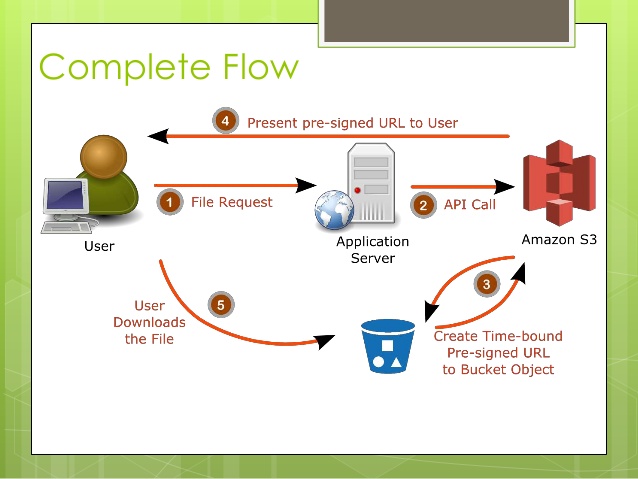
Anyone who receives the pre-signed URL can then access the object. For example, if you have a video in your bucket and both the bucket and the object are private, you can share the video with others by generating a pre-signed URL.
Hence, the correct answer is: Configure your S3 bucket to remove public read access and use pre-signed URLs with expiry dates.
The option that says: Using Amazon CloudFront distributions for your photos is incorrect. CloudFront is primarily a content delivery network service that speeds up the delivery of content to your customers.
The option that says: Blocking the IP addresses of the offending websites using NACL is also incorrect. Blocking IP addresses using NACLs is not a very efficient method because a quick change in IP address would easily bypass this configuration.
The option that says: Move the high-quality photos to Amazon WorkDocs to serve them privately is incorrect, as WorkDocs is simply a fully managed, secure content creation, storage, and collaboration service. It is not a suitable service for storing static content. Amazon WorkDocs is more often used to easily create, edit, and share documents for collaboration and not for serving object data like Amazon S3.
References:
https://docs.aws.amazon.com/AmazonS3/latest/dev/ShareObjectPreSignedURL.html
https://docs.aws.amazon.com/AmazonS3/latest/dev/ObjectOperations.html
Check out this Amazon CloudFront Cheat Sheet:
https://tutorialsdojo.com/amazon-cloudfront/
Comparison of AWS Services Cheat Sheets:
Question 8
Phần tiêu đề “Question 8”Type: Single answer · Câu gốc: #37
An online shopping platform is hosted on an Auto Scaling group of Amazon EC2 Spot instances and utilizes Amazon Aurora PostgreSQL as its database. It is required to optimize database workloads in the cluster by directing the production traffic to high-capacity instances and routing the reporting queries from the internal staff to the low-capacity instances.
Which is the most suitable configuration for the application as well as the Aurora database cluster to achieve this requirement?
- A. Configure your application to use the reader endpoint for both production traffic and reporting queries, which will enable your Aurora database to automatically perform load-balancing among all the Aurora Replicas.
- B. In your application, use the instance endpoint of your Aurora database to handle the incoming production traffic and use the cluster endpoint to handle reporting queries.
- C. Create a custom endpoint in Aurora based on the specified criteria for the production traffic and another custom endpoint to handle the reporting queries.
- D. Do nothing since by default, Aurora will automatically direct the production traffic to your high-capacity instances and the reporting queries to your low-capacity instances.
Answer & explanation
Correct answer: C
Amazon Aurora typically involves a cluster of DB instances instead of a single instance. Each connection is handled by a specific DB instance. When you connect to an Aurora cluster, the host name and port that you specify point to an intermediate handler called an endpoint. Aurora uses the endpoint mechanism to abstract these connections. Thus, you don’t have to hardcode all the hostnames or write your own logic for load-balancing and rerouting connections when some DB instances aren’t available.
For certain Aurora tasks, different instances or groups of instances perform different roles. For example, the primary instance handles all data definition language (DDL) and data manipulation language (DML) statements. Up to 15 Aurora Replicas handle read-only query traffic.

Using endpoints, you can map each connection to the appropriate instance or group of instances based on your use case. For example, to perform DDL statements you can connect to whichever instance is the primary instance. To perform queries, you can connect to the reader endpoint, with Aurora automatically performing load-balancing among all the Aurora Replicas. For clusters with DB instances of different capacities or configurations, you can connect to custom endpoints associated with different subsets of DB instances. For diagnosis or tuning, you can connect to a specific instance endpoint to examine details about a specific DB instance.
The custom endpoint provides load-balanced database connections based on criteria other than the read-only or read-write capability of the DB instances. For example, you might define a custom endpoint to connect to instances that use a particular AWS instance class or a particular DB parameter group. Then you might tell particular groups of users about this custom endpoint. For example, you might direct internal users to low-capacity instances for report generation or ad hoc (one-time) querying, and direct production traffic to high-capacity instances.
Hence, the correct answer is: Create a custom endpoint in Aurora based on the specified criteria for the production traffic and another custom endpoint to handle the reporting queries.
The option that says: Configuring your application to use the reader endpoint for both production traffic and reporting queries, which will enable your Aurora database to automatically perform load-balancing among all the Aurora Replicas is incorrect. Although it is true that a reader endpoint enables your Aurora database to automatically perform load-balancing among all the Aurora Replicas, it is quite limited to doing read operations only. You still need to use a custom endpoint to load-balance the database connections based on the specified criteria.
The option that says: In your application, use the instance endpoint of your Aurora database to handle the incoming production traffic and use the cluster endpoint to handle reporting queries is incorrect because a cluster endpoint (also known as a writer endpoint) for an Aurora DB cluster simply connects to the current primary DB instance for that DB cluster. This endpoint can perform write operations in the database such as DDL statements, which is perfect for handling production traffic but not suitable for handling queries for reporting since there will be no write database operations that will be sent. Moreover, the endpoint does not point to lower-capacity or high-capacity instances as per the requirement. A better solution for this is to use a custom endpoint.
The option that says: Do nothing since by default, Aurora will automatically direct the production traffic to your high-capacity instances and the reporting queries to your low-capacity instances is incorrect because Aurora does not do this by default. You have to create custom endpoints in order to accomplish this requirement.
References:
https://docs.aws.amazon.com/AmazonRDS/latest/AuroraUserGuide/Aurora.Overview.Endpoints.html
https://docs.aws.amazon.com/AmazonRDS/latest/AuroraUserGuide/Aurora.Endpoints.Custom.html
Check out this Amazon Aurora Cheat Sheet:
Question 9
Phần tiêu đề “Question 9”Type: Single answer · Câu gốc: #39
A company is experiencing repeated outages in the Availability Zone where its Amazon RDS database instance is deployed, resulting in a complete loss of access to the database during each incident. The team evaluated a multi-site active/active deployment but found that it requires cross-Region synchronization, whereas a simpler embedded solution would suffice.
Which solution should be implemented to prevent losing database access if this occurs again?
- A. Create a snapshot of the database
- B. Enabled Multi-AZ failover
- C. Increase the database instance size
- D. Create a read replica
Answer & explanation
Correct answer: B
Amazon RDS Multi-AZ deployments are designed to enhance the availability and durability of database instances, making them well-suited for production workloads. When you enable Multi-AZ failover, Amazon RDS automatically creates a standby replica in a different Availability Zone (AZ) and synchronously replicates data from the primary instance. This ensures high data consistency and protection against infrastructure-related disruptions. Each AZ operates on physically distinct infrastructure, which adds fault isolation and resilience.
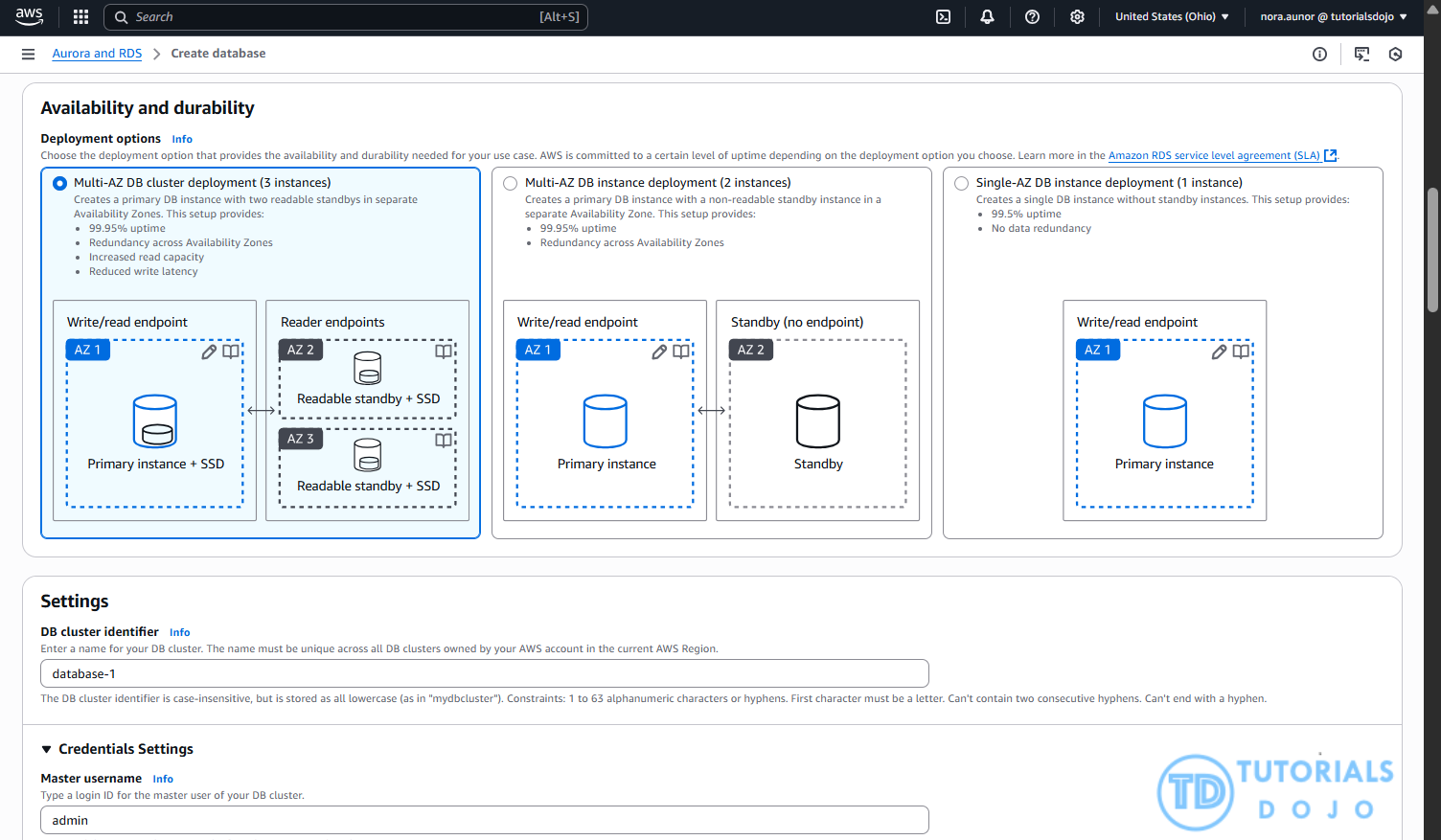
In the event of planned maintenance or an unexpected failure, such as an Availability Zone outage or hardware issue, Amazon RDS automatically performs a failover to the standby instance. This process is fully managed by Amazon RDS and does not require manual intervention, helping to minimize downtime and maintain business continuity. For Amazon Aurora, the failover involves promoting a replica to become the new writer instance.
Hence, the correct answer is: Enable Multi-AZ failover.
The option that says: Create a snapshot of the database is incorrect because snapshots are typically used for backup and disaster recovery, not for maintaining high availability. A snapshot allows you to restore a database to a specific point in time, but it does not prevent downtime or provide continuous access during an Availability Zone outage.
The option that says: Increase the database instance size is incorrect because this action just improves the instance’s compute and memory capacity, which may help performance, but does not address Availability Zone-level failures. The database would still be a single point of failure within the same zone, leaving it vulnerable to the same type of outage described in the question.
The option that says: Create a read replica is incorrect because read replicas are primarily intended to handle read-heavy workloads and do not automatically take over in the event of a failure. Promoting a read replica to a standalone instance requires manual intervention, which simply does not meet the goal of preventing loss of access during unplanned outages.
References:
https://aws.amazon.com/rds/features/multi-az/
https://docs.aws.amazon.com/AmazonRDS/latest/UserGuide/Concepts.MultiAZ.html
Check out this Amazon RDS Cheat Sheet:
https://tutorialsdojo.com/amazon-relational-database-service-amazon-rds/
Tutorials Dojo’s AWS Certified Solutions Architect Associate Exam Study Guide:
https://tutorialsdojo.com/aws-certified-solutions-architect-associate-saa-c03/
Question 10
Phần tiêu đề “Question 10”Type: Single answer · Câu gốc: #41
A company has a hybrid cloud architecture that connects its on-premises data center and cloud infrastructure in AWS. It requires a durable storage backup for its corporate documents stored on-premises and a local cache that provides low-latency access to recently accessed data to reduce data egress charges. The documents must be stored on and retrieved from AWS via the Server Message Block (SMB) protocol. These files must be immediately accessible within minutes for six months and archived for another decade to meet data compliance.
Which of the following is the best and most cost-effective approach to implement in this scenario?
- A. Launch a new file gateway that connects to your on-premises data center using AWS Storage Gateway. Upload the documents to the file gateway and set up a lifecycle policy to move the data into Glacier for data archival.
- B. Launch a new tape gateway that connects to your on-premises data center using AWS Storage Gateway. Upload the documents to the tape gateway and set up a lifecycle policy to move the data into Glacier for archival.
- C. Establish a Direct Connect connection to integrate your on-premises network to your VPC. Upload the documents on Amazon EBS Volumes and use a lifecycle policy to automatically move the EBS snapshots to an Amazon S3 bucket, and then later to Glacier for archival.
- D. Use AWS DataSync to transfer all files from the on-premises network directly to an Amazon S3 bucket, and set up a lifecycle policy to move the data into Glacier for archival.
Answer & explanation
Correct answer: A
A file gateway supports a file interface into Amazon Simple Storage Service (Amazon S3) and combines a service and a virtual software appliance. By using this combination, you can store and retrieve objects in Amazon S3 using industry-standard file protocols such as Network File System (NFS) and Server Message Block (SMB). The software appliance, or gateway, is deployed into your on-premises environment as a virtual machine (VM) running on VMware ESXi, Microsoft Hyper-V, or Linux Kernel-based Virtual Machine (KVM) hypervisor.
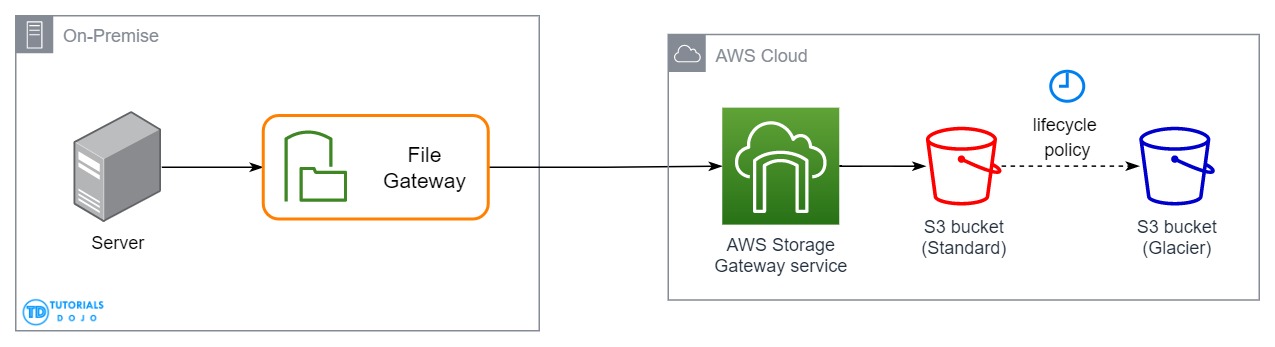
The gateway provides access to objects in S3 as files or file share mount points. With a file gateway, you can do the following:
-
You can store and retrieve files directly using the NFS version 3 or 4.1 protocol.
-
You can store and retrieve files directly using the SMB file system version, 2 and 3 protocol.
-
You can access your data directly in Amazon S3 from any AWS Cloud application or service.
-
You can manage your Amazon S3 data using lifecycle policies, cross-region replication, and versioning. You can think of a file gateway as a file system mount on S3.
AWS Storage Gateway supports the Amazon S3 Standard, Amazon S3 Standard-Infrequent Access, Amazon S3 One Zone-Infrequent Access and Amazon Glacier storage classes. When you create or update a file share, you have the option to select a storage class for your objects. You can either choose the Amazon S3 Standard or any of the infrequent access storage classes such as S3 Standard IA or S3 One Zone IA. Objects stored in any of these storage classes can be transitioned to Amazon Glacier using a Lifecycle Policy.
Although you can write objects directly from a file share to the S3-Standard-IA or S3-One Zone-IA storage class, it is recommended that you use a Lifecycle Policy to transition your objects rather than write directly from the file share, especially if you’re expecting to update or delete the object within 30 days of archiving it.
Therefore, the correct answer is: Launch a new file gateway that connects to your on-premises data center using AWS Storage Gateway. Upload the documents to the file gateway and set up a lifecycle policy to move the data into Glacier for data archival.
The option that says: Launch a new tape gateway that connects to your on-premises data center using AWS Storage Gateway. Upload the documents to the tape gateway and set up a lifecycle policy to move the data into Glacier for archival is incorrect because although tape gateways provide cost-effective and durable archive backup data in Amazon Glacier, it does not meet the criteria of being retrievable immediately within minutes. It also doesn’t maintain a local cache that provides low latency access to the recently accessed data and reduce data egress charges. Thus, it is still better to set up a file gateway instead.
The option that says: Establish a Direct Connect connection to integrate your on-premises network to your VPC. Upload the documents on Amazon EBS Volumes and use a lifecycle policy to automatically move the EBS snapshots to an Amazon S3 bucket, and then later to Glacier for archival is incorrect because EBS Volumes are not only less durable compared with S3 and it would be more cost-efficient if you directly store the documents to an S3 bucket. An alternative solution is to use AWS Direct Connect with AWS Storage Gateway to create a connection for high-throughput workload needs, providing a dedicated network connection between your on-premises file gateway and AWS. But this solution is using EBS, hence, this option is still wrong.
The option that says: Use AWS DataSync to transfer all files from the on-premises network directly to an Amazon S3 bucket, and set up a lifecycle policy to move the data into Glacier for archival is incorrect because DataSync is primarily a data migration service that facilitates bulk transfers, but it does not offer local caching for low-latency access to recently accessed files. Without caching, the company may incur higher data egress charges, making this option less cost-effective.
References:
https://docs.aws.amazon.com/AmazonS3/latest/dev/object-lifecycle-mgmt.html
https://docs.aws.amazon.com/storagegateway/latest/userguide/StorageGatewayConcepts.html
Check out this Amazon S3 Cheat Sheet:
https://tutorialsdojo.com/amazon-s3/
Tutorials Dojo’s AWS Certified Solutions Architect Associate Exam Study Guide:
https://tutorialsdojo.com/aws-certified-solutions-architect-associate-saa-c02/
Question 11
Phần tiêu đề “Question 11”Type: Single answer · Câu gốc: #46
An application consists of multiple Amazon EC2 instances in private subnets in different availability zones. The application uses a single NAT Gateway for downloading software patches from the Internet to the instances. There is a requirement to protect the application from a single point of failure when the NAT Gateway encounters a failure or if its availability zone goes down.
How should the Solutions Architect redesign the architecture to be more highly available and cost-effective?
- A. Create a NAT Gateway in each availability zone. Configure the route table in each private subnet to ensure that instances use the NAT Gateway in the same availability zone
- B. Create a NAT Gateway in each availability zone. Configure the route table in each public subnet to ensure that instances use the NAT Gateway in the same availability zone.
- C. Create two NAT Gateways in each availability zone. Configure the route table in each public subnet to ensure that instances use the NAT Gateway in the same availability zone.
- D. Create three NAT Gateways in each availability zone. Configure the route table in each private subnet to ensure that instances use the NAT Gateway in the same availability zone.
Answer & explanation
Correct answer: A
A NAT Gateway is a highly available, managed Network Address Translation (NAT) service for your resources in a private subnet to access the Internet. NAT gateway is created in a specific Availability Zone and implemented with redundancy in that zone.
You must create a NAT gateway on a public subnet to enable instances in a private subnet to connect to the Internet or other AWS services, but prevent the Internet from initiating a connection with those instances.
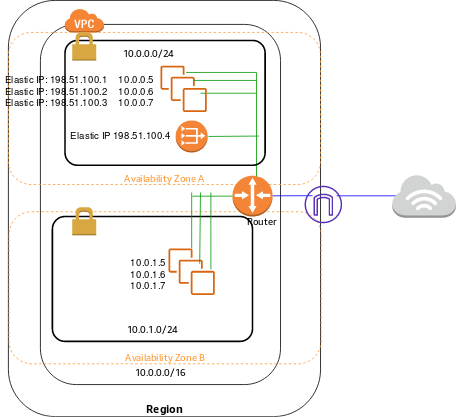
If you have resources in multiple Availability Zones and they share one NAT gateway, and if the NAT gateway’s Availability Zone is down, resources in the other Availability Zones lose Internet access. To create an Availability Zone-independent architecture, create a NAT gateway in each Availability Zone and configure your routing to ensure that resources use the NAT gateway in the same Availability Zone.
Hence, the correct answer is: Create a NAT Gateway in each availability zone. Configure the route table in each private subnet to ensure that instances use the NAT Gateway in the same availability zone.
The option that says: Create a NAT Gateway in each availability zone. Configure the route table in each public subnet to ensure that instances use the NAT Gateway in the same availability zone is incorrect because you should configure the route table in the private subnet and not the public subnet to associate the right instances in the private subnet.
The options that say: Create two NAT Gateways in each availability zone. Configure the route table in each public subnet to ensure that instances use the NAT Gateway in the same availability zone is incorrect because you are primarily required to set up the NAT Gateway in the private subnet to allow outbound internet access for private instances.
The options that say: Create three NAT Gateways in each availability zone. Configure the route table in each private subnet to ensure that instances use the NAT Gateway in the same availability zone is incorrect because the only necessity here is ensuring outbound traffic for private instances, and adding multiple NAT Gateways does not align with cost optimization unless explicitly required for high availability.
References:
https://docs.aws.amazon.com/vpc/latest/userguide/vpc-nat-gateway.html
https://docs.aws.amazon.com/vpc/latest/userguide/vpc-nat-comparison.html
Check out this Amazon VPC Cheat Sheet:
Question 12
Phần tiêu đề “Question 12”Type: Single answer · Câu gốc: #48
An organization requires a persistent block storage volume to support its mission-critical workloads. The backup data will be stored in an object storage service and, after 30 days, transitioned to an archival storage service for long-term retention. The team has already configured an Amazon EBS snapshot retention rule for point-in-time recovery.
What should be done to meet the above requirement?
- A. Attach an EBS volume to your Amazon EC2 instance. Use Amazon S3 to store your backup data and configure a lifecycle policy to transition your objects to S3 Glacier Flexible Retrieval.
- B. Attach an EBS volume to your Amazon EC2 instance. Use Amazon S3 to store your backup data and configure a lifecycle policy to transition your objects to S3 One Zone-IA.
- C. Attach an instance store volume in your existing Amazon EC2 instance. Use Amazon S3 to store your backup data and configure a lifecycle policy to transition your objects to S3 Glacier Flexible Retrieval.
- D. Attach an instance store volume in your Amazon EC2 instance. Use Amazon S3 to store your backup data and configure a lifecycle policy to transition your objects to S3 One Zone-IA.
Answer & explanation
Correct answer: A
Amazon Elastic Block Store (EBS) is an easy-to-use, high-performance block storage service designed for use with Amazon Elastic Compute Cloud (EC2) for both throughput and transaction-intensive workloads at any scale. A broad range of workloads, such as relational and non-relational databases, enterprise applications, containerized applications, big data analytics engines, file systems, and media workflows, are widely deployed on Amazon EBS.
Amazon Simple Storage Service (Amazon S3) is an object storage service that offers industry-leading scalability, data availability, security, and performance. This means customers of all sizes and industries can use it to store and protect any amount of data for a range of use cases, such as websites, mobile applications, backup and restore, archive, enterprise applications, IoT devices, and big data analytics.
In an S3 Lifecycle configuration, you can define rules to transition objects from one storage class to another to save on storage costs. Amazon S3 supports a waterfall model for transitioning between storage classes, as shown in the diagram below:
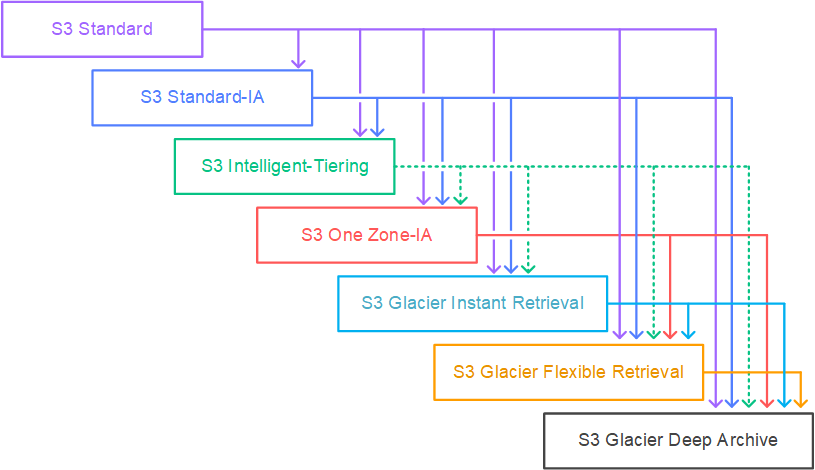
In this scenario, three services are required to implement this solution. The mission-critical workloads mean that you need to have a persistent block storage volume and the designed service for this is Amazon EBS volumes. The second workload needs to have an object storage service, such as Amazon S3, to store your backup data. Amazon S3 enables you to configure the lifecycle policy from S3 Standard to different storage classes. For the last one, it needs archive storage such as Amazon S3 Glacier Flexible Retrieval.
The mention of an EBS snapshot retention rule is intentionally included as a distractor. Although EBS snapshots are stored in S3 internally, they are managed separately and cannot be transitioned using S3 lifecycle policies to archival storage classes like S3 Glacier Flexible Retrieval.
Hence, the correct answer is: Attach an EBS volume to your Amazon EC2 instance. Use Amazon S3 to store your backup data and configure a lifecycle policy to transition your objects to S3 Glacier Flexible Retrieval.
The option that says: Attach an EBS volume to your Amazon EC2 instance. Use Amazon S3 to store your backup data and configure a lifecycle policy to transition your objects to S3 One Zone-IA is incorrect because the lifecycle policy will transition your objects into an infrequently accessed storage class and not a storage class for data archiving.
The option that says: Attach an instance store volume in your existing Amazon EC2 instance. Use Amazon S3 to store your backup data and configure a lifecycle policy to transition your objects to S3 Glacier Flexible Retrieval is incorrect because an Instance Store volume is simply a temporary block-level storage for EC2 instances. Also, you can’t attach instance store volumes to an instance after you’ve launched it. You can specify the instance store volumes for your instance only when you launch it.
The option that says: Attach an instance store volume in your Amazon EC2 instance. Use Amazon S3 to store your backup data and configure a lifecycle policy to transition your objects to S3 One Zone-IA is incorrect. Just like the previous option, the use of instance store volume is not suitable for mission-critical workloads because the data can be lost if the underlying disk drive fails, the instance stops, or if the instance is terminated. In addition, Amazon S3 Glacier Flexible Retrieval is a more suitable option for data archival instead of Amazon S3 One Zone-IA.
References:
https://docs.aws.amazon.com/AWSEC2/latest/UserGuide/AmazonEBS.html
https://aws.amazon.com/s3/storage-classes/
Check out this Amazon S3 Cheat Sheet:
https://tutorialsdojo.com/amazon-s3/
Tutorials Dojo’s AWS Storage Services Cheat Sheets:
https://tutorialsdojo.com/aws-cheat-sheets-storage-services/
Question 13
Phần tiêu đề “Question 13”Type: Single answer · Câu gốc: #52
A company needs to deploy at least two Amazon EC2 instances to support the normal workloads of its application and automatically scale up to six EC2 instances to handle the peak load. The architecture must be highly available and fault-tolerant as it is processing mission-critical workloads.
As a Solutions Architect, what should be done to meet this requirement?
- A. Create an Auto Scaling group of EC2 instances and set the minimum capacity to 2 and the maximum capacity to 6. Deploy 4 instances in Availability Zone A.
- B. Create an Auto Scaling group of EC2 instances and set the minimum capacity to 4 and the maximum capacity to 6. Deploy 2 instances in Availability Zone A and another 2 instances in Availability Zone B.
- C. Create an Auto Scaling group of EC2 instances and set the minimum capacity to 2 and the maximum capacity to 6. Use 2 Availability Zones and deploy 1 instance for each AZ.
- D. Create an Auto Scaling group of EC2 instances and set the minimum capacity to 2 and the maximum capacity to 4. Deploy 2 instances in Availability Zone A and 2 instances in Availability Zone B.
Answer & explanation
Correct answer: B
Amazon EC2 Auto Scaling helps ensure that you have the correct number of Amazon EC2 instances available to handle the load for your application. You create collections of EC2 instances, called Auto Scaling groups. You can specify the minimum number of instances in each Auto Scaling group, and Amazon EC2 Auto Scaling ensures that your group never goes below this size. You can also specify the maximum number of instances in each Auto Scaling group, and Amazon EC2 Auto Scaling ensures that your group never goes above this size.
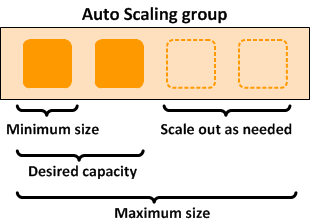
To achieve highly available and fault-tolerant architecture for your applications, you must deploy all your instances in different Availability Zones. This will help you isolate your resources if an outage occurs. Take note that to achieve fault tolerance, you need to have redundant resources in place to avoid any system degradation in the event of a server fault or an Availability Zone outage. Having a fault-tolerant architecture entails an extra cost in running additional resources than what is usually needed. This is to ensure that the mission-critical workloads are processed.
Since the scenario requires at least 2 instances to handle regular traffic, you should have 2 instances running all the time even if an AZ outage occurred. You can use an Auto Scaling Group to automatically scale your compute resources across two or more Availability Zones. You have to specify the minimum capacity to 4 instances and the maximum capacity to 6 instances. If each AZ has 2 instances running, even if an AZ fails, your system will still run a minimum of 2 instances.
Hence, the correct answer is: Create an Auto Scaling group of EC2 instances and set the minimum capacity to 4 and the maximum capacity to 6. Deploy 2 instances in Availability Zone A and another 2 instances in Availability Zone B.
The option that says: Create an Auto Scaling group of EC2 instances and set the minimum capacity to 2 and the maximum capacity to 6. Deploy 4 instances in Availability Zone A is incorrect because the instances are only deployed in a single Availability Zone. It cannot protect your applications and data from datacenter or AZ failures.
The option that says: Create an Auto Scaling group of EC2 instances and set the minimum capacity to 2 and the maximum capacity to 6. Use 2 Availability Zones and deploy 1 instance for each AZ is incorrect. It is required to have 2 instances running all the time. If an AZ outage happened, ASG will launch a new instance on the unaffected AZ. This provisioning does not happen instantly, which means that for a certain period of time, there will only be 1 running instance left.
The option that says: Create an Auto Scaling group of EC2 instances and set the minimum capacity to 2 and the maximum capacity to 4. Deploy 2 instances in Availability Zone A and 2 instances in Availability Zone B is incorrect. Although this fulfills the requirement of at least 2 EC2 instances and high availability, the maximum capacity setting is wrong. It should be set to 6 to properly handle the peak load. If an AZ outage occurs and the system is at its peak load, the number of running instances in this setup will only be 4 instead of 6 and this will affect the performance of your application.
References:
https://docs.aws.amazon.com/autoscaling/ec2/userguide/what-is-amazon-ec2-auto-scaling.html
https://docs.aws.amazon.com/documentdb/latest/developerguide/regions-and-azs.html
Check out this AWS Auto Scaling Cheat Sheet:
Question 14
Phần tiêu đề “Question 14”Type: Single answer · Câu gốc: #54
A Solutions Architect is designing a highly available relational database solution to mitigate the risk of a multi-region failure. The database must meet a Recovery Point Objective (RPO) of 1 second and a Recovery Time Objective (RTO) of less than 1 minute. The architect needs a disaster recovery plan that enables automatic cross-region replication with minimal data loss and rapid recovery in the event of a failure, which is a requirement beyond the regional high availability provided by Amazon RDS Multi-AZ.
Which AWS solution best fulfills this requirement?
- A. Amazon DynamoDB Global table
- B. RDS for PostgreSQL with cross-region read replicas
- C. Amazon Timestream for Analytics
- D. Amazon Aurora Global Database
Answer & explanation
Correct answer: D
Amazon Aurora Global Database is designed for globally distributed applications, allowing a single Amazon Aurora database to span multiple AWS regions. It replicates your data with no impact on database performance, enables fast local reads with low latency in each region, and provides disaster recovery from region-wide outages.
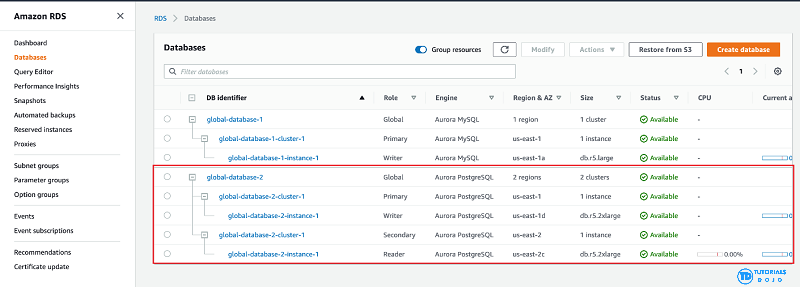
Aurora Global Database supports storage-based replication that has a latency of less than 1 second. If there is an unplanned outage, one of the secondary regions you assigned can be promoted to read and write capabilities in less than 1 minute. This feature is called Cross-Region Disaster Recovery. An RPO of 1 second and an RTO of less than 1 minute provide you with a strong foundation for a global business continuity plan.
Hence, the correct answer is: Amazon Aurora Global Database.
The option that says: Amazon DynamoDB Global table is incorrect because while this supports multi-region, fully replicated tables with low latency, it’s more suitable for NoSQL workloads, not relational databases.
The option that says: RDS for PostgreSQL with cross-region read replicas is incorrect. While this option can help with disaster recovery, it simply doesn’t meet the specified RPO and RTO requirements in the scenario. Replication lag in cross-region read replicas can take several minutes to complete, which could prevent the company from meeting the RPO of 1 second.
The option that says: Amazon Timestream for Analytics is incorrect because it is primarily a serverless time series database service that is commonly used for IoT and operational applications. The most suitable solution for this scenario is to use the Amazon Aurora Global Database since it can provide the required RPO and RTO.
References:
https://aws.amazon.com/rds/aurora/global-database/
https://docs.aws.amazon.com/AmazonRDS/latest/AuroraUserGuide/aurora-global-database.html
Check out this Amazon Aurora Cheat Sheet:
Question 15
Phần tiêu đề “Question 15”Type: Multi-select · Câu gốc: #55
A company plans to host a web application in an Auto Scaling group of Amazon EC2 instances. The application will be used globally by users to upload and store several types of files. Based on user trends, files that are older than 2 years must be stored in a different storage class. The Solutions Architect of the company needs to create a cost-effective and scalable solution to store the old files yet still provide durability and high availability.
Which of the following approach can be used to fulfill this requirement? (Select TWO.)
- A. Use Amazon S3 and create a lifecycle policy that will move the objects to S3 Glacier after 2 years.
- B. Use Amazon EFS and create a lifecycle policy that will move the objects to EFS-IA after 2 years.
- C. Use Amazon S3 and create a lifecycle policy that will move the objects to S3 Standard-IA after 2 years.
- D. Use Amazon EBS volumes to store the files. Configure the Amazon Data Lifecycle Manager (DLM) to schedule snapshots of the volumes after 2 years.
- E. Use a RAID 0 storage configuration that stripes multiple Amazon EBS volumes together to store the files. Configure the Amazon Data Lifecycle Manager (DLM) to schedule snapshots of the volumes after 2 years.
Answer & explanation
Correct answer: A, C
Amazon S3 stores data as objects within buckets. An object is a file and any optional metadata that describes the file. To store a file in Amazon S3, you upload it to a bucket. When you upload a file as an object, you can set permissions on the object and any metadata. Buckets are containers for objects. You can have one or more buckets. You can control access for each bucket, deciding who can create, delete, and list objects in it. You can also choose the geographical region where Amazon S3 will store the bucket and its contents, and view access logs for the bucket and its objects.
To move a file to a different storage class, you can use Amazon S3 or Amazon EFS. Both services have lifecycle configurations. Take note that Amazon EFS lifecycle policies support a minimum transition period of 1 day and a maximum of 365 days. Since the requirement is to move files older than 2 years (730 days), EFS still cannot meet this requirement even at its maximum configuration. Since you need to move the files that are older than 2 years to a more cost-effective and scalable solution, you should use the Amazon S3 lifecycle configuration. With S3 lifecycle rules, you can transition files to S3 Standard IA or S3 Glacier. Using S3 Glacier expedited retrieval, you can quickly access your files within 1-5 minutes.
Hence, the correct answers are:
- Use Amazon S3 and create a lifecycle policy that will move the objects to S3 Glacier after 2 years.
- Use Amazon S3 and create a lifecycle policy that will move the objects to S3 Standard-IA after 2 years.
The option that says: Use Amazon EFS and create a lifecycle policy that will move the objects to EFS-IA after 2 years is incorrect because the maximum days of EFS lifecycle policies is only up to 365 days. Therefore, it still does not meet the requirement of moving files older than 2 years or 730 days.
The option that says: Use Amazon EBS volumes to store the files. Configure the Amazon Data Lifecycle Manager (DLM) to schedule snapshots of the volumes after 2 years is incorrect because Amazon EBS simply costs more and is not as scalable as Amazon S3. It has some limitations when accessed by multiple EC2 instances. There are also huge costs involved in using the multi-attach feature on a Provisioned IOPS EBS volume to allow multiple EC2 instances to access the volume.
The option that says: Use a RAID 0 storage configuration that stripes multiple Amazon EBS volumes together to store the files. Configure the Amazon Data Lifecycle Manager (DLM) to schedule snapshots of the volumes after 2 years is incorrect because RAID (Redundant Array of Independent Disks) is just a data storage virtualization technology that combines multiple storage devices to achieve higher performance or data durability. RAID 0 can stripe multiple volumes together for greater I/O performance than you can achieve with a single volume. On the other hand, RAID 1 can mirror two volumes together to achieve on-instance redundancy.
References:
https://docs.aws.amazon.com/AmazonS3/latest/dev/object-lifecycle-mgmt.html
https://docs.aws.amazon.com/efs/latest/ug/lifecycle-management-efs.html
https://docs.aws.amazon.com/efs/latest/ug/API_LifecyclePolicy.html
https://aws.amazon.com/s3/faqs/
Check out this Amazon S3 Cheat Sheet:
Question 16
Phần tiêu đề “Question 16”Type: Single answer · Câu gốc: #57
A company plans to migrate its on-premises workload to AWS. The current architecture is composed of a Microsoft SharePoint server that uses a Windows shared file storage. The Solutions Architect needs to use a cloud storage solution that is highly available and can be integrated with Active Directory for access control and authentication, and must be accessible from on-premises via a direct connection.
Which of the following options can satisfy the given requirement?
- A. Launch an Amazon EC2 Windows Server to mount a new Amazon S3 bucket as a file volume.
- B. Create a file system using Amazon EFS and join it to an Active Directory domain.
- C. Create a Network File System (NFS) file share using AWS Storage Gateway.
- D. Provision an Amazon FSx for Windows File Server file system and join it to an AWS Active Directory domain.
Answer & explanation
Correct answer: D
Amazon FSx for Windows File Server provides fully managed, highly reliable, and scalable file storage that is accessible over the industry-standard Service Message Block (SMB) protocol. It is built on Windows Server, delivering a wide range of administrative features such as user quotas, end-user file restore, and Microsoft Active Directory (AD) integration. Amazon FSx is accessible from Windows, Linux, and MacOS compute instances and devices. Thousands of compute instances and devices can access a file system concurrently.
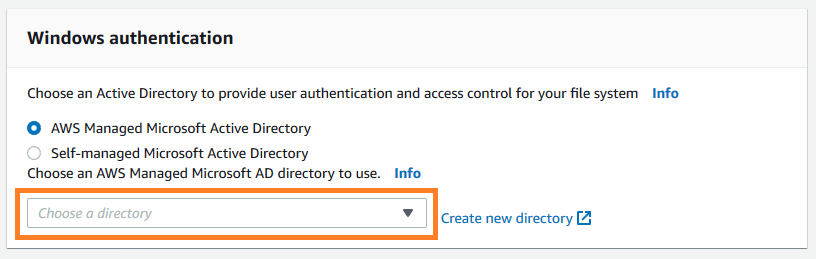
Amazon FSx works with Microsoft Active Directory to integrate with your existing Microsoft Windows environments. You have two options to provide user authentication and access control for your file system: AWS Managed Microsoft Active Directory and Self-managed Microsoft Active Directory.
Take note that after you create an Active Directory configuration for a file system, you can’t change that configuration. However, you can create a new file system from a backup and change the Active Directory integration configuration for that file system. These configurations allow the users in your domain to use their existing identity to access the Amazon FSx file system and to control access to individual files and folders.
Hence, the correct answer is: Provision an Amazon FSx for Windows File Server file system and join it to an AWS Active Directory domain.
The option that says: Create a file system using Amazon EFS and join it to an Active Directory domain is incorrect because Amazon EFS does not support Windows systems, only Linux OS. You should use Amazon FSx for Windows File Server instead to satisfy the requirement in the scenario.
The option that says: Launch an Amazon EC2 Windows Server to mount a new Amazon S3 bucket as a file volume is incorrect because you can’t integrate Amazon S3 with your existing Active Directory to provide authentication and access control.
The option that says: Create a Network File System (NFS) file share using AWS Storage Gateway is incorrect because an NFS file share is primarily used for Linux systems. Remember that the requirement in the scenario is to use a Windows shared file storage. Therefore, you must use an SMB file share instead, which supports Windows OS and Active Directory configuration. Alternatively, you can also use the Amazon FSx for Windows File Server file system.
References:
https://docs.aws.amazon.com/fsx/latest/WindowsGuide/aws-ad-integration-fsxW.html
https://aws.amazon.com/fsx/windows/faqs/
https://docs.aws.amazon.com/storagegateway/latest/userguide/CreatingAnSMBFileShare.html
Check out this Amazon FSx Cheat Sheet:
Question 17
Phần tiêu đề “Question 17”Type: Single answer · Câu gốc: #60
A logistics company plans to automate its order management application. The company wants to use SFTP file transfer for uploading business-critical documents. Since the files are confidential, encryption at rest is required, and high availability must be ensured. Additionally, each file must be automatically deleted one month after creation.
Which of the following options should be implemented to meet the company’s requirements with the least operational overhead?
- A. Create an Amazon S3 bucket with encryption enabled. Configure AWS Transfer for SFTP to securely upload files to the S3 bucket. Configure the retention policy on the SFTP server to delete files after a month.
- B. Create an Amazon Elastic File System (Amazon EFS) and enable encryption. Configure AWS Transfer for SFTP to securely upload files to the EFS file system. Apply an EFS lifecycle policy to delete files after 30 days.
- C. Provision an Amazon EC2 instance and install the SFTP service. Mount an encrypted Amazon EFS file system on the EC2 instance to store the uploaded files. Add a cron job to delete the files older than a month.
- D. Create an Amazon S3 bucket with encryption enabled. Launch an AWS Transfer for SFTP endpoint to securely upload files to the S3 bucket. Configure an S3 lifecycle rule to delete files after a month.
Answer & explanation
Correct answer: D
AWS Transfer for SFTP enables you to easily move your file transfer workloads that use the Secure Shell File Transfer Protocol (SFTP) to AWS without needing to modify your applications or manage any SFTP servers.
To get started with AWS Transfer for SFTP (AWS SFTP) you create an SFTP server and map your domain to the server endpoint, select authentication for your SFTP clients using service-managed identities, or integrate your own identity provider, and select your Amazon S3 buckets to store the transferred data. Your existing users can continue to operate with their existing SFTP clients or applications. Data uploaded or downloaded using SFTP is available in your Amazon S3 bucket, and can be used for archiving or processing in AWS.
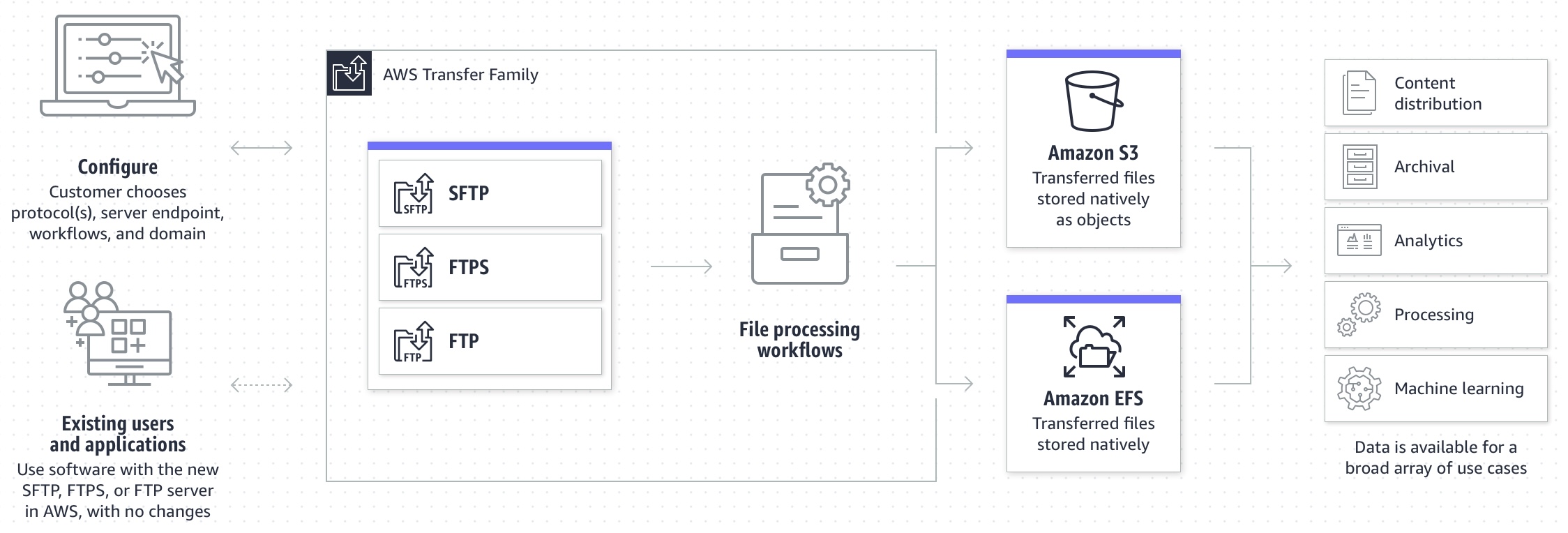
An Amazon S3 Lifecycle configuration is a set of rules that define actions that Amazon S3 applies to a group of objects. There are two types of actions:
Transition actions – These actions define when objects transition to another storage class. For example, you might choose to transition objects to the S3 Standard-IA storage class 30 days after creating them.
Expiration actions – These actions define when objects expire. Amazon S3 deletes expired objects on your behalf.
Therefore, the correct answer is: Create an Amazon S3 bucket with encryption enabled. Launch an AWS Transfer for SFTP endpoint to securely upload files to the S3 bucket. Configure an S3 lifecycle rule to delete files after a month. You can use S3 as the storage service for your AWS Transfer SFTP-enabled server.
The option that says: Create an Amazon S3 bucket with encryption enabled. Configure AWS Transfer for SFTP to securely upload files to the S3 bucket. Configure the retention policy on the SFTP server to delete files after a month is incorrect. The 30-day retention policy must be primarily configured on the Amazon S3 bucket. There is no retention policy option on AWS Transfer for SFTP.
The option that says: Create an Amazon Elastic File System (Amazon EFS) and enable encryption. Configure AWS Transfer for SFTP to securely upload files to the EFS file system. Apply an EFS lifecycle policy to delete files after 30 days is incorrect. This may be possible, however, the EFS lifecycle management doesn’t delete objects. It can only transition files in and out of the “Infrequent Access” tier.
The option that says: Provision an Amazon EC2 instance and install the SFTP service. Mount an encrypted Amazon EFS file system on the EC2 instance to store the uploaded files. Add a cron job to delete the files older than a month is incorrect. This option is possible, however, it entails greater operational overhead since you need to manage the EC2 instance and SFTP service.
References:
https://aws.amazon.com/aws-transfer-family/
https://docs.aws.amazon.com/transfer/latest/userguide/create-server-sftp.html
https://docs.aws.amazon.com/AmazonS3/latest/userguide/object-lifecycle-mgmt.html
Check out these AWS Transfer Family and Amazon S3 Cheat Sheets:
Question 18
Phần tiêu đề “Question 18”Type: Single answer · Câu gốc: #64
A company has recently migrated its microservices-based application to Amazon Elastic Kubernetes Service (Amazon EKS). As part of the migration, the company must ensure that all sensitive configuration data and credentials, such as database passwords and API keys, are stored securely and encrypted within the Amazon EKS cluster’s etcd key-value store.
What is the most suitable solution to meet the company’s requirements?
- A. Enable secret encryption with a new AWS KMS key on an existing Amazon EKS cluster to encrypt sensitive data stored in the EKS cluster’s etcd key-value store.
- B. Use AWS Secrets Manager with a new AWS KMS key to securely manage and store sensitive data within the EKS cluster’s etcd key-value store.
- C. Enable default Amazon EBS volume encryption for the account with a new AWS KMS key to ensure encryption of sensitive data within the Amazon EKS cluster.
- D. Use Amazon EKS default options and the Amazon Elastic Block Store (Amazon EBS) Container Storage Interface (CSI) driver as an add-on to securely store sensitive data within the Amazon EKS cluster.
Answer & explanation
Correct answer: A
Enabling secret encryption with a new AWS Key Management Service (KMS) key in an existing Amazon Elastic Kubernetes Service (EKS) cluster is critical to securing sensitive data stored in the cluster’s etcd key-value store. Amazon EKS is a service for running and managing containerized applications, storing configuration data and secrets, etc., and is a distributed data store. By default, these secrets are not encrypted, posing potential security risks. Integrating AWS KMS with Amazon EKS allows for the encryption of these secrets, leveraging AWS KMS’s capabilities to manage cryptographic keys and control their use across AWS services and applications.
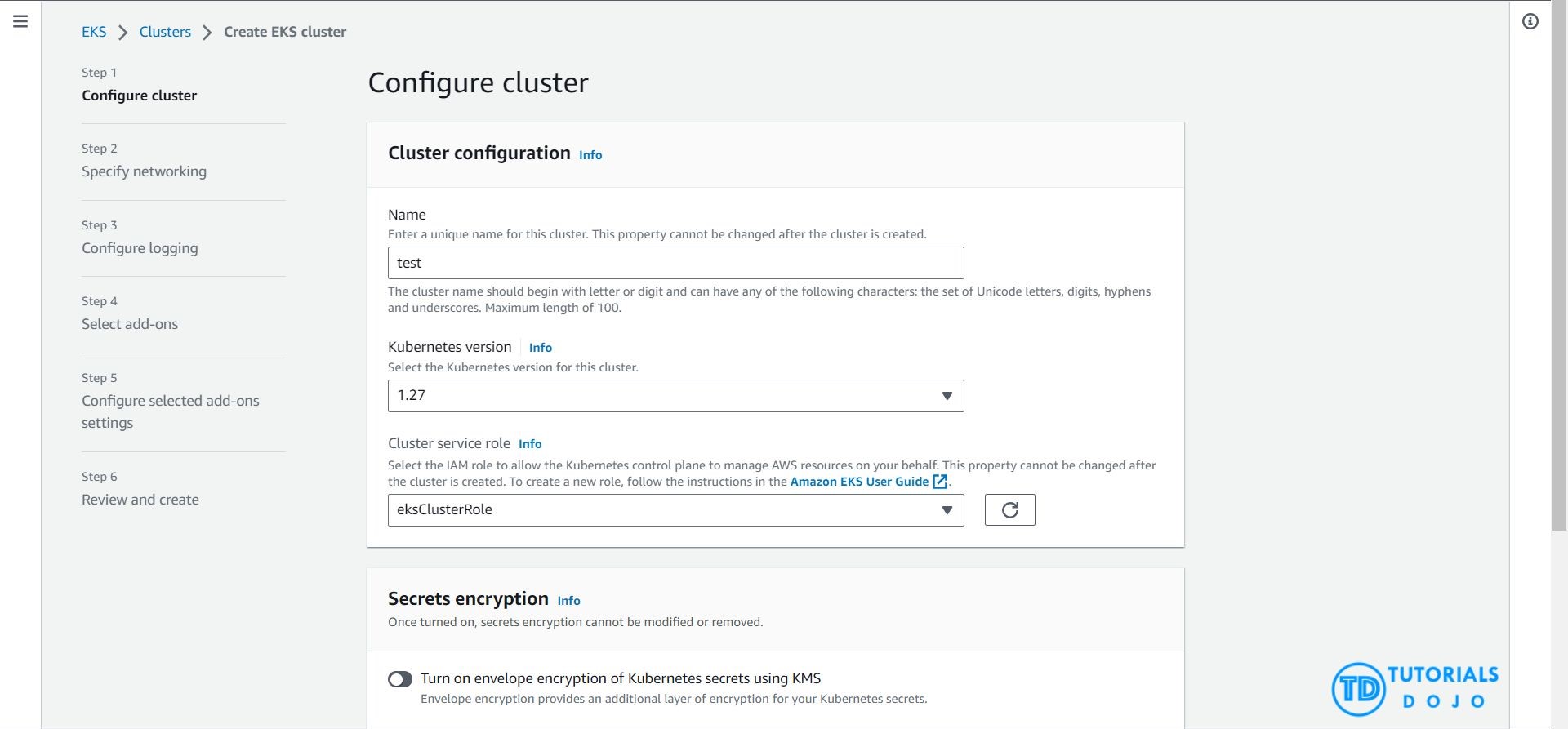
The process involves creating an AWS KMS key specifically for the EKS cluster and configuring the cluster to encrypt secrets before they are saved in etcd. This setup ensures that all sensitive information within the etcd database is encrypted at rest, enhancing data security. By adopting this approach, organizations can significantly improve their security posture, ensuring that sensitive data and credentials are protected according to industry standards and compliance requirements, thus maintaining data confidentiality and integrity within their Kubernetes environments.
Hence, the correct answer is: Enable secret encryption with a new AWS KMS key on an existing Amazon EKS cluster to encrypt sensitive data stored in the EKS cluster’s etcd key-value store.
The option that says: Use AWS Secrets Manager with a new AWS KMS key to securely manage and store sensitive data within the EKS cluster’s etcd key-value store is incorrect. AWS Secrets Manager is a powerful tool for managing secrets but it doesn’t directly address encrypting data within the etcd key-value store of an EKS cluster. Secrets Manager is more about managing and retrieving secrets rather than encrypting data within etcd.
The option that says: Enable default Amazon EBS volume encryption for the account with a new AWS KMS key to ensure encryption of sensitive data within the Amazon EKS cluster is incorrect. Enabling default Amazon EBS volume encryption is a way to ensure that data at rest in EBS volumes is encrypted. However, the EBS volumes are primarily used for persistent storage of the worker nodes. They are not directly related to the storage of sensitive configuration data and credentials within the EKS cluster’s etcd key-value store.
The option that says: Use Amazon EKS default options and the Amazon Elastic Block Store (Amazon EBS) Container Storage Interface (CSI) driver as an add-on to securely store sensitive data within the Amazon EKS cluster is incorrect. Amazon EBS CSI driver enables Amazon Elastic Block Store (EBS) volumes as persistent storage for Kubernetes applications running on the Amazon EKS. While this can provide secure persistent storage for your microservices, it does not address the specific requirement of securely storing sensitive data within the EKS cluster’s etcd key-value store.
References:
https://docs.aws.amazon.com/eks/latest/userguide/what-is-eks.html
https://kubernetes.io/docs/tasks/administer-cluster/encrypt-data/
https://docs.aws.amazon.com/eks/latest/userguide/enable-kms.html
Check out this Amazon Elastic Kubernetes Service Cheat Sheet:
https://tutorialsdojo.com/amazon-elastic-kubernetes-service-eks/
Question 19
Phần tiêu đề “Question 19”Type: Multi-select · Câu gốc: #65
A Forex trading platform, which frequently processes and stores global financial data every minute, is hosted in an on-premises data center and uses an Oracle database. Due to a recent cooling problem in its data center, the company urgently needs to migrate its infrastructure to AWS to improve the performance of its applications. As the Solutions Architect, the responsibility is to ensure that the database is properly migrated and remains available in case of database server failure in the future, following AWS Prescriptive Guidance for database migration and high availability.
Which combination of actions would meet the requirement? (Select TWO.)
- A. Launch an Oracle database instance in Amazon RDS with Recovery Manager (RMAN) enabled.
- B. Convert the database schema using the AWS Schema Conversion Tool.
- C. Create an Oracle database in Amazon RDS with Multi-AZ deployments.
- D. Migrate the Oracle database to a non-cluster Amazon Aurora with a single instance.
- E. Migrate the Oracle database to AWS using the AWS Database Migration Service
Answer & explanation
Correct answer: C, E
Amazon RDS Multi-AZ deployments provide enhanced availability and durability for Database (DB) Instances, making them a natural fit for production database workloads. When you provision a Multi-AZ DB Instance, Amazon RDS automatically creates a primary DB Instance and synchronously replicates the data to a standby instance in a different Availability Zone (AZ). Each AZ runs on its own physically distinct, independent infrastructure, and is engineered to be highly reliable.

In case of an infrastructure failure, Amazon RDS performs an automatic failover to the standby (or to a read replica in the case of Amazon Aurora) so that you can resume database operations as soon as the failover is complete. Since the endpoint for your DB Instance remains the same after a failover, your application can resume database operation without the need for manual administrative intervention.
In this scenario, the best RDS configuration to use is an Oracle database in RDS with Multi-AZ deployments to ensure high availability even if the primary database instance goes down. You can use AWS DMS to move the on-premises database to AWS with minimal downtime and zero data loss. It supports over 20 engines, including Oracle to Aurora MySQL, MySQL to RDS for MySQL, SQL Server to Aurora PostgreSQL, MongoDB to DocumentDB, Oracle to Redshift, and S3.
Hence, the correct answers are:
- Create an Oracle database in Amazon RDS with Multi-AZ deployments.
- Migrate the Oracle database to AWS using the AWS Database Migration Service.
The option that says: Launch an Oracle database instance in Amazon RDS with Recovery Manager (RMAN) enabled is incorrect because Oracle RMAN is not supported in RDS.
The option that says: Convert the database schema using the AWS Schema Conversion Tool is incorrect. AWS Schema Conversion Tool is typically used for heterogeneous migrations where you’re moving from one type of database to another (e.g., Oracle to PostgreSQL). In the scenario, the migration is homogenous, meaning it’s an Oracle-to-Oracle migration. As a result, there’s no need to convert the schema since you’re staying within the same database type.
The option that says: Migrate the Oracle database to a non-cluster Amazon Aurora with a single instance is incorrect. While a single-instance Aurora can be a feasible solution for non-critical applications or environments like development or testing, it is typically not suitable for applications that demand high availability.
References:
https://aws.amazon.com/rds/details/multi-az/
https://docs.aws.amazon.com/AmazonRDS/latest/UserGuide/Concepts.MultiAZ.html
Check out this Amazon RDS Cheat Sheet:
https://tutorialsdojo.com/amazon-relational-database-service-amazon-rds/